
Synthesia AI Avatar: A Beginner's Guide to Creating Videos
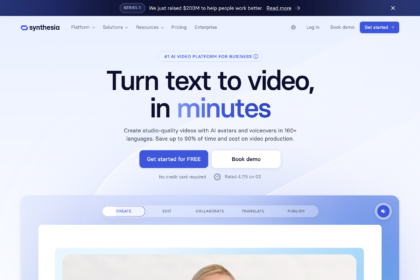
Creating professional-quality video content has traditionally been a complex, expensive, and time-consuming process. It involves hiring actors, booking studios, managing camera crews, and lengthy post-production edits. For businesses needing to produce training materials, marketing videos, or internal communications at scale, these hurdles can be overwhelming. A Synthesia AI avatar offers a powerful solution, transforming a simple text script into a polished video presentation fronted by a realistic human presenter in minutes.
- What You'll Learn
- What Exactly is a Synthesia AI Avatar?
- How Does a Synthesia Avatar Work? The Technology Explained
- Key Features and Benefits of Using a Virtual Avatar
- Unmatched Scalability and Speed
- Significant Cost Reduction
- Multi-Language Support for Global Reach
- Consistency Across All Content
- Choosing Your Synthesia Avatar: Stock vs. Custom Options
- Step-by-Step: How to Create a Video with a Synthesia Avatar
- Synthesia Pricing and Plans: What Does an AI Avatar Cost?
- The Pros and Cons of Synthesia's AI Avatars
- Frequently Asked Questions (FAQ)
- Are Synthesia avatars real people?
- Is Synthesia AI free or paid?
- Can you make your own avatar in Synthesia?
- What are Synthesia's limitations?
- What's better than Synthesia?
- Final Thoughts: Is a Synthesia AI Avatar Right for You?
This technology allows anyone, regardless of technical skill, to generate high-quality video content efficiently. Instead of coordinating a full production team, you can simply type your message, choose a digital presenter, and let artificial intelligence handle the rest. This guide explains everything you need to know about using a Synthesia avatar, from the underlying technology to creating your first video.
What You'll Learn
- What They Are: A Synthesia AI avatar is a photorealistic, AI-generated digital presenter used to create professional videos directly from text scripts.
- Two Main Options: You can select from a diverse library of over 200 pre-made stock avatars or create a custom virtual avatar that is a digital twin of yourself or a team member.
- Key Business Benefits: The primary advantages are massive cost savings compared to traditional video production, incredible speed, and the ability to scale content creation across more than 130 languages.
- How It Works: The platform combines text-to-speech technology with advanced AI video synthesis to animate the avatar, perfectly synchronising its lip movements and expressions to the generated audio.
- Important Considerations: While extremely powerful for corporate and educational content, the technology has limitations in conveying deep emotional nuance compared to a live-action human actor.
What Exactly is a Synthesia AI Avatar?
A Synthesia AI avatar is a digitally generated, photorealistic human presenter that can speak any text you provide. Think of it as a virtual actor who is always available, never needs a script rehearsal, and can speak hundreds of languages fluently. These aren't cartoonish animations; they are designed to look and sound like real people, making them suitable for professional business communications, from employee onboarding to product marketing videos.
One of the most common questions is whether these avatars are based on real people. The answer is yes. Each stock avatar in Synthesia's library is created from high-resolution video footage of a paid, professional actor. The AI learns their mannerisms, facial expressions, and movements to create a digital model.
When you generate a video, the AI synthesises new footage of that actor saying your script, even though the actor never actually spoke those words.
This process ensures a high degree of realism that sets it apart from other forms of digital characters. The goal is to create a seamless viewing experience where the virtual avatar is a credible and engaging presenter for corporate, educational, or commercial content. This technology bridges the gap between simple text-based content and expensive, full-production video.
How Does a Synthesia Avatar Work? The Technology Explained
The magic behind a Synthesia avatar lies in a sophisticated blend of several artificial intelligence technologies working in concert. While the user experience is as simple as typing in a script, the back-end process is complex. It can be broken down into a few core stages that transform your text into a final, polished video.
First is the text-to-speech (TTS) conversion. When you enter your script, Synthesia's advanced neural network AI voices convert the written words into natural-sounding speech. You can choose from a vast library of over 400 voices across more than 130 languages and accents, ensuring your message resonates with a global audience. The AI doesn't just read the words; it analyses the text to apply appropriate intonation and pacing.
Next, the AI gets to work on the visual generation. Using a type of machine learning model known as a Generative Adversarial Network (GAN), the system synthesises the video of the avatar. It meticulously animates the avatar's facial muscles, particularly the mouth and lips, to ensure the movements are perfectly synchronised with the generated audio track. This lip-syncing is crucial for creating a believable and professional result.
The AI also adds subtle, natural movements like blinks and slight head tilts to make the virtual avatar appear more lifelike and engaging.
Finally, all these elements are combined with your chosen background, on-screen text, images, or brand assets within the Synthesia video editor. You don't need any technical video editing skills; the platform provides a simple drag-and-drop interface. Once you're happy with the composition, you click 'Generate', and Synthesia's cloud-based servers render all the elements into a high-definition video file, ready for you to download and share.
Key Features and Benefits of Using a Virtual Avatar
Using a Synthesia virtual avatar for video creation offers a host of benefits that directly address the main pain points of traditional video production. Businesses and content creators are adopting this technology to become more agile, efficient, and globally relevant.
Unmatched Scalability and Speed
Perhaps the most significant advantage is the ability to scale video production at a pace that was previously unimaginable. A marketing team could create customised video ads for ten different audience segments in a single afternoon. A learning and development department can update dozens of training modules with new information in minutes, simply by editing a text script and regenerating the video. This speed allows organisations to be more responsive and keep their content consistently up-to-date without logistical delays.
Significant Cost Reduction
Traditional video shoots are expensive. Costs for studio rental, camera equipment, actors, directors, and post-production editors can easily run into thousands of pounds for a single short video. A Synthesia subscription replaces nearly all of these expenses with a predictable monthly or annual fee. There are no variable costs, allowing for better budget management and a much higher return on investment for your content creation efforts.
For many businesses, this makes high-quality video accessible for the first time.
Multi-Language Support for Global Reach
Localising video content for international markets is a major undertaking. It requires hiring translators, voice-over artists, and editors for each language. With a Synthesia avatar, localisation becomes incredibly simple. You can translate your script and generate a new version of your video in any of the 130+ supported languages and accents with just a few clicks.
This allows companies to communicate effectively with global teams and customers without a proportional increase in production costs.
Consistency Across All Content
Brand consistency is vital for building trust and recognition. By using the same virtual avatar across all your training, marketing, or communication videos, you create a consistent and familiar presence. Your 'brand presenter' will always be on-message, perfectly presented, and available on demand. This is especially useful for video series or extensive learning courses where maintaining a consistent look and feel is essential for the user experience.
Choosing Your Synthesia Avatar: Stock vs. Custom Options
Synthesia provides two primary pathways for selecting a presenter for your videos: using their extensive library of stock avatars or creating a bespoke custom avatar. The right choice depends on your budget, branding requirements, and the specific goals of your video content.
The Extensive Library of Stock Avatars
For users who need to create professional videos quickly, Synthesia offers a library of over 200 high-quality stock avatars. This collection is remarkably diverse, featuring presenters of various ages, ethnicities, and professional attire. Whether you need a presenter in corporate wear, a casual outfit, or medical scrubs, there's likely an option that fits your needs.
Using a stock avatar is the most straightforward and cost-effective method. It's included with the standard subscription plans and allows you to start creating videos immediately. This option is perfect for internal communications, standard training modules, and marketing videos where having a specific, recognisable person as the face of the content is not a primary requirement. The quality is consistently high across the entire library, ensuring a professional result every time.
Creating Your Own Custom AI Avatar
For organisations that require a higher level of brand identity or personalisation, creating a custom AI avatar is the ultimate solution. This feature allows you to create a digital twin of a real person—be it your company's CEO, a top instructor, or a brand spokesperson. This is a premium feature that adds a unique and authentic touch to your video content.
Synthesia offers a few ways to create a custom avatar. You can create a 'Personal Avatar' by recording footage of yourself using just a webcam or smartphone. While more accessible, this method produces a result with slightly lower fidelity. For the highest possible quality, the 'Studio Avatar' option is recommended.
This involves a professional recording session in a green screen studio to capture the necessary footage. The result is a hyper-realistic digital double that is virtually indistinguishable from a real video recording.
Creating a custom avatar ensures that your brand's unique voice and face are front and centre, building a stronger connection with your audience. It's an investment, but for many companies, the ability to have a key stakeholder present in countless videos without ever stepping in front of a camera again is invaluable.
Step-by-Step: How to Create a Video with a Synthesia Avatar
One of Synthesia's core strengths is its intuitive, user-friendly platform. You don't need any prior experience in video production or editing to create a professional-looking video. The entire process can be completed in just a few simple steps.
Choose Your Avatar and Voice
The first step is to select your presenter. You can browse the extensive library of over 200 stock avatars or choose your own custom avatar if you have one. After selecting your avatar, you'll choose a voice. You can filter by language, accent, and gender to find the perfect match for your script and audience.Write or Paste Your Script
Next, you'll input your script into the text box. You can type it directly, paste it from another document, or even use AI to help you write it. For longer scripts, you can break the text into different scenes, which makes editing and timing easier. Each scene can have its own text, background, and on-screen elements.Customise Your Video Scene
This is where you bring your video to life visually. Synthesia provides a simple yet powerful editor to customise the look of your video. You can upload your own image or video background, choose from a library of stock assets, add text overlays, and incorporate your company's logo to maintain brand consistency. The interface works much like creating a presentation slide, making it familiar and easy to navigate.Add Gestures and Pauses
To make your avatar's delivery more natural, you can add subtle cues into your script. For example, you can insert pauses for dramatic effect or select from a library of micro-gestures, such as a head nod or raised eyebrows, at specific points in the script. While the AI handles most of the natural movement, these small additions can add an extra layer of polish.Generate and Share Your Video
Once you are happy with your script and visual layout, you simply click the 'Generate video' button. Synthesia's cloud platform will then process and render your video, which typically takes a few minutes, depending on the length. You'll receive a notification when it's ready. From there, you can download the MP4 file, share it via a link, or embed it directly onto your website or learning management system.
Pro Tip: Before generating a long video, use the 'preview' function to listen to the AI voice reading a sentence or two. This helps you catch any pronunciation errors or awkward phrasing in the script, saving you generation time and credits.
Synthesia Pricing and Plans: What Does an AI Avatar Cost?
Synthesia operates on a subscription-based model, with different tiers designed to suit the needs of individuals, small teams, and large enterprises. Understanding the pricing structure is key to determining if it's the right fit for your budget and video creation goals.
As of 2026, Synthesia offers several plans, typically starting with a 'Personal' plan aimed at individual creators. This plan usually includes a set number of video minutes per month, access to the full library of stock avatars and voices, and all the core video editing features. This is an excellent starting point for those new to AI video generation.
For businesses and teams, there are 'Enterprise' or custom plans. These plans offer significantly more video minutes, collaboration features for teams, and access to premium services like creating a custom AI avatar. The cost of a custom avatar is typically an additional investment on top of the subscription fee, as it requires a dedicated production process to create the digital model.
Synthesia does not offer a traditional free plan, but it does provide a free AI video generator on its website. This tool allows you to create a short sample video to experience the quality of the avatars and voices before committing to a paid plan. It's a great way to test the platform's capabilities.
Because pricing and plan features can change, it is always best to visit the official Synthesia website for the most current and detailed information. There, you can compare the features of each plan and contact their sales team for a custom quote if you have enterprise-level needs.
The Pros and Cons of Synthesia's AI Avatars
Like any technology, Synthesia's AI avatars come with a distinct set of advantages and limitations. A balanced understanding of both is essential for deciding where and how to best implement this tool in your content strategy.
Advantages (The Pros)
- Efficiency and Speed: The ability to go from script to finished video in minutes is the standout benefit. This allows for rapid content creation and updates that are impossible with traditional methods.
- Cost-Effectiveness: By eliminating the need for actors, studios, and camera crews, Synthesia dramatically lowers the financial barrier to producing high-quality video.
- Scalability: Creating dozens of video variations for different languages, regions, or customer segments is simple and doesn't require a proportional increase in resources.
- Ease of Use: The platform is designed for non-technical users. Anyone comfortable with creating a slide presentation can produce a professional video.
- Consistency: Using the same avatar and branding elements across all videos ensures a high level of brand consistency.
- Easy Updates: If information changes, you can simply edit the script and regenerate the video in minutes, ensuring your content is always current.
Limitations to Consider (The Cons)
- Limited Emotional Range: While the avatars are incredibly realistic for instructional and corporate content, they can struggle to convey deep or complex emotions like excitement, empathy, or humour with the same authenticity as a human actor.
- The 'Uncanny Valley': The technology is excellent, but some viewers may still perceive a subtle artificiality, often referred to as the 'uncanny valley'. This is becoming less of an issue as the technology improves but is still a consideration.
- Restricted Body Movement: The current generation of avatars primarily features presenters from the torso up with limited hand gestures. They cannot walk around or interact with physical objects, which limits their use for certain types of demonstration videos.
- Cost of Customisation: While powerful, creating a high-quality custom studio avatar represents a significant financial investment, which may be prohibitive for smaller businesses or individual creators.
Frequently Asked Questions (FAQ)
Here are answers to some of the most common questions people have about using a Synthesia AI avatar.
Are Synthesia avatars real people?
Yes, Synthesia avatars are based on video footage of real, paid actors. The AI platform uses this footage to create a digital model that can then be animated to say anything from a text script. So, while the final performance is AI-generated, its appearance and mannerisms are rooted in a real human's likeness.
Is Synthesia AI free or paid?
Synthesia is a paid subscription service. It offers different pricing tiers for individuals and businesses, based on factors like the number of video minutes needed and access to premium features. However, they do offer a free demo video generator on their website, which allows you to test the technology and see the quality for yourself before purchasing a plan.
Can you make your own avatar in Synthesia?
Yes, you can. This is one of Synthesia's most powerful features. You can create a custom virtual avatar of yourself or anyone else (with their consent). This is a premium feature, often included in enterprise-level plans, and it allows you to create a unique, branded presenter for your videos.
What are Synthesia's limitations?
The main limitations relate to emotional expression and physical movement. AI avatars are best suited for professional and instructional content and may not convey deep, nuanced emotions as effectively as a human actor. Their body movements are also typically restricted to the upper body and a set of pre-programmed gestures.
What's better than Synthesia?
Synthesia is widely regarded as a leader in the AI video generation space, particularly for its high-quality, realistic avatars. However, the 'best' platform depends on your specific needs. Competitors like HeyGen or Murf AI offer different feature sets, avatar styles, or pricing models. For users prioritising the most lifelike digital presenters for corporate use, Synthesia is often considered the top choice.
Final Thoughts: Is a Synthesia AI Avatar Right for You?
The emergence of the Synthesia AI avatar represents a significant shift in how we approach video creation. For businesses, educators, and marketers, it removes the traditional barriers of cost, time, and complexity, making it possible to produce high-quality video content at an unprecedented scale. The ability to create, update, and localise videos by simply editing text is a powerful advantage in today's fast-paced digital world.
While the technology has its limitations, particularly in the realm of deep emotional expression, its strengths are perfectly aligned with the needs of corporate communications, e-learning, and informational marketing. If your goal is to deliver clear, consistent, and professional video messages efficiently, then a Synthesia avatar is an exceptionally powerful tool.
For any organisation looking to enhance its communication strategy, reduce production costs, and scale its content globally, exploring what Synthesia has to offer is a logical next step. The technology is no longer a futuristic concept; it's a practical solution being used by thousands of companies today.
Ready to see the future of video creation for yourself? Visit the Synthesia website to try their free AI video generator and bring your first script to life.