Lead Capture Landing Page Explained: A Guide for Marketers to Boost Conversions
Turning website visitors into potential customers is a fundamental goal for any online business. While a great website is essential, a standard webpage often presents too many options, causing visitors to lose focus. This is where a dedicated lead capture landing page becomes your most powerful tool, acting as a focused, high-performance engine designed for one specific purpose: converting traffic into leads.
- What You'll Learn
- What Exactly Is a Lead Capture Landing Page?
- The Anatomy of a High-Converting Lead Capture Page
- Compelling Headline and Subheading
- Clear Value Proposition and Persuasive Copy
- The Streamlined Lead Capture Form
- A Strong, Contrasting Call-to-Action (CTA)
- Social Proof and Trust Signals
- Why Your Business Needs a Dedicated Landing Page for Leads
- Dramatically Increased Conversion Rates
- Improved Lead Quality and Segmentation
- Actionable Data and Optimisation Insights
- Better Ad Campaign Performance
- How to Create Your First Lead Capture Page (Step-by-Step)
- 1. Define Your Goal and Offer (The Lead Magnet)
- 2. Choose Your Platform or Builder
- 3. Write Compelling, Benefit-Driven Copy
- 4. Design for Simplicity and Focus
- 5. Integrate With Your Email Marketing Tool
- 6. Publish, Drive Traffic, and Analyse
- Top Tools for Building Lead Capture Landing Pages
- Leadpages: Best for Simplicity and Speed
- Unbounce: Best for A/B Testing and Optimisation
- Instapage: Best for Personalisation and Teams
- ClickFunnels: Best for Complete Sales Funnels
- GetResponse: Best All-in-One Solution
- Understanding Pricing and Choosing the Right Plan
- FAQ: Your Lead Capture Questions Answered
- What is the difference between a landing page and a lead page?
- Do you need a landing page for a lead magnet?
- Is Leadpages worth the money?
- What are the three main types of landing pages?
- What are common landing page mistakes to avoid?
- Final Thoughts
This guide explains everything marketers and business owners need to know about creating a landing page for leads. We'll break down its core components, explore the best tools to build one, and provide actionable steps to help you start capturing more, higher-quality leads today. Whether you're promoting an ebook, a webinar, or a free consultation, a well-optimised page is the key to maximising your marketing ROI.
What You'll Learn
- Core Definition: A lead capture landing page is a standalone web page designed with a single, focused objective: collecting contact details from potential customers in exchange for a valuable offer.
- Essential Elements: The most effective pages include a compelling headline, a clear value proposition, a streamlined form, and a strong, unmissable call-to-action (CTA).
- Choosing the Right Tool: Your choice of platform depends on your budget, technical skill, and integration needs, with options ranging from dedicated builders like Leadpages to all-in-one marketing platforms like GetResponse.
- Key Principles for Success: To maximise conversions, your page must focus on a single offer, remove distracting navigation menus, and build trust with social proof like testimonials or client logos.
What Exactly Is a Lead Capture Landing Page?
A lead capture landing page is a purpose-built, standalone web page created specifically for a marketing or advertising campaign. Unlike a homepage, which has multiple goals and links (e.g., About Us, Products, Contact), a lead capture page has only one goal: to persuade a visitor to provide their contact information, such as an email address and name.
Think of it as a focused conversation. When a visitor lands on your homepage, it's like they've walked into a busy department store with countless aisles and distractions. A lead capture page, however, is like a boutique with a single, compelling item in the window. The entire experience is designed to guide the visitor towards one action, making it far more effective at its job.
This process works through a value exchange. You offer something valuable for free, often called a 'lead magnet'. This could be an ebook, a webinar registration, a free template, a discount code, or a consultation. In return for this valuable resource, the visitor provides their contact details by filling out a form.
This simple transaction is the foundation of how you capture leads online effectively.

The Anatomy of a High-Converting Lead Capture Page
An effective lead capture page isn't just a random collection of elements; it's a carefully orchestrated system where every component works together to guide the user towards conversion. Understanding these key features is the first step to building pages that perform.
Compelling Headline and Subheading
The headline is the first thing a visitor reads and is often the deciding factor in whether they stay or leave. It must be attention-grabbing and directly reflect the promise made in the ad or link they clicked. A strong subheading can then provide additional context or highlight the primary benefit of your offer.
For example, a headline like "Learn SEO" is vague. A better headline would be: "Triple Your Organic Traffic in 90 Days". The subheading could add: "Download our free, step-by-step SEO checklist used by over 10,000 marketers."
Clear Value Proposition and Persuasive Copy
Your page must immediately answer the visitor's most important question: "What's in it for me?" The copy, often presented as bullet points, should clearly and concisely explain the benefits of your offer. Focus on the outcome and the problem you're solving for them, not just the features of what you're giving away.
Instead of saying "10-page PDF guide", say "Discover 5 proven strategies to cut your ad spend by 30%". The first describes a feature; the second describes a benefit.
The Streamlined Lead Capture Form
The form is where the conversion happens. The golden rule is to only ask for the information you absolutely need. Every additional field you add creates friction and can decrease your conversion rate. For most top-of-funnel offers, a name and email address are sufficient.
The form should be placed prominently on the page, often "above the fold" (visible without scrolling), so visitors don't have to search for it.
A Strong, Contrasting Call-to-Action (CTA)
The CTA button is the final step. It needs to stand out visually with a contrasting colour and use clear, action-oriented text. Avoid generic words like "Submit" or "Download".
Instead, use specific text that reinforces the value, such as "Get My Free Ebook Now", "Reserve My Spot", or "Start My Free Trial". This makes the action feel more tangible and appealing.
Social Proof and Trust Signals
People are more likely to trust you if they see that others already do. Social proof can take many forms: customer testimonials, logos of well-known clients, star ratings, or statistics like "Join 50,000+ subscribers".
Trust signals like privacy policy links, security badges (if applicable), or a simple statement like "We'll never share your email" can also reduce anxiety and increase form submissions.
Why Your Business Needs a Dedicated Landing Page for Leads
Some marketers wonder if sending campaign traffic directly to their homepage is good enough. The data is clear: it's not. Using a dedicated landing page for leads is one of the most effective ways to improve your marketing performance for several key reasons.
Dramatically Increased Conversion Rates
The primary benefit is a higher conversion rate. Because a lead capture page is 100% focused on a single offer and a single action, it eliminates distractions. There are no navigation menus, sidebars, or links to other parts of your site that could pull the visitor away from the goal. This singular focus is proven to generate more leads from the same amount of traffic.
According to some industry reports, businesses with more landing pages tend to generate significantly more leads.
Improved Lead Quality and Segmentation
When someone fills out a form on a landing page for a specific offer, they are signalling a clear interest in that topic. This allows you to gather highly qualified leads who are genuinely interested in what you have to say. It also makes segmentation easy. If someone downloads your ebook on social media marketing, you can add them to an email list specifically for that topic, allowing you to send more relevant, personalised follow-up content.
Actionable Data and Optimisation Insights
Dedicated landing pages are perfect for A/B testing. You can easily create two versions of a page with different headlines, images, or CTA buttons to see which one performs better. This provides clear, actionable data on what resonates with your audience. Testing a homepage is nearly impossible because it has too many variables, but testing a landing page gives you precise insights you can use to continually improve your conversion rates over time.
Pro Tip: When A/B testing, only change one element at a time. If you change the headline, the image, and the button colour all at once, you won't know which change was responsible for the increase or decrease in conversions.
Better Ad Campaign Performance
Platforms like Google Ads reward relevance. When you run an ad campaign, Google assesses the relevance between your ad, your keywords, and your landing page. Sending traffic to a highly relevant, dedicated landing page results in a higher Quality Score. A higher Quality Score can lead to lower costs-per-click (CPC) and better ad positions, stretching your advertising budget further.
How to Create Your First Lead Capture Page (Step-by-Step)
Building a high-performing lead capture page is a methodical process. By following these steps, you can create a focused experience that effectively turns visitors into valuable leads for your business.
1. Define Your Goal and Offer (The Lead Magnet)
Before you write a single word, you need to know what you want to achieve and what you'll offer in return. Is your goal to get webinar sign-ups, ebook downloads, or demo requests. Your goal will define your offer. The offer, or lead magnet, must be genuinely valuable to your target audience.
It should solve a specific problem or provide a quick win. A great lead magnet is the foundation of a great landing page.
2. Choose Your Platform or Builder
You don't need to be a developer to create a beautiful landing page. There are many user-friendly platforms designed for this exact purpose. We'll cover some top recommendations in the next section, but your choice will depend on your budget, technical comfort level, and existing marketing tools. Options range from dedicated builders like Leadpages to all-in-one platforms like GetResponse that include landing pages as part of a larger suite.
3. Write Compelling, Benefit-Driven Copy
With your offer and platform chosen, it's time to write the copy. Start with a powerful headline that grabs attention and aligns with your ad. Use bullet points to list the key benefits of your offer, focusing on the outcome for the user. Keep your language clear, concise, and persuasive.
Write directly to your ideal customer, addressing their pain points and showing how your offer is the solution.
4. Design for Simplicity and Focus
The best landing page designs are clean and uncluttered. Use plenty of white space to make the content easy to read. Choose a high-quality image or video that is directly relevant to your offer. Most importantly, remove all site navigation and any other links that could distract the visitor from your CTA.
The only clickable elements should be your CTA button and perhaps a link to your privacy policy.
5. Integrate With Your Email Marketing Tool
This is a critical technical step. Your landing page form needs to connect to your email marketing software (like ActiveCampaign, Selzy, or Moosend). This integration ensures that when someone fills out the form, their contact information is automatically added to your email list. It also allows you to trigger an automated email that delivers the lead magnet they requested.
6. Publish, Drive Traffic, and Analyse
Once your page is live, it's time to send traffic to it from your chosen channels—social media, email marketing, or paid ads. But the work isn't over. Use your landing page builder's analytics or Google Analytics to track your conversion rate. Watch how visitors behave and don't be afraid to run A/B tests to optimise your page for even better results.
Top Tools for Building Lead Capture Landing Pages
Choosing the right software is crucial for building and optimising your pages efficiently. The market is filled with excellent options, each with its own strengths. Here are some of the top recommendations based on different business needs.
Leadpages: Best for Simplicity and Speed
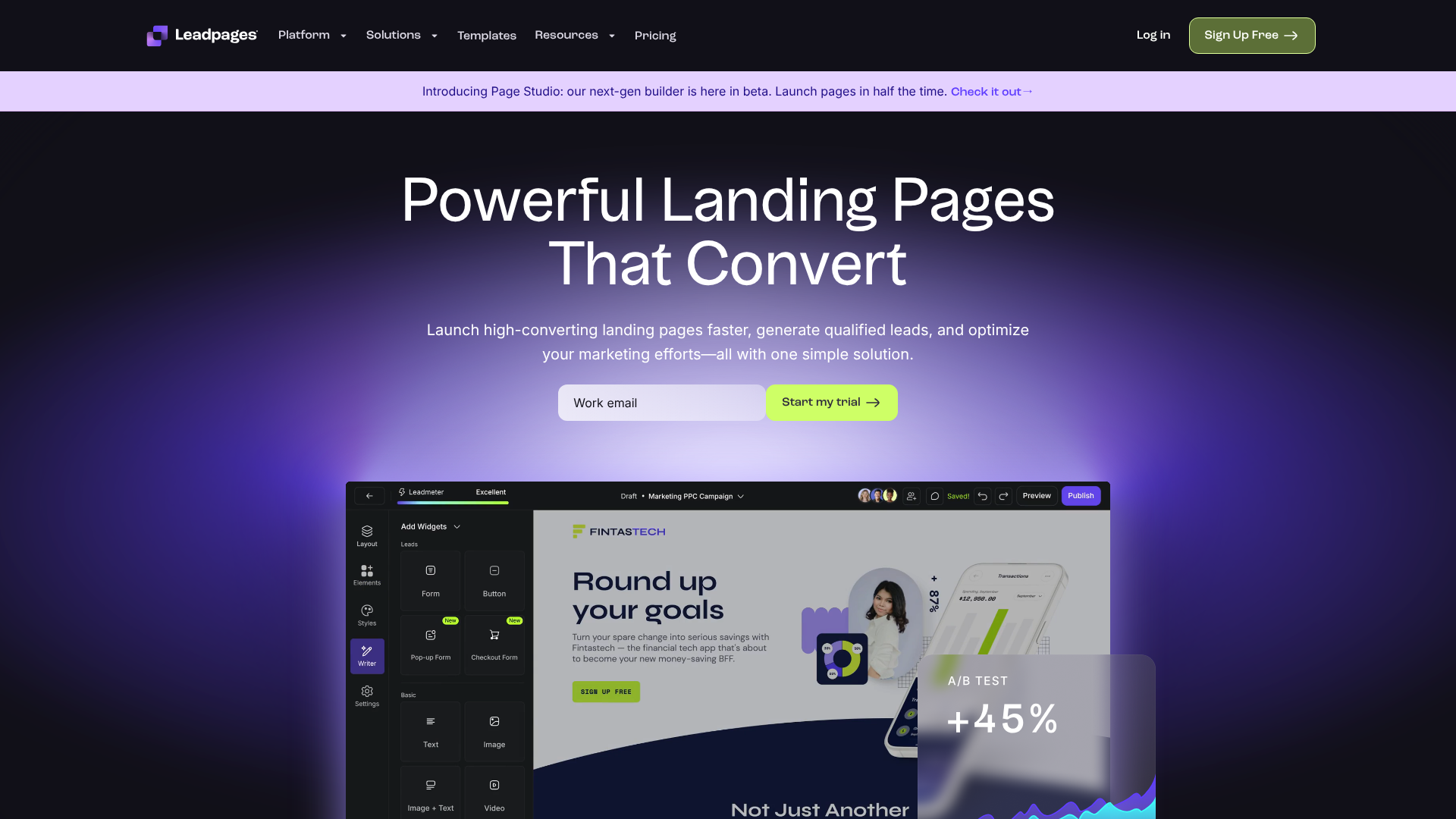
Leadpages is a popular choice, especially among small businesses and entrepreneurs, because of its focus on ease of use and speed. It offers a vast library of high-converting, mobile-responsive templates that you can customise with a user-friendly drag-and-drop editor.
Pros:
- Extremely easy to use, even for absolute beginners.
- Large selection of professional templates for various industries and offers.
- Includes features like pop-ups and alert bars to capture leads across your site.
- Generally more affordable than its more advanced competitors.
Cons:
- The drag-and-drop editor is less flexible than pixel-perfect builders like Unbounce.
- A/B testing features are solid but not as advanced as some other platforms.
Unbounce: Best for A/B Testing and Optimisation

Unbounce is a favourite among performance marketers and agencies who need powerful tools for optimisation. Its standout feature is a highly flexible drag-and-drop builder that gives you complete control over the design. It also offers powerful A/B testing and AI-powered features like Smart Traffic, which automatically sends visitors to the landing page variant most likely to convert for them.
Pros:
- Powerful and flexible page builder for full creative control.
- Advanced A/B testing capabilities.
- AI-driven optimisation tools to improve conversions automatically.
- Integrates with a wide range of marketing tools.
Cons:
- Has a steeper learning curve than Leadpages.
- Comes at a higher price point, making it a bigger investment.
Instapage: Best for Personalisation and Teams

Instapage is designed for larger teams and enterprises that need advanced features like personalisation and collaboration. Its AdMap feature allows you to visualise your ad campaigns and connect ad groups to unique, personalised landing page experiences. This ensures a 1:1 message match from ad to page, which can significantly boost conversions.
Pros:
- Unmatched personalisation and post-click experience capabilities.
- Excellent collaboration tools for teams.
- Fast-loading pages, which is great for SEO and user experience.
Cons:
- It is the most expensive option on this list.
- May be overly complex for small businesses or solo entrepreneurs.
ClickFunnels: Best for Complete Sales Funnels
While it can build standalone landing pages, ClickFunnels excels at creating entire multi-step sales funnels. If your goal is not just to capture a lead but to guide them through a series of steps (like an upsell, downsell, or webinar registration), ClickFunnels is a powerful all-in-one solution. It combines page building with shopping carts, affiliate management, and email automation.
Pros:
- Excellent for building structured, multi-page funnels.
- Includes a wide range of marketing tools beyond just page building.
- Strong community and extensive training resources.
Cons:
- Can be overkill if you only need a simple lead capture page.
- The page editor is not as flexible as Unbounce or Instapage.
GetResponse: Best All-in-One Solution

For businesses looking for a single platform to manage multiple marketing channels, GetResponse is a strong contender. It's primarily an email marketing platform but comes with a built-in landing page builder, webinar hosting, and marketing automation. This can simplify your tech stack and save money.
Pros:
- An affordable all-in-one solution for email, landing pages, and more.
- Seamless integration between your landing pages and email campaigns.
- Includes AI-powered tools for page generation.
Cons:
- The landing page builder is functional but not as feature-rich or flexible as dedicated tools.
- Best suited for those who will use its other marketing features as well.
Understanding Pricing and Choosing the Right Plan
Landing page builder pricing can vary widely, so it's important to understand the different models and what you get for your money. Most tools operate on a tiered subscription model, typically billed monthly or annually.
Here’s a general breakdown of what to expect:
| Tool | Target Audience | Typical Starting Price Range (Monthly) | Key Differentiator |
|---|---|---|---|
| Leadpages | Small Businesses, Entrepreneurs | £30 – £50 | Ease of use, templates |
| Unbounce | Performance Marketers, Agencies | £70 – £100 | A/B testing, AI optimisation |
| Instapage | Enterprise, Large Teams | £150+ | Advanced personalisation |
| ClickFunnels | Funnel Builders, Info Products | £100 – £120 | All-in-one funnel building |
| GetResponse | All-in-One Marketers | £15 – £40 | Integrated marketing suite |
Note: Prices are estimates and subject to change. Please visit the official websites for the most current pricing information.
When choosing, look beyond the price tag. Consider these factors:
- Traffic/Conversion Limits: Some plans limit the number of visitors or conversions you can have per month.
- Feature Set: Do you need A/B testing, dynamic text replacement, or AI features? Make sure the plan you choose includes the tools you need.
- Integrations: Ensure the platform connects smoothly with your other essential tools, like your CRM or email marketing service.
- Support: Check what level of customer support is offered. When you're stuck on a technical issue, good support is invaluable.
Pro Tip: Many platforms offer a free trial or a money-back guarantee. Take advantage of this to test the software and see if its workflow and features are a good fit for you before committing to a long-term plan.
FAQ: Your Lead Capture Questions Answered
Here are answers to some of the most common questions marketers have about building a landing page for leads.
What is the difference between a landing page and a lead page?
These terms are often used interchangeably, and for the most part, they mean the same thing. However, if you want to be precise, a "landing page" is a broad term for any standalone page a visitor "lands" on after clicking a link. A "lead page" or "lead capture page" is a specific type of landing page whose sole purpose is to capture lead information via a form. All lead pages are landing pages, but not all landing pages are lead pages (e.g., a click-through landing page that sends users to a checkout page).
Do you need a landing page for a lead magnet?
Yes, absolutely. A dedicated landing page is the most effective way to promote and deliver your lead magnet. It provides a focused environment where you can explain the value of your offer and make it easy for people to sign up. Sending traffic from an ad or social post to your homepage to find a lead magnet is inefficient and will result in a much lower conversion rate.
Is Leadpages worth the money?
For many small businesses, entrepreneurs, and marketers who prioritise speed and ease of use, Leadpages is definitely worth the investment. Its templates and simple editor allow you to launch professional-looking pages very quickly without a steep learning curve. However, for advanced performance marketers who require granular design control and the most powerful A/B testing features, a more advanced tool like Unbounce might be a better fit, despite its higher cost.
What are the three main types of landing pages?
While there are many variations, landing pages generally fall into three main categories. The first is the Lead Generation Page (or Lead Capture Page), which we've discussed throughout this guide. The second is the Click-Through Page, which aims to "warm up" a visitor before sending them to another page, like a checkout or registration page. The third is the Squeeze Page, which is an ultra-minimalist version of a lead capture page, often with very little copy and a heavy focus on the form.
What are common landing page mistakes to avoid?
The most common mistakes include having a cluttered design with too many distractions, a headline that doesn't match the ad, a form that asks for too much information, and a weak or unclear call-to-action. Other frequent errors are slow page load times, a design that isn't mobile-friendly, and a lack of social proof to build trust with visitors.
Final Thoughts
A well-crafted lead capture landing page is more than just a part of your website; it's a specialised tool designed to turn passive visitors into active, engaged leads. By focusing on a single, clear objective and removing all distractions, you create a frictionless path for your audience to connect with your business.
Remember the core principles: start with a valuable offer, write compelling, benefit-focused copy, and design for simplicity. Whether you choose a straightforward builder like Leadpages or a powerful optimisation suite like Unbounce, the right platform will empower you to test, learn, and continuously improve your results.
For those looking to build comprehensive marketing and sales processes, a tool like ClickFunnels can help you map out the entire customer journey. The key is to start now. Build your first page, drive traffic, and begin the journey of turning clicks into customers.