

Synthesia AI Voice Generator Review: Is It Best for Pro Video Content?
Creating consistently high-quality voiceovers for videos can be a significant bottleneck for content creators and businesses. The process often involves hiring expensive voice actors, booking studio time, and dealing with lengthy editing cycles. The Synthesia AI voice generator offers a powerful alternative, promising to transform simple text into professional-grade narration directly within a comprehensive video creation platform. But does it live up to the hype, and is it the right tool for your specific needs?
- In a Nutshell
- What Exactly is the Synthesia AI Voice Generator?
- A Closer Look at Key Features and Benefits
- Extensive Library of Voices and Languages
- High-Quality, Natural-Sounding Audio
- Custom AI Voice Cloning
- Seamless Integration with AI Avatars
- Script-Based Editing and Updates
- How to Choose the Right Synthesia Plan for Your Needs
- Understanding Synthesia's Pricing Tiers
- Who is the Personal Plan For?
- When to Upgrade to the Creator or Enterprise Plan
- Top Recommendations: Use Cases Where Synthesia Excels
- Synthesia AI Voice Generator: A Balanced Look at Pros and Cons
- How To Create Your First AI Voiceover Video
- Synthesia vs. The Competition: A Brief Comparison
- Frequently Asked Questions (FAQ)
- Is Synthesia AI free?
- What is the best AI voice generator?
- Can I use my own voice on Synthesia?
- Are AI vocals legal?
- What's better than Synthesia?
- Is there a free alternative to Synthesia?
- Final Thoughts: Is the Synthesia Voice Tool Right for You?
This review provides an in-depth analysis of Synthesia's voice generation capabilities. We'll explore its core features, pricing structures, ideal use cases, and potential drawbacks. By the end, you'll have a clear understanding of whether Synthesia is the all-in-one solution to streamline your video production workflow.
In a Nutshell
- Integrated Video Platform: Synthesia is a complete AI video creation suite. The voice generator is a core, integrated feature, not a standalone tool, making it ideal for users who need both audio and visual components.
- Extensive Language Support: With over 1000 distinct voices available in more than 160 languages, the platform provides exceptional options for global content localisation and finding a unique brand voice.
- Advanced Voice Features: Beyond standard text-to-speech, Synthesia offers high-fidelity AI voice cloning, allowing you to create a digital replica of your own voice for ultimate brand consistency.
- Business-Focused Pricing: The pricing plans are primarily designed for professional and business use, from individual creators to large enterprise teams, which may be a significant investment for casual users.
- Best for All-in-One Creation: While its voice quality is excellent, its main strength lies in its seamless combination of voice, AI avatars, and video editing tools. It may be more than what's needed for users seeking only a simple text-to-speech audio file.
What Exactly is the Synthesia AI Voice Generator?
It's important to clarify a common misconception from the start: the Synthesia AI voice generator is not a standalone product you can buy separately. Instead, it is a fundamental and deeply integrated component of the broader Synthesia AI video creation platform. This distinction is crucial because it shapes the entire user experience and defines who the tool is best for. At its core, the platform is designed to eliminate the need for cameras, microphones, and actors, allowing you to produce complete, presenter-led videos from nothing more than a script.
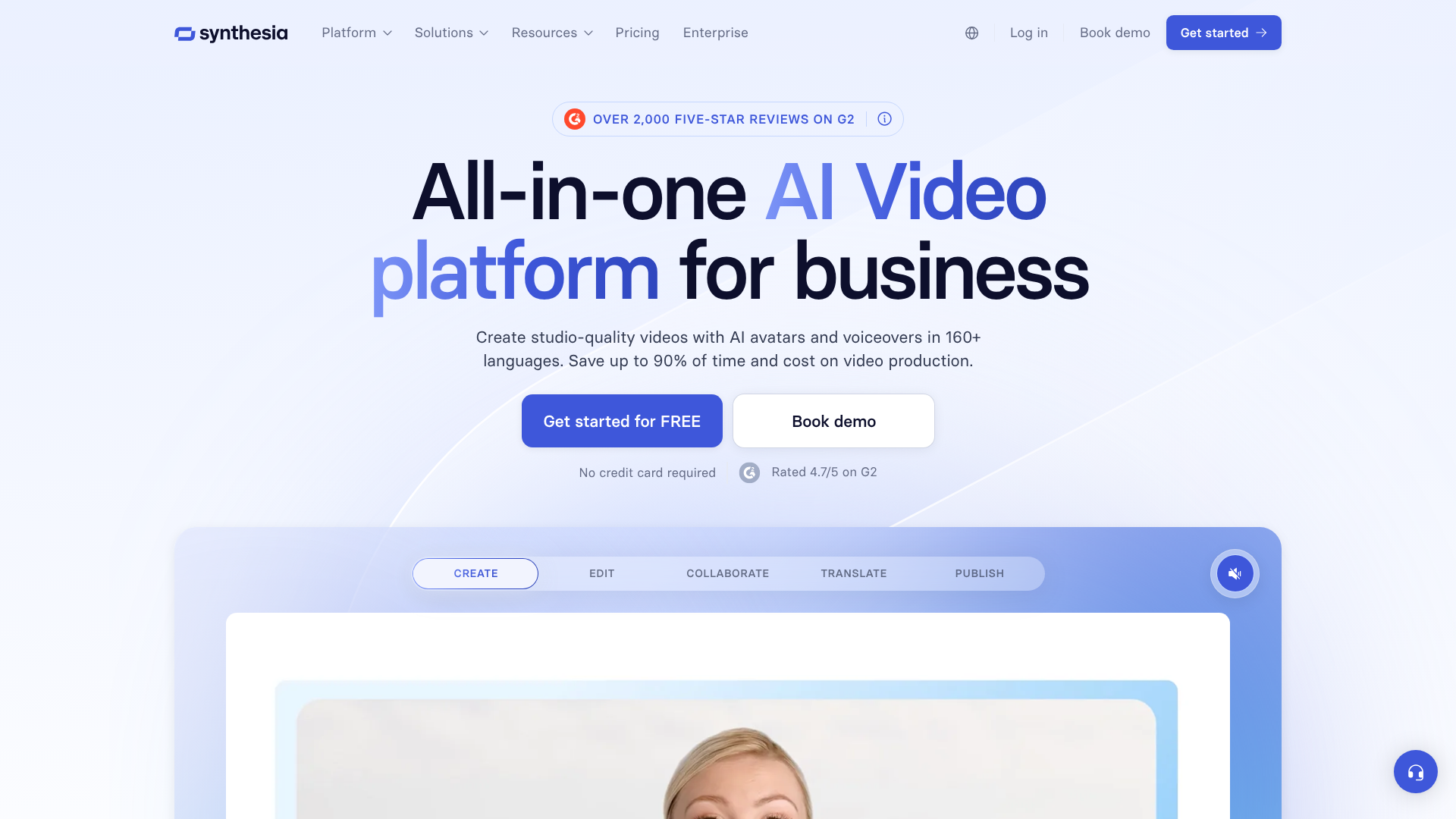
The voice generator's primary function is to serve as the audio backbone for these videos. It is a sophisticated text to speech AI engine that converts your written script into a natural-sounding voiceover. This audio is then automatically synchronised with one of Synthesia's 200+ stock AI avatars, or even a custom avatar of yourself. The result is a polished video where a digital presenter speaks your script with realistic lip-syncing.
This integrated approach makes the synthesia voice tool incredibly powerful for businesses, marketers, and learning and development professionals. It streamlines the entire video production workflow into a single, script-based interface. Need to update a product feature in a demo video. You don't need to re-record anything; you simply edit the text, and both the voiceover and the avatar's performance are updated in minutes.
This makes it a scalable solution for creating and maintaining large libraries of video content.
A Closer Look at Key Features and Benefits
Synthesia's platform is packed with features designed to make professional video creation accessible. The voice generation capabilities are central to this, offering a level of quality and flexibility that sets it apart from more basic tools. Here’s a detailed breakdown of what makes it so effective.
Extensive Library of Voices and Languages
One of the most impressive aspects of the platform is its sheer scale. As of 2026, Synthesia offers a library of over 1000 unique AI voices. This vast selection ensures that you can find a voice that perfectly matches your brand's tone, whether you need something authoritative and professional for corporate training or warm and friendly for a marketing campaign.
This variety is complemented by support for over 160 languages and accents. This is a massive advantage for global organisations aiming to localise content. Instead of sourcing and managing dozens of voice actors from around the world, a team can produce consistent, high-quality videos for different regions from a single platform. This dramatically reduces the complexity and cost associated with international marketing and training initiatives.
High-Quality, Natural-Sounding Audio
The biggest challenge for any AI voice generator is overcoming the robotic, monotone sound that plagued early text-to-speech technology. Synthesia has invested heavily in creating voices that are rich with natural intonation, pacing, and inflection. The underlying AI models are trained to understand the context of sentences, allowing them to place emphasis correctly and pause in a way that mimics human speech.
Users can further refine the delivery by using punctuation like commas and full stops to control pacing. While it may not capture the full emotional spectrum of a seasoned human voice actor for a dramatic film trailer, the quality is more than sufficient for the vast majority of business and educational content. The clarity and professionalism of the output ensure that your message is delivered effectively and your audience stays engaged.
Custom AI Voice Cloning
For brands and creators who want ultimate consistency and personalisation, Synthesia's voice cloning feature is a standout offering. Available on its higher-tier plans, this allows you to create a high-fidelity digital replica of your own voice or that of a designated company spokesperson. The process is straightforward: you record yourself reading a script provided by Synthesia, and their AI analyses the unique characteristics of your voice.
Once created, your custom voice can be used to generate audio for any script you provide. This is incredibly powerful for several reasons. It ensures absolute brand consistency, as the same trusted voice can be used across all video communications. For individual creators, it allows them to scale content production without having to record every single video themselves.
They can write a script, and the AI will narrate it in their voice, saving countless hours behind the microphone.
Seamless Integration with AI Avatars
The true magic of Synthesia happens when the voice tool works in concert with the AI avatars. This is the platform's unique selling proposition. When you generate a voiceover, it isn't just an audio file; it's an entire performance. The platform's AI automatically animates the chosen avatar's lip movements to perfectly synchronise with the generated audio.
This creates a complete, ready-to-use video clip of a presenter delivering your message. This integration solves a major problem in video production: connecting audio narration with engaging visuals. It removes the need to film a person, set up lighting, or worry about on-camera presence. For teams creating how-to guides, internal announcements, or product explainers, this all-in-one functionality is a massive time-saver.
Script-Based Editing and Updates
Traditional video production is rigid. If a small detail in the narration needs to be changed, it often requires a full re-shoot or a new recording session with a voice actor, which costs time and money. The synthesia voice tool, being part of a script-based platform, completely changes this dynamic.
Editing a video's narration is as simple as editing a text document. If you need to update a statistic, change a product name, or add a new sentence, you just type the change into the script editor. Synthesia re-generates the audio and updates the avatar's performance instantly. This agility is invaluable for content that requires frequent updates, such as training materials, software tutorials, and compliance videos.
How to Choose the Right Synthesia Plan for Your Needs

Synthesia's pricing is structured in tiers to cater to different types of users, from individuals to large corporations. Understanding these plans is key to determining if the platform is a cost-effective choice for you. The cost is directly tied to the volume of video content you produce and the advanced features you require.
Understanding Synthesia's Pricing Tiers
Synthesia typically offers three main pricing plans. It's important to note that pricing and plan features can change, so you should always check the official website for the most current information.
- Personal Plan: This is the entry-level option, designed for individual users. It usually includes a set number of video minutes per month (e.g., 10 minutes), access to the standard library of AI avatars and voices, and the core video creation tools. This plan is ideal for testing the platform or for users with very light video creation needs.
- Creator Plan: Aimed at professionals and small teams, this plan offers a higher allowance of video minutes per month and includes more features. You might get access to premium voices and additional collaboration tools. This is often the sweet spot for content creators, marketers, and instructional designers who produce video content regularly.
- Enterprise Plan: This is a custom plan for larger organisations. It includes everything in the Creator plan plus advanced features like custom AI avatar creation, AI voice cloning, API access for integrations, and dedicated support. Pricing is tailored to the specific needs of the company, based on factors like the number of users and video volume.
For the most up-to-date pricing and feature comparison, it's best to visit the official Synthesia website.
Who is the Personal Plan For?
The Personal plan is a great starting point if you're an individual with a specific, limited project in mind. For example, a freelancer creating a short series of tutorial videos for a client, a student working on a presentation, or a small business owner who needs a single product demo video. It provides full access to the core functionality, allowing you to produce a high-quality video without a significant upfront investment. However, the limited video minutes mean it's not suitable for ongoing, high-volume content production.
When to Upgrade to the Creator or Enterprise Plan
You should consider the Creator plan as soon as video creation becomes a regular part of your workflow. If you're a YouTuber, a social media manager, or part of a small marketing team, the increased video minute allowance and additional features will be necessary. This plan provides the capacity to experiment, iterate, and produce content on a consistent schedule.
The Enterprise plan is essential for businesses that require brand customisation and scalability. The ability to create a custom avatar of a key executive or use a cloned voice of a brand ambassador provides a level of professionalism and consistency that stock options cannot match. Furthermore, the API access allows for automating video creation at scale, such as generating thousands of personalised sales videos, which is a powerful tool for large sales and marketing departments.
Top Recommendations: Use Cases Where Synthesia Excels
Synthesia's integrated platform isn't just a novelty; it's a practical tool that solves real-world problems across various industries. Its ability to quickly turn a script into a polished video makes it particularly effective for specific applications where speed, scale, and consistency are paramount.
Corporate Training and L&D Videos
This is arguably one of Synthesia's strongest use cases. Learning and Development (L&D) departments are constantly tasked with creating training materials for onboarding, compliance, and skill development. Traditional video production is slow and expensive, making it difficult to keep content up-to-date.
With Synthesia, an instructional designer can create a comprehensive training module with a consistent presenter and voice in a fraction of the time. If a company policy or software interface changes, the video can be updated in minutes by simply editing the script. The ability to generate the same training video in multiple languages with just a few clicks is also a massive benefit for global organisations.
Marketing and Sales Videos
In the world of digital marketing, video is king. Synthesia empowers marketing teams to rapidly produce a wide range of content, including product explainer videos, social media ads, and customer testimonials. The professional look and feel of the videos help build brand credibility without the high cost of a production agency.
For sales teams, the platform can be used to create personalised outreach videos at scale. A sales representative can use a template to generate a short video that addresses a specific prospect by name and mentions their company, creating a highly engaging first touchpoint. This level of personalisation would be impossible to achieve manually.
Pro Tip: When creating marketing videos, use Synthesia's screen recording feature to capture your product in action. You can then add an AI avatar as a presenter in the corner of the screen to guide the viewer through the demo, combining a personal touch with a practical walkthrough.
Internal Communications
Getting important messages across in a large organisation can be challenging. Long emails are often ignored, and text-based announcements can lack impact. Using Synthesia, HR and internal communications teams can create short, engaging video updates from key executives.
For example, a CEO's monthly update can be produced using a custom avatar, ensuring the message is delivered consistently and professionally, even if the executive is travelling. This is also useful for creating how-to guides for new internal software or explaining changes to company benefits in a clear and accessible format.
Synthesia AI Voice Generator: A Balanced Look at Pros and Cons
No tool is perfect for every situation. To make an informed decision, it's essential to weigh the significant advantages of Synthesia against its potential limitations. This balanced perspective will help you determine if it aligns with your budget, workflow, and creative goals.
The Advantages of Using Synthesia
- Unmatched Cost and Time Efficiency: The primary benefit is the dramatic reduction in production costs and timelines. Compared to the expense of hiring voice actors, renting studio space, filming, and editing, Synthesia offers a predictable, subscription-based cost. A video that could take weeks to produce traditionally can be completed in under an hour.
- Incredible Scalability and Localisation: The platform is built for scale. The ability to produce hundreds of videos and translate them into over 160 languages with ease is something that traditional methods simply cannot compete with. This makes it an invaluable asset for global companies.
- Guaranteed Brand Consistency: Using the same AI avatars and voices across all your video content ensures a high level of brand consistency. With voice cloning and custom avatars, you can create a truly unique and recognisable brand presence that reinforces trust and familiarity with your audience.
- True All-in-One Platform: The biggest pro is that it's a complete text-to-video solution. You don't need separate tools for voice generation, video editing, and finding stock footage. Everything you need to go from script to finished video is contained within a single, user-friendly interface.
Potential Drawbacks to Consider
- No Standalone Voice Tool: If your only need is to convert text into an MP3 audio file, Synthesia is not the right tool. Its voice generator is intrinsically linked to the video platform. You would be paying for a full suite of video features that you would not use.
- Subscription Cost: While cost-effective compared to traditional production, the monthly subscription can be a significant expense for individuals or small businesses with tight budgets, especially when compared to cheaper, dedicated text-to-speech AI tools.
- Limited Emotional Range: While the AI voices are remarkably natural for informational content, they can struggle to convey deep or complex emotions. For highly persuasive, dramatic, or heartfelt content, the nuance of a professional human voice actor may still be superior.
- The 'Uncanny Valley' Effect: AI avatar technology has improved immensely, but for some viewers, the digital presenters can still feel slightly unnatural or fall into the 'uncanny valley'. This is a subjective factor, but it's worth considering how your specific audience might perceive the AI-generated presenters.
How To Create Your First AI Voiceover Video
Getting started with Synthesia is a surprisingly straightforward process. The platform is designed to be intuitive, even for those without any video editing experience. Here is a step-by-step guide to creating your first video with an AI-generated voiceover.
- Choose Your Template and Avatar: Start by selecting a video template that suits your content. Synthesia offers a range of pre-designed templates for different use cases like presentations, tutorials, and social media posts. Next, choose your AI avatar from the extensive library of over 200 options.
- Write or Paste Your Script: This is where you bring your content to life. In the script box, you can type your narration directly or paste it from another document. Each scene in your video can have its own script segment, allowing you to build your video piece by piece.
- Select Your Voice and Language: Below the script box, you'll find the voice selection menu. Here, you can browse through the 1000+ voices and filter by language, gender, and style. You can preview each voice to find the one that best fits your message.
- Customise Your Visuals: While the voice is being generated, you can customise the visual elements of your video. You can change background colours, add text overlays, upload images or logos, and even include screen recordings. This allows you to create a visually engaging video that complements the narration.
- Generate and Preview Your Video: Once you're happy with your script and visuals, click the 'Generate' button. Synthesia's AI will then process your project, creating the voiceover, synchronising the avatar's lip movements, and rendering the final video. This process usually takes just a few minutes. You can then preview the video and make any necessary edits by simply changing the script.
Synthesia vs. The Competition: A Brief Comparison
While Synthesia is a leader in the AI video space, it's not the only player. Understanding how it compares to other popular tools can help clarify its unique position in the market. The key difference almost always comes down to its all-in-one, video-centric approach.
Tools like Murf AI and ElevenLabs are often mentioned as competitors. However, they primarily focus on voice generation as their core product. ElevenLabs is renowned for its incredibly realistic voice cloning and expressive text-to-speech engine, making it a top choice for podcasters, audiobook creators, and anyone needing high-fidelity audio files. Murf AI also offers a powerful suite of voice tools and includes some basic video editing capabilities, but its strength lies in its voice-first features.
Synthesia's main advantage over these is its deep integration of voice with high-quality AI avatars. If your end goal is a video with a presenter, Synthesia provides the most streamlined path. If your end goal is a standalone audio file, a more specialised tool like ElevenLabs would be a more direct and potentially more cost-effective solution.
Here’s a quick comparison:
| Feature | Synthesia | Murf AI | ElevenLabs |
|---|---|---|---|
| Primary Focus | AI Video Platform | AI Voice Generator | AI Voice Cloning & TTS |
| AI Avatars | Yes, core feature | Limited (stock video) | No |
| Voice Cloning | Yes (Enterprise) | Yes | Yes (core feature) |
| Languages | 160+ | 20+ | 29 |
| Best For | All-in-one video creation | High-quality voiceovers | Realistic voice cloning |
Frequently Asked Questions (FAQ)
Here are answers to some of the most common questions people ask about the Synthesia AI voice generator and the platform as a whole.
Is Synthesia AI free?
Synthesia is a paid platform, but it does offer a free AI video generator demo. This allows you to create a short sample video to test the technology and see the quality of the output for yourself. However, to access the full platform with all its features, avatars, and voices, you will need to subscribe to one of their paid plans, starting with the Personal plan.
What is the best AI voice generator?
The "best" AI voice generator really depends on your specific needs. If your primary goal is to create presenter-led videos quickly and efficiently, Synthesia is arguably the best all-in-one solution on the market. If you only need the highest possible quality audio for a podcast or audiobook and don't need video, a specialised tool like ElevenLabs might be considered the best for that specific task. The best tool is the one that aligns with your project's requirements and budget.
Can I use my own voice on Synthesia?
Yes, you can. Synthesia offers a custom AI voice cloning feature, which is typically available on its Enterprise plan. This process involves you recording a script provided by them, which their AI then uses to create a digital replica of your voice. This is an excellent feature for maintaining brand consistency or for creators who want to scale their content production.
Are AI vocals legal?
Yes, using AI-generated vocals is legal when done responsibly within the terms of the platform. When you use the stock voices provided by Synthesia, you have the commercial rights to use them in your projects. Similarly, when you clone your own voice with your consent, you own the resulting digital voice. The legal and ethical issues arise when people attempt to clone someone else's voice without their explicit permission, which is a violation of Synthesia's terms of service and can have legal consequences.
What's better than Synthesia?
Whether another tool is "better" than Synthesia depends on the specific features you prioritise. For creating videos with AI avatars, Synthesia is a top contender. However, a competitor like HeyGen might be considered better by some for its different style of avatars or specific features. For pure audio generation, as mentioned, ElevenLabs is often seen as a leader in voice realism.
It's less about one being definitively better and more about which platform's feature set is the best match for your workflow.
Is there a free alternative to Synthesia?
There are some tools that offer free tiers for AI video or voice generation, but they are typically much more limited than Synthesia's paid platform. These free alternatives often come with significant restrictions, such as heavy watermarking, very low limits on video length or usage, and a much smaller selection of voices and avatars. While they can be useful for very small, non-commercial projects, they don't offer the professional quality and feature depth required for most business use cases.
Final Thoughts: Is the Synthesia Voice Tool Right for You?
After a thorough review, it's clear that the Synthesia AI voice generator is a formidable tool, but its true power is only realised when viewed as part of the entire Synthesia video creation platform. It successfully delivers on its promise of creating natural, professional-sounding voiceovers that can elevate a wide range of video content. The vast library of languages and the option for custom voice cloning provide a level of flexibility and brand control that is hard to match.
If you are a business, marketer, or L&D professional looking to scale your video production, reduce costs, and maintain brand consistency across global markets, Synthesia is an outstanding investment. It streamlines the entire workflow from script to final video in a way that traditional methods cannot. The ability to update content by simply editing text is a significant advantage for any organisation that needs to keep its materials current.
However, if your needs are simpler—if you're a podcaster, author, or developer who just needs a high-quality text to speech AI to generate audio files—then Synthesia is likely overkill. You would be better served by a more specialised and cost-effective audio-only tool. The decision ultimately comes down to whether your end product is an audio file or a complete video. If it's the latter, Synthesia stands out as a market leader.
Ready to see how it can transform your video workflow? You can explore its features and create a sample video by trying the Synthesia free AI video generator today.