
Synthesia AI Video Explained: A Guide for Businesses to Create Pro Videos
Creating professional-quality video content has traditionally been a complex, expensive, and time-consuming process. It involves hiring actors, booking studios, managing camera crews, and lengthy post-production edits. The rise of synthesia ai video platforms is changing this entire workflow, allowing businesses to generate high-quality videos from a simple text script in minutes, not weeks. This technology uses artificial intelligence to create realistic human presenters, or avatars, that speak your words in over 120 languages, eliminating the need for cameras, microphones, or actors.
- What You'll Learn
- What Exactly is Synthesia AI Video?
- How Does Synthesia AI Video Creation Work? A Step-by-Step Guide
- Step 1: Write or Generate Your Script
- Step 2: Choose Your AI Avatar
- Step 3: Select a Voice and Language
- Step 4: Customise Your Video Scene
- Step 5: Generate and Share Your Video
- Core Features and Business Benefits of Synthesia AI
- Extensive Library of AI Avatars and Voices
- Custom AI Avatars and Voice Cloning
- AI Script Assistant
- Templates and Media Library
- The Key Benefit: Scalability and Cost-Effectiveness
- Top Use Cases: Who is Synthesia For?
- Corporate Training and Learning & Development (L&D)
- Marketing and Sales Enablement
- Internal Communications
- Customer Support and How-To Guides
- Synthesia Pricing and Plans: A Cost Comparison
- The Pros and Cons of Using Synthesia
- Frequently Asked Questions about Synthesia AI Video
- Can I use Synthesia AI video for free?
- How much does Synthesia AI video cost?
- What is the maximum length of a Synthesia video?
- Are AI-generated videos allowed on YouTube?
- What is the best free AI video generator?
- Final Thoughts: The Future of AI Video Creation
Synthesia stands at the forefront of this shift, offering a powerful platform for AI video creation that is accessible to marketers, trainers, and communicators alike. Instead of organising a full video shoot for a simple training update or a marketing message, you can now type a script, choose an avatar, and generate a polished video ready for distribution. This guide explains everything you need to know about how Synthesia works, its key features, pricing, and how it can fit into your business strategy.
What You'll Learn
- What Synthesia Is: Synthesia is a leading AI platform that generates videos from text using hyper-realistic digital avatars, removing the need for traditional video production.
- Core Benefits: The primary advantages are significant reductions in cost and time, massive scalability for content localisation, and consistent, professional branding across all video communications.
- Key Features: The platform includes over 160 diverse AI avatars, voiceovers in more than 120 languages, custom avatar creation, an AI script assistant, and a library of video templates.
- Primary Use Cases: It is widely used for corporate training and L&D, marketing and sales videos, internal communications, and customer support guides.
- How to Get Started: You can test the technology using Synthesia's free AI video generator before committing to a paid plan, which is designed for individuals and enterprise teams.
What Exactly is Synthesia AI Video?
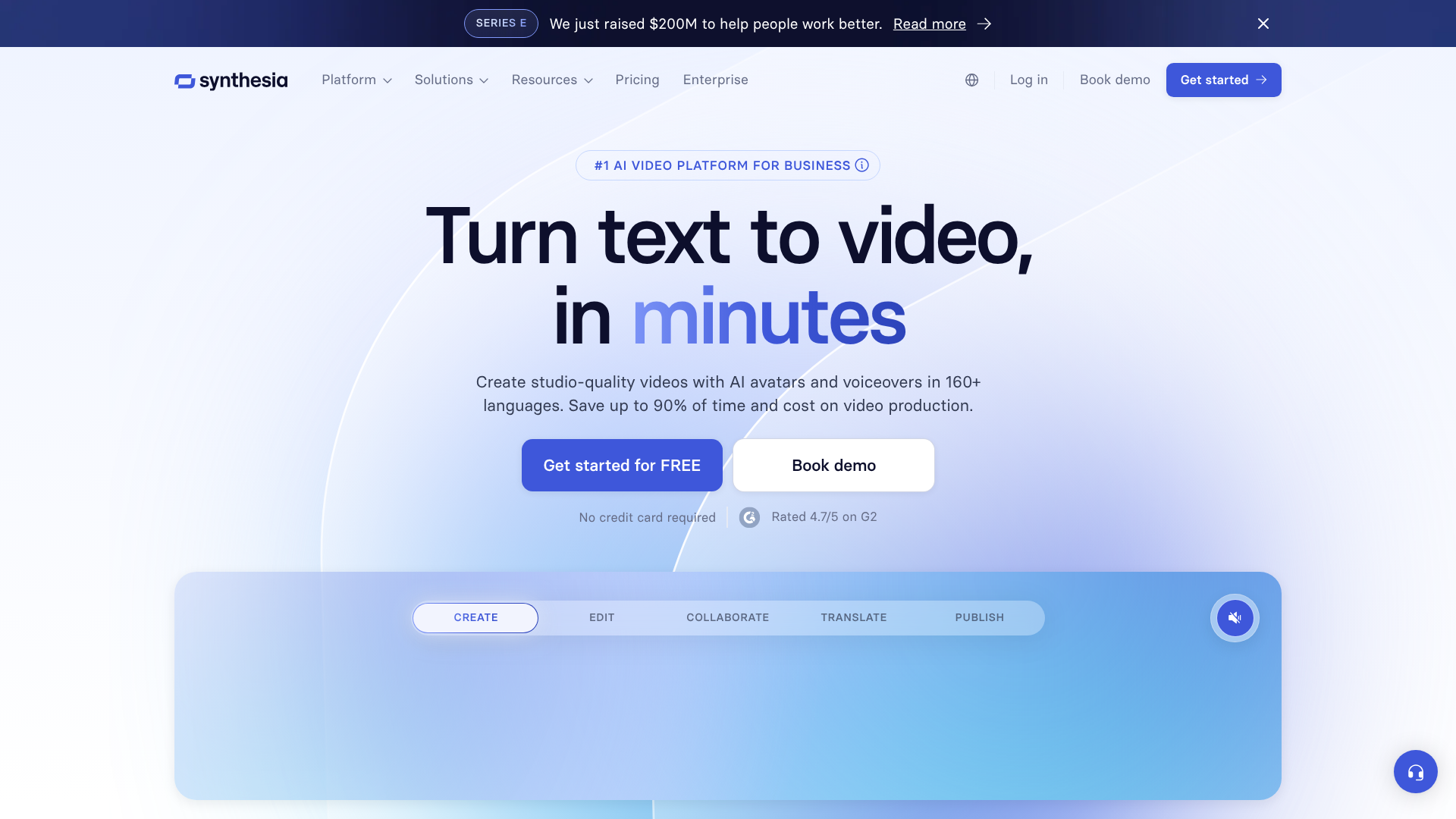
Synthesia AI video is a form of media generated by artificial intelligence where a digital human presenter speaks a script provided by a user. Think of it less like a video editor and more like a video generator. You don't edit existing footage; you create entirely new video content from scratch using text as your primary input. The platform combines advanced AI, machine learning, and computer graphics to produce a final product where a lifelike avatar delivers your message with realistic lip-syncing and intonation.
The process feels almost like creating a presentation. You choose a template, select a presenter from a large library of digital avatars, and paste in your script. The AI then gets to work, mapping the phonetics of your text to the avatar's mouth movements and generating a corresponding voiceover. The result is a seamless video where a digital person appears to be speaking your words directly to the camera.
This technology is a significant step forward in making video production more democratic and accessible.
This approach is part of a larger trend towards what some industry leaders, like Synthesia CEO Victor Riparbelli, call "AI native" video. As he explained in a discussion highlighted by The Information on Instagram, this means video is becoming interactive and personalised—content you can potentially talk to. This moves beyond simple one-way communication and opens the door for dynamic, responsive video experiences, such as AI-powered video agents for customer service or training.
How Does Synthesia AI Video Creation Work? A Step-by-Step Guide
Getting started with Synthesia is designed to be intuitive, even for those with no prior video production experience. The platform breaks down the complex process of AI video creation into a few simple, manageable steps. Here’s a look at the typical workflow from script to finished video.
Step 1: Write or Generate Your Script
Everything starts with your message. You can type your script directly into Synthesia's editor, paste it from another document, or use the built-in AI Script Assistant. This feature is particularly helpful if you're struggling with wording or need to generate content quickly. You simply provide a prompt, and the AI will draft a script for you, which you can then edit and refine.
Step 2: Choose Your AI Avatar
Next, you select your presenter. Synthesia offers a diverse library of over 160 stock AI avatars, representing various ethnicities, ages, and styles of dress. This allows you to choose a presenter that best aligns with your brand and target audience. For businesses seeking a higher level of personalisation, Synthesia also offers the ability to create a custom digital twin of a real person, such as your CEO or a brand spokesperson.
Step 3: Select a Voice and Language
Once you have your avatar, you choose a voice. The platform supports over 120 languages and a wide range of accents, making it incredibly powerful for global communication. You can preview different voices to find the tone that best suits your message. For ultimate brand consistency, you can also use the voice cloning feature to create a digital version of your own voice or that of a designated speaker.
Step 4: Customise Your Video Scene
This is where you bring your video to life visually. You can choose from dozens of pre-designed templates or start with a blank canvas. The editor allows you to add text overlays, upload images, embed screen recordings of software, and incorporate your company's branding elements like logos and colour schemes. This ensures your final synthesia video looks professional and aligns with your brand identity.
Step 5: Generate and Share Your Video
With your script, avatar, and visuals in place, you simply click the "Generate" button. Synthesia's AI engine processes all the elements and renders your video, which typically takes just a few minutes. Once complete, you can download the video file (MP4), get a shareable link, or use an embed code to add it directly to your website or learning management system (LMS).
Core Features and Business Benefits of Synthesia AI

Synthesia is more than just a text-to-video tool; it's a comprehensive platform packed with features designed to streamline and scale business communications. These capabilities translate into tangible benefits, including cost savings, increased efficiency, and improved engagement.
Extensive Library of AI Avatars and Voices
The platform's core strength lies in its vast selection of over 160 stock avatars and 120+ languages. This diversity allows companies to create content that resonates with a global audience. Whether you need a corporate trainer for a compliance video in German or a friendly marketing presenter for a social media ad in Japanese, you can produce localised content without hiring local talent or managing complex international shoots.
Custom AI Avatars and Voice Cloning
For a truly unique brand experience, Synthesia offers custom avatar creation. This involves creating a digital replica of a person of your choice. A company can create an avatar of its CEO to deliver internal announcements or a top salesperson to create personalised outreach videos. Paired with voice cloning, this feature ensures that your AI-generated content is indistinguishable from content featuring your actual team members, fostering a stronger connection with your audience.
Pro Tip: When creating a custom avatar, ensure the person being filmed follows Synthesia's best practices for recording. This includes using a green screen, good lighting, and clear audio to produce the most realistic digital twin possible. A high-quality source video is essential for a high-quality avatar.
AI Script Assistant
Overcoming writer's block is a common challenge in content creation. Synthesia's AI Script Assistant, powered by technology similar to ChatGPT, helps users generate scripts from simple prompts. You can ask it to write a script for a 2-minute product demo, a 5-step safety training module, or an engaging social media update. This accelerates the content creation process and provides a solid foundation that you can then edit to match your brand's voice.
Templates and Media Library
To further speed up production, Synthesia provides a rich library of professionally designed video templates. These templates are tailored for common use cases like training presentations, marketing updates, and how-to guides. You can also upload your own assets—images, videos, background music, and brand elements—to the media library, ensuring all your content remains consistent and on-brand.
The Key Benefit: Scalability and Cost-Effectiveness
The most significant benefit of using synthesia AI is the dramatic reduction in cost and time. A single traditional corporate video can cost thousands of pounds and take weeks to produce. With Synthesia, a monthly subscription gives you the ability to create dozens of videos for a fraction of the cost. Furthermore, updating content is effortless.
If a policy changes or a product feature is updated, you don't need to reshoot the entire video; you just edit the text and regenerate it in minutes.
Top Use Cases: Who is Synthesia For?
Synthesia's versatility makes it a valuable tool for various departments within an organisation. Its ability to produce professional video content quickly and affordably addresses key challenges in training, marketing, and internal communications.
Corporate Training and Learning & Development (L&D)
This is one of the most popular applications of Synthesia. L&D teams use the platform to create engaging onboarding materials, compliance training, software tutorials, and safety procedures. Traditional training videos quickly become outdated. With Synthesia, if a process or policy changes, the training video can be updated by simply editing the script and regenerating the video.
This agility ensures that learning content is always current and accurate, without the high costs of reshooting.
Marketing and Sales Enablement
Marketing teams use Synthesia to create a wide range of content, from social media ads and product explainers to personalised sales outreach videos. A sales team can create a template video and then quickly personalise it with a prospect's name and company to increase engagement. This level of personalisation at scale is nearly impossible with traditional video production methods. It helps sales and marketing teams create more relevant content that speaks directly to their audience's needs.
Internal Communications
Keeping employees informed is crucial for any organisation. Synthesia is an effective tool for creating internal communications content, such as weekly updates from the CEO, announcements about company changes, or how-to guides for new internal software. Using a consistent AI avatar (or a custom avatar of a leader) helps create a familiar and professional channel for company-wide messages, ensuring information is delivered clearly and consistently.
Customer Support and How-To Guides
Video is an excellent medium for customer support. Companies use Synthesia to build extensive libraries of video FAQs and step-by-step tutorials that show customers how to use a product or troubleshoot common issues. These videos can be embedded in a knowledge base or sent by support agents in response to customer queries. This not only improves the customer experience by providing clear, visual instructions but also helps reduce the workload on support teams.
Synthesia Pricing and Plans: A Cost Comparison
Synthesia offers a tiered pricing structure designed to accommodate different users, from individuals to large enterprise teams. Understanding the options helps you determine which plan provides the best value for your specific needs.
The Free AI Video Generator
For those new to AI video creation, Synthesia offers a free AI video generator. This tool allows you to create a short video to test the platform's capabilities. While it has limitations—such as a cap on script length and the inclusion of a Synthesia watermark—it's an excellent way to experience the quality of the avatars and voices firsthand without any financial commitment. It's perfect for creating a quick proof-of-concept to share with your team.
Personal Plan
The Personal plan is aimed at individual creators, freelancers, and small businesses. It's a subscription-based plan that typically includes a set number of video minutes per month, access to the full library of stock avatars and languages, and all the standard editing features. This plan is ideal for users who need to create professional videos regularly but don't require advanced collaboration or branding features.
Enterprise Plan
The Enterprise plan is tailored for larger organisations and teams that need to produce video content at scale. This plan offers everything in the Personal plan plus advanced features like custom AI avatars, voice cloning, collaboration tools for teams, premium security features, and dedicated support. Pricing for the Enterprise plan is customised based on the organisation's specific needs, including the number of users and required video volume. For the most up-to-date details, it's best to visit the Synthesia website for the latest pricing information.
Is It Worth the Cost?
When evaluating the cost, it's essential to compare it not to other software but to the alternative: traditional video production. A single professionally produced 3-minute video can easily cost £3,000 to £10,000 or more, factoring in actors, location, crew, and editing. A yearly Synthesia subscription can cost less than a single one of these videos while providing the ability to create hundreds. The return on investment, especially for organisations with ongoing video needs, is exceptionally high.
The Pros and Cons of Using Synthesia
Like any technology, Synthesia offers a powerful set of advantages but also has some limitations to consider. A balanced view can help you decide if it's the right fit for your content strategy.
Advantages of Synthesia
- Unmatched Speed and Efficiency: The ability to go from script to finished video in under 15 minutes is a massive advantage. This speed allows teams to be more agile and responsive with their video content.
- Significant Cost Savings: By eliminating the need for actors, studios, and camera crews, Synthesia dramatically lowers the financial barrier to creating high-quality video.
- Effortless Scalability and Localisation: A single script can be translated and generated in over 120 languages with different avatars, making global campaigns feasible for businesses of all sizes.
- Consistency and Professionalism: AI avatars deliver a perfect, on-brand performance every time. There are no flubbed lines or off-days, ensuring a consistent level of quality across all your videos.
- Accessibility for Non-Experts: You don't need any video editing skills to use Synthesia. The intuitive interface makes video creation accessible to marketers, trainers, and communicators, not just video professionals.
Potential Limitations
- The "Uncanny Valley" Effect: While Synthesia's avatars are among the most realistic available, they are still AI-generated. Some viewers may perceive a subtle lack of human warmth or nuance, sometimes referred to as the "uncanny valley."
- Limited Gestures and Body Language: Most avatars are presented from the waist up and have a limited range of gestures. While recent updates are introducing more movement and 3D scenes, they can't yet replicate the full spectrum of human body language and physical interaction.
- Lack of Spontaneous Emotion: AI can simulate tones like "friendly" or "professional," but it cannot replicate the genuine, spontaneous emotion of a human actor. For content that relies heavily on emotional storytelling or authentic personal connection, a real human presenter may still be more effective.
Frequently Asked Questions about Synthesia AI Video
Here are answers to some of the most common questions people have about Synthesia and AI-generated video.
Can I use Synthesia AI video for free?
Yes, you can. Synthesia provides a free AI video generator on its website that allows you to create a short sample video. This is a great way to test the technology and see the quality of the avatars and voices for yourself. However, the free version has limitations, such as a maximum script length and watermarking on the final video.
For regular use without these restrictions, you will need to subscribe to a paid plan.
How much does Synthesia AI video cost?
Synthesia's pricing is tiered. There is a "Personal" plan designed for individual users, which is billed as a monthly or annual subscription and includes a specific amount of video creation time. For teams and larger businesses, there is an "Enterprise" plan with custom pricing. This plan includes advanced features like custom avatars, collaboration tools, and enhanced security.
It's best to check Synthesia's official website for the most current pricing details.
What is the maximum length of a Synthesia video?
The maximum video length depends on your plan. For the Personal plan, a single video project can typically be up to 10 minutes long. The Enterprise plan often allows for longer video creation, with limits tailored to the specific needs of the organisation. This structure ensures that the platform can handle both short-form marketing content and longer, in-depth training modules.
Are AI-generated videos allowed on YouTube?
Yes, AI-generated videos are generally allowed on YouTube. However, YouTube's policies are evolving to address synthetic media. As of 2024, YouTube requires creators to disclose when their content is realistic synthetic media. This is to ensure transparency with viewers.
As long as you adhere to YouTube's community guidelines and properly label your content where required, you can publish videos made with Synthesia on the platform.
What is the best free AI video generator?
Synthesia's free tool is one of the best for creating high-quality AI avatar videos specifically. It provides a direct glimpse into the capabilities of a premium, professional-grade platform. While other free AI tools exist for different purposes—like creating animated videos from text or generating video clips from prompts—Synthesia's free generator is a top choice for anyone wanting to test realistic, presenter-led video creation.
Final Thoughts: The Future of AI Video Creation
Synthesia AI video is more than just a novelty; it's a practical and powerful tool that solves real-world business problems. By making video production 10 times faster and significantly more affordable, it empowers organisations to communicate more effectively through the most engaging medium available today. It levels the playing field, allowing businesses of any size to create the kind of polished, professional video content that was once the exclusive domain of large corporations with big budgets.
The technology is continuously improving, with avatars becoming more realistic and expressive. The future of AI video creation is moving towards even more dynamic and interactive experiences, where AI agents can respond to users in real-time. For businesses looking to scale their training, enhance their marketing, and streamline their communications, adopting a platform like Synthesia is no longer a futuristic idea—it's a strategic advantage.
If you're ready to explore how AI can transform your video strategy, the best way to start is by seeing it for yourself. You can create your first video in just a few minutes and witness the power of turning text into professional video content.
Ready to create your first AI video? Try Synthesia's free AI video generator today and see how easy it is to get started.