



The Grammarly AI Writing Assistant: A 2026 Guide for Flawless Writing
In professional and academic life, the clarity of your writing directly impacts your success. A misplaced comma or an awkward phrase can undermine an otherwise powerful message. While basic spell checkers catch simple errors, they miss the nuances of tone, clarity, and style. This is where the Grammarly AI writing assistant steps in, offering a sophisticated solution that acts as a real-time writing coach.
- What to Know
- What Exactly is the Grammarly AI Writing Assistant?
- A Deep Dive into Grammarly's Key Features and Benefits
- Core Grammar, Spelling, and Punctuation Correction
- Clarity, Conciseness, and Readability
- Tone Detection and Adjustment
- Generative AI: Brainstorming, Composing, and Rewriting
- Plagiarism Detection (Premium Feature)
- Style Guide and Brand Tones (Business Feature)
- How the Grammarly Writing Tool Works (Step-by-Step)
- Choosing Your Plan: Free vs. Premium vs. Business
- Grammarly Free: Is It Enough?
- Grammarly Premium: For Professionals and Students
- Grammarly Business: For Teams and Organisations
- Grammarly Pricing in 2026: A Cost-Benefit Analysis
- The Honest Truth: Pros and Cons of the Grammarly Assistant
- Frequently Asked Questions (FAQ)
- Is Grammarly an AI writing assistant?
- Will I get flagged for AI if I use Grammarly?
- Is Grammarly AI better than ChatGPT?
- Can teachers tell if you use Grammarly AI?
- What is the downside of Grammarly?
- How much is a 12-month subscription to Grammarly?
- Final Thoughts: Is the Grammarly AI Writing Assistant Worth It?
It goes far beyond simple corrections to help you communicate exactly as you intend.
This guide explains everything you need to know about this powerful tool. We'll break down its features, compare the different plans, and provide an honest look at its advantages and limitations. Whether you're a student aiming for better marks, a professional drafting critical emails, or a content creator polishing your work, understanding how to use this AI writing helper can significantly improve your output. For those ready to see it in action, you can explore Grammarly and its features directly.
What to Know
- Comprehensive Writing Support: Grammarly is more than a grammar checker. It's a full-featured AI assistant that provides feedback on spelling, grammar, punctuation, clarity, tone, and style.
- Generative AI Capabilities: The tool can help you brainstorm ideas, compose drafts from prompts, rewrite sentences for different tones, and summarise long texts, speeding up the entire writing process.
- Multiple Tiers for Different Needs: Grammarly offers a capable free version for basic corrections, a Premium plan for individuals needing advanced features like plagiarism detection, and a Business plan for teams requiring brand consistency.
- Wide-Ranging Integration: It works where you write, with browser extensions for Chrome and Safari, a desktop application for Windows and Mac, and a mobile keyboard for iOS and Android.
- User Discretion is Key: While the Grammarly assistant is powerful, its suggestions are not always perfect. It's essential to review its feedback critically, especially when using generative features, to avoid AI detection issues in academic settings.
What Exactly is the Grammarly AI Writing Assistant?
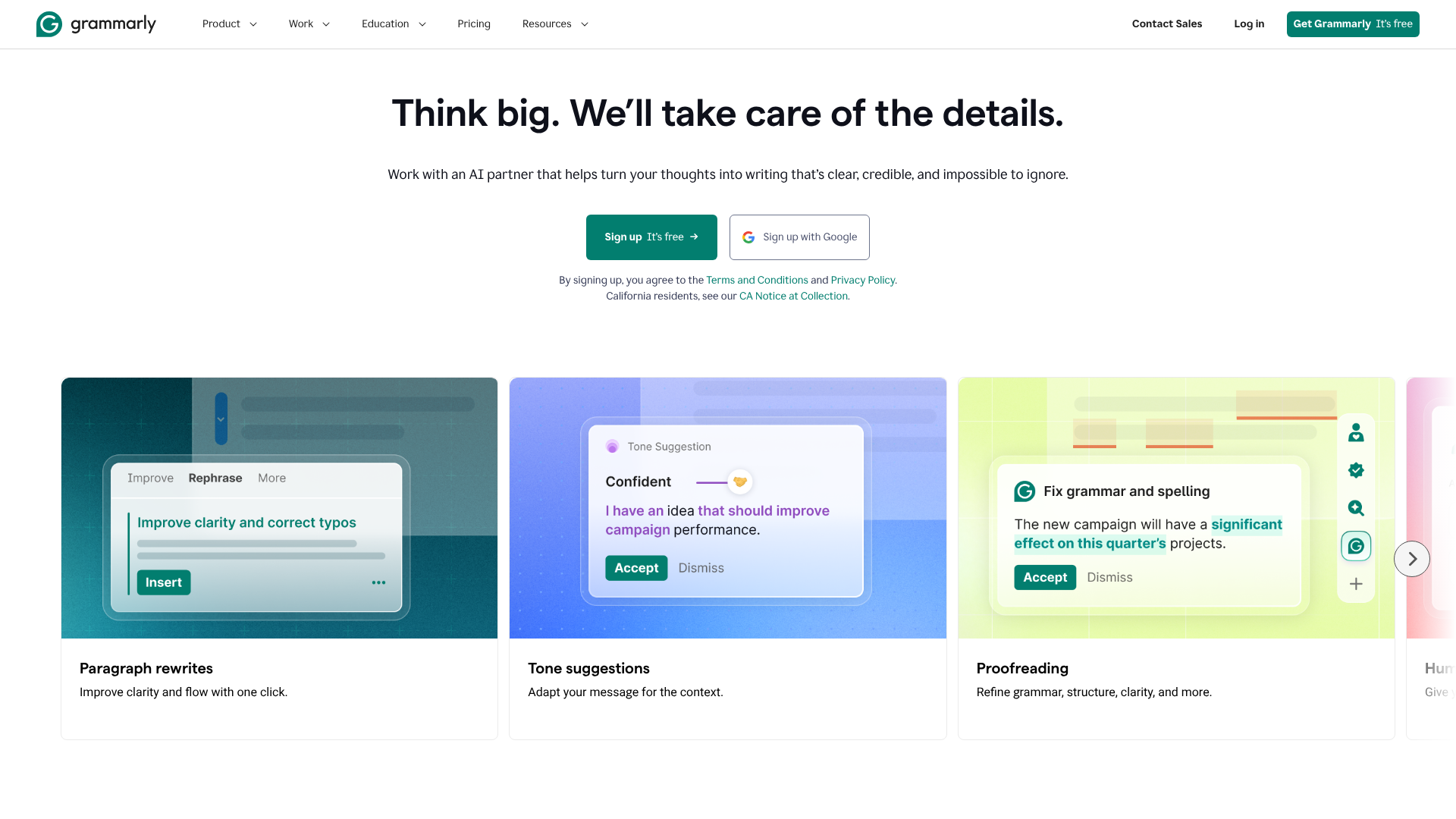
At its core, the Grammarly AI writing assistant is a cloud-based application that uses artificial intelligence and natural language processing (NLP) to analyse written text. It started as a tool focused on identifying grammatical errors but has evolved into a comprehensive writing partner. Unlike traditional word processors that only flag obvious spelling mistakes, Grammarly delves into the context and structure of your sentences.
This AI writing helper evaluates your text against hundreds of grammatical rules and style conventions. It checks for everything from subject-verb agreement and punctuation usage to sentence structure and word choice. The system is powered by complex algorithms that learn from a massive corpus of well-written text, allowing it to provide suggestions that are not just grammatically correct but also more effective and readable.
The true power of the modern Grammarly assistant lies in its ability to understand nuance. It can detect the intended tone of your writing—whether it's formal, friendly, confident, or analytical—and suggest adjustments to better match your goals. This makes it an invaluable tool for crafting emails, reports, articles, and social media posts that resonate with your intended audience.

A Deep Dive into Grammarly's Key Features and Benefits
Grammarly's usefulness comes from its layered set of features, which cater to different aspects of the writing process. From foundational corrections to advanced stylistic enhancements, the tool provides support from the first draft to the final polish.
Core Grammar, Spelling, and Punctuation Correction
This is the bedrock of the Grammarly writing tool. Its correction capabilities are significantly more advanced than built-in checkers found in Microsoft Word or Google Docs. It catches contextual spelling errors (like their vs. there), complex punctuation mistakes (such as comma splices), and a wide array of grammatical goofs that other programs often miss.
This ensures your writing is technically sound and professional.
Clarity, Conciseness, and Readability
Good writing is clear and easy to understand. Grammarly excels at identifying wordy sentences, confusing phrasing, and unnecessary jargon. It provides suggestions to rewrite sentences for better clarity, helping you get your point across more directly. For example, it might suggest breaking up a long, complex sentence into two shorter ones or replacing a passive voice construction with a more direct active voice.
Tone Detection and Adjustment
One of the most powerful features is its tone detector. The AI analyses your word choice, phrasing, and punctuation to determine how your writing might be perceived by a reader. It provides feedback on tones like 'confident', 'formal', 'optimistic', or 'concerned'. If your tone doesn't match your intention, Grammarly offers suggestions to adjust it, ensuring your message lands exactly as you planned.
Generative AI: Brainstorming, Composing, and Rewriting
With the integration of generative AI, Grammarly has become a creative partner. You can provide a simple prompt, and it will generate outlines, draft emails, or even compose entire paragraphs. This feature is incredibly useful for overcoming writer's block or quickly producing first drafts. It can also rewrite existing text to be shorter, longer, or adapted for a different audience, saving you significant editing time.
Plagiarism Detection (Premium Feature)
For students, academics, and professional writers, originality is non-negotiable. Grammarly Premium includes a plagiarism checker that compares your text against billions of web pages and academic databases. It highlights passages that may be unoriginal and provides the source, allowing you to add proper citations or rephrase the content to ensure your work is entirely your own.
Style Guide and Brand Tones (Business Feature)
For organisations, maintaining a consistent voice across all communications is crucial. The Grammarly Business plan allows companies to create a custom style guide. This ensures that all team members adhere to specific rules regarding terminology, formatting, and brand tone, promoting a unified and professional brand identity.
How the Grammarly Writing Tool Works (Step-by-Step)
Getting started with Grammarly is straightforward, and it's designed to integrate into your existing workflow with minimal disruption. Here’s a look at how to set it up and use it effectively.
Getting Started: Installation and Setup
The first step is to create an account on the Grammarly website. From there, you can access the tool in several ways:
- Browser Extension: Install the extension for Chrome, Safari, Firefox, or Edge. This is the most common way to use Grammarly, as it provides real-time suggestions on websites like Gmail, LinkedIn, Google Docs, and more.
- Desktop App: Download the native application for Windows or macOS. This allows you to drag and drop documents into the editor or write directly within the app.
- Grammarly for Microsoft Office: An add-in that brings Grammarly's suggestions directly into Word and Outlook.
- Grammarly Keyboard: A mobile app for iOS and Android that replaces your default keyboard, providing writing assistance in any app on your phone.
Using Grammarly in Your Workflow
Once installed, Grammarly works automatically in the background. As you type, it underlines potential issues in red (for spelling/grammar), blue (for clarity), green (for engagement), and purple (for delivery/tone). Hovering over an underlined word or phrase reveals a brief explanation and a one-click suggestion for correction.
For a more detailed analysis, you can open the Grammarly sidebar. This provides a comprehensive overview of your document's performance, including an overall score, and categorises suggestions by type. This is also where you can access the generative AI features to compose, rewrite, or ideate.
Customising Your Experience
To get the most accurate suggestions, you can set writing goals for your document. Before you start editing, you can specify your audience (general, knowledgeable, expert), formality (informal, neutral, formal), and domain (academic, business, creative). This helps the AI tailor its feedback to your specific context, making the suggestions far more relevant and useful.
Pro Tip: Build your personal dictionary. If you frequently use specific technical terms, brand names, or acronyms that Grammarly flags as errors, add them to your dictionary. This teaches the tool to ignore them in the future, saving you time and reducing unnecessary alerts.
Choosing Your Plan: Free vs. Premium vs. Business
Grammarly offers several tiers to meet the needs of different users. Understanding the differences is key to choosing the right plan for your situation.
| Feature | Grammarly Free | Grammarly Premium | Grammarly Business |
|---|---|---|---|
| Core Corrections | Spelling, Grammar, Punctuation | Yes | Yes |
| Conciseness | Basic | Yes | Yes |
| Tone Detection | Basic | Advanced | Advanced |
| Clarity-focused Rewrites | No | Yes | Yes |
| Plagiarism Detection | No | Yes | Yes |
| Generative AI | 100 prompts/month | 1000 prompts/month | 2000 prompts/month |
| Style Guide | No | No | Yes |
| Team Analytics | No | No | Yes |
| User Management | No | No | Yes |
Grammarly Free: Is It Enough?
The free version of Grammarly is surprisingly powerful and is an excellent starting point for most people. It provides critical grammar, spelling, and punctuation corrections, along with basic tone detection. For everyday writing like emails, social media updates, and personal documents, the free plan is often sufficient to catch major errors and improve overall quality.
Grammarly Premium: For Professionals and Students
Grammarly Premium is designed for users who rely on their writing for professional or academic success. It includes all the features of the free plan plus advanced suggestions for clarity, engagement, and delivery. The full-sentence rewrites, advanced tone adjustments, and, most importantly, the plagiarism detector make it an essential tool for students, content creators, marketers, and business professionals.
Grammarly Business: For Teams and Organisations
Grammarly Business is tailored for teams of three or more. It includes all Premium features and adds administrative and team-management tools. The central feature is the ability to create a company-wide style guide, ensuring that all communications are consistent with the brand's voice. It also provides analytics to track team performance and centralised billing for easy management.
Grammarly Pricing in 2026: A Cost-Benefit Analysis
When considering a subscription, it's important to weigh the cost against the potential benefits. Grammarly's pricing is structured to offer discounts for longer commitments.
As of late 2024, Grammarly Premium pricing generally follows this structure:
- Monthly Subscription: The most flexible but highest-cost option, billed each month.
- Quarterly Subscription: A mid-tier option billed every three months, offering a moderate discount.
- Annual Subscription: The most cost-effective option, billed once for the entire year. This plan often provides a saving of over 50% compared to the monthly rate.
For the most current and specific pricing information, it's always best to visit the Grammarly website. The PAA question, "Why did Grammarly charge me $200?", likely relates to an annual subscription charge, which can be a surprise if a user forgets they signed up for a yearly plan after a trial period.
Is the cost worth it. For many, the answer is yes. The time saved on proofreading and editing alone can justify the expense. Furthermore, the improvement in writing quality can lead to better academic results, more effective business communication, and a more professional personal brand.
The cost of a single rejected proposal or a poorly graded paper can easily exceed the annual cost of a Premium subscription.
The Honest Truth: Pros and Cons of the Grammarly Assistant
No tool is perfect, and while Grammarly offers immense value, it's important to be aware of its limitations. A balanced view can help you decide if it's the right fit for your needs.
The Advantages (Pros)
- Significant Improvement in Writing Quality: It catches a wide range of errors, from simple typos to complex stylistic issues, making your writing more polished and professional.
- Saves Time: The real-time feedback and one-click corrections dramatically reduce the time spent on manual proofreading and editing.
- Educational Tool: By explaining the reasoning behind its suggestions, Grammarly helps users understand their common mistakes and improve their writing skills over time.
- Seamless Integration: It works across a vast number of platforms and applications, providing consistent support wherever you write.
- User-Friendly Interface: The design is intuitive and easy to navigate, making it accessible even for non-technical users.
The Disadvantages (Cons)
- Imperfect Suggestions: The AI is not infallible. It can occasionally offer suggestions that are grammatically correct but stylistically awkward or that change the intended meaning of a sentence.
- Risk of Over-Reliance: Relying too heavily on the tool can prevent writers from developing their own editing skills. It's crucial to use it as a guide, not a crutch.
- AI Detection Concerns: Using the generative AI features to write entire sections of text can be flagged by AI detection software used in many academic institutions. Users must be cautious and use these features primarily for brainstorming and editing.
- Privacy Considerations: As a cloud-based service, your text is sent to Grammarly's servers for analysis. While the company has a strong privacy policy, users writing highly sensitive information should be aware of this.
- Controversial Features: As noted in discussions on platforms like Reddit, Grammarly has faced criticism for features like its now-removed "Expert Review," which mimicked the styles of famous authors without their consent. This highlights the ethical complexities of AI development and the need for user vigilance.
Frequently Asked Questions (FAQ)
Here are answers to some of the most common questions about the Grammarly AI writing assistant.
Is Grammarly an AI writing assistant?
Yes, absolutely. While it began as a grammar checker, Grammarly has fully evolved into an AI writing assistant. It uses artificial intelligence, machine learning, and natural language processing to analyse and improve text. Its capabilities now include generative AI for creating content, tone analysis for emotional context, and advanced suggestions for style and clarity, placing it firmly in the category of a comprehensive AI writing partner.
Will I get flagged for AI if I use Grammarly?
This is a nuanced issue. Using Grammarly for its core purpose—correcting grammar, spelling, and punctuation—is highly unlikely to be flagged by AI detectors. This is considered editing, not generation. However, if you use Grammarly's generative AI features to write entire essays or reports from a prompt, that generated text can be identified by AI detection tools like Turnitin.
The key is to use the generative features as a tool for brainstorming, outlining, and refining your own original work, not for creating it from scratch.
Is Grammarly AI better than ChatGPT?
They serve different primary purposes. Grammarly is fundamentally an editor and writing coach designed to improve text you have already written. Its strength lies in refining, correcting, and enhancing your own ideas. ChatGPT, on the other hand, is primarily a content generator.
It excels at creating text from a prompt. While ChatGPT can also edit, its interface is not as streamlined for that purpose as Grammarly's real-time, integrated suggestions. Many writers use both: ChatGPT for initial brainstorming and drafting, and Grammarly for polishing and perfecting the final text.
Can teachers tell if you use Grammarly AI?
Teachers generally cannot tell if you use Grammarly for its proofreading functions. In fact, many encourage it as a way to submit cleaner, more professional work. However, as mentioned above, they may be able to detect text that was written entirely by Grammarly's generative AI features. Academic integrity policies usually require that the submitted work is the student's own, so using AI to write your paper for you would be a violation.
Using it to check your own writing for errors is simply good practice.
What is the downside of Grammarly?
The main downsides include the potential for over-reliance, which can hinder the development of one's own editing skills. The AI can also occasionally provide incorrect or stylistically poor suggestions that a human editor would not. For some, the cost of the Premium version can be a barrier, and there are always privacy considerations with any cloud-based service that processes your text. Finally, the generative AI features must be used responsibly to avoid issues with plagiarism and AI detection.
How much is a 12-month subscription to Grammarly?
The price of a 12-month (annual) subscription to Grammarly Premium can vary based on promotions and regional differences, but it typically offers the best value, often saving users more than 50% compared to paying month-to-month. You should always check the official Grammarly website for the most accurate and up-to-date pricing. The annual plan is billed as a single upfront payment for the entire year.
Final Thoughts: Is the Grammarly AI Writing Assistant Worth It?
After a thorough review of its features, applications, and limitations, the verdict is clear: the Grammarly AI writing assistant is a valuable tool for almost anyone who writes. For the casual user, the free version offers a significant upgrade over standard spell checkers, catching errors that would otherwise be missed and ensuring clearer communication.
For students, professionals, and anyone serious about their writing, the Premium version is a worthwhile investment. The combination of advanced stylistic feedback, tone adjustment, and the essential plagiarism checker provides a safety net that helps produce high-quality, original work. It acts as a tireless proofreader and a helpful writing coach, available 24/7.
While it's important to remain an active participant in the writing process and not blindly accept every suggestion, Grammarly empowers users to write with greater confidence and efficiency. It handles the tedious aspects of editing, freeing you up to focus on what truly matters: your ideas. If you're looking to elevate your writing and communicate more effectively, this tool is one of the best available today.
Ready to transform your writing process? Explore Grammarly's plans and start writing with confidence.