

Leadpages Landing Page Builder Review (2026): Is It Worth It for Small Businesses?
Creating a landing page that converts visitors into customers can feel like a major hurdle, especially if you're not a web developer. You need a professional-looking page, it has to load quickly, and most importantly, it must be optimised to capture leads. This is where the Leadpages landing page builder comes in, offering a solution designed to simplify this process for entrepreneurs and small businesses without needing a single line of code.
- Quick Summary
- What Exactly is the Leadpages Landing Page Builder?
- A Deep Dive into Key Features and Benefits
- Intuitive Drag-and-Drop Builder
- Extensive Template Library
- Leadmeter: Your Real-Time Conversion Assistant
- Pop-Ups and Alert Bars
- A/B Split Testing
- Who is the Leadpages Builder Best For?
- How to Get Started with the Leadpages Page Builder Tool
- Step 1: Choose Your Goal and Template
- Step 2: Customise Your Page with the Drag-and-Drop Editor
- Step 3: Configure Your Form and Integrations
- Step 4: Set Up SEO and Analytics Settings
- Step 5: Publish Your Page
- Leadpages Pricing and Plans: A Cost Comparison
- Pros and Cons of the Leadpages Landing Page Builder
- Leadpages Alternatives: A Brief Comparison
- Frequently Asked Questions (FAQ)
- Is Leadpages worth the money?
- What is the best platform to build a landing page?
- How much does it cost to get a landing page built?
- Is there a free alternative to Leadpages?
- Is Leadpages just for landing pages?
- Final Thoughts: Is the Leadpages Builder Right for You?
This tool aims to be more than just a page creator; it's a conversion-focused platform. It provides templates, analytics, and built-in optimisation features to help you turn web traffic into tangible business growth. But with several options on the market, does Leadpages deliver on its promises, and is it the right investment for your specific needs?
In this comprehensive review, we'll break down everything the Leadpages builder offers. We'll examine its core features, analyse its pricing structure, weigh the pros and cons, and see how it stacks up against its main competitors. By the end, you'll have a clear understanding of whether Leadpages is the right tool to help you achieve your marketing goals.
Quick Summary
- What is Leadpages? Leadpages is a user-friendly landing page and website builder focused on helping small businesses generate leads and sales. It's known for its high-converting templates and code-free drag-and-drop editor.
- Who is it for? It's ideal for entrepreneurs, consultants, course creators, and small business owners who need to create professional landing pages quickly without technical expertise.
- Key Strength: Its main advantage is simplicity and speed. The platform is incredibly intuitive, allowing you to publish a fully optimised landing page in a fraction of the time it would take with more complex tools.
- Pricing: Leadpages offers a Standard and a Pro plan, with the Pro plan including A/B testing and online sales/payments. While there's no free plan, it offers a 14-day free trial to test its features.
- Final Verdict: For businesses prioritising ease of use and conversion rate optimisation over complex design customisation, Leadpages is an excellent and worthwhile investment.
What Exactly is the Leadpages Landing Page Builder?
Leadpages is a digital lead generation platform primarily known for its powerful landing page creator. At its core, it's a tool that allows users to design and publish professional, mobile-responsive landing pages without any knowledge of coding. Founded in 2012, it was one of the first platforms to focus specifically on making high-converting page creation accessible to non-developers, a mission it continues to champion today.
The platform operates on a simple premise: provide businesses with the tools they need to capture email addresses, register attendees for webinars, sell products, and grow their audience. It achieves this through a combination of a drag-and-drop editor, a vast library of professionally designed templates, and built-in conversion optimisation tools. Unlike general-purpose website builders, every feature within Leadpages is geared towards a single goal: encouraging a visitor to take a specific action.
Over the years, the Leadpages builder has expanded its capabilities. It now includes features for building complete websites, creating pop-up forms, and displaying alert bars on any website. This evolution has turned it from a simple page builder tool into a more comprehensive marketing suite. However, its heart remains in landing page creation, where it excels at providing a streamlined, efficient, and effective solution for marketers and business owners who need results without a steep learning curve.
A Deep Dive into Key Features and Benefits
Leadpages packs a suite of features designed to make lead generation as straightforward as possible. These tools work together to help you not only build pages but also optimise them for maximum conversions. Let's explore the most impactful features.
Intuitive Drag-and-Drop Builder
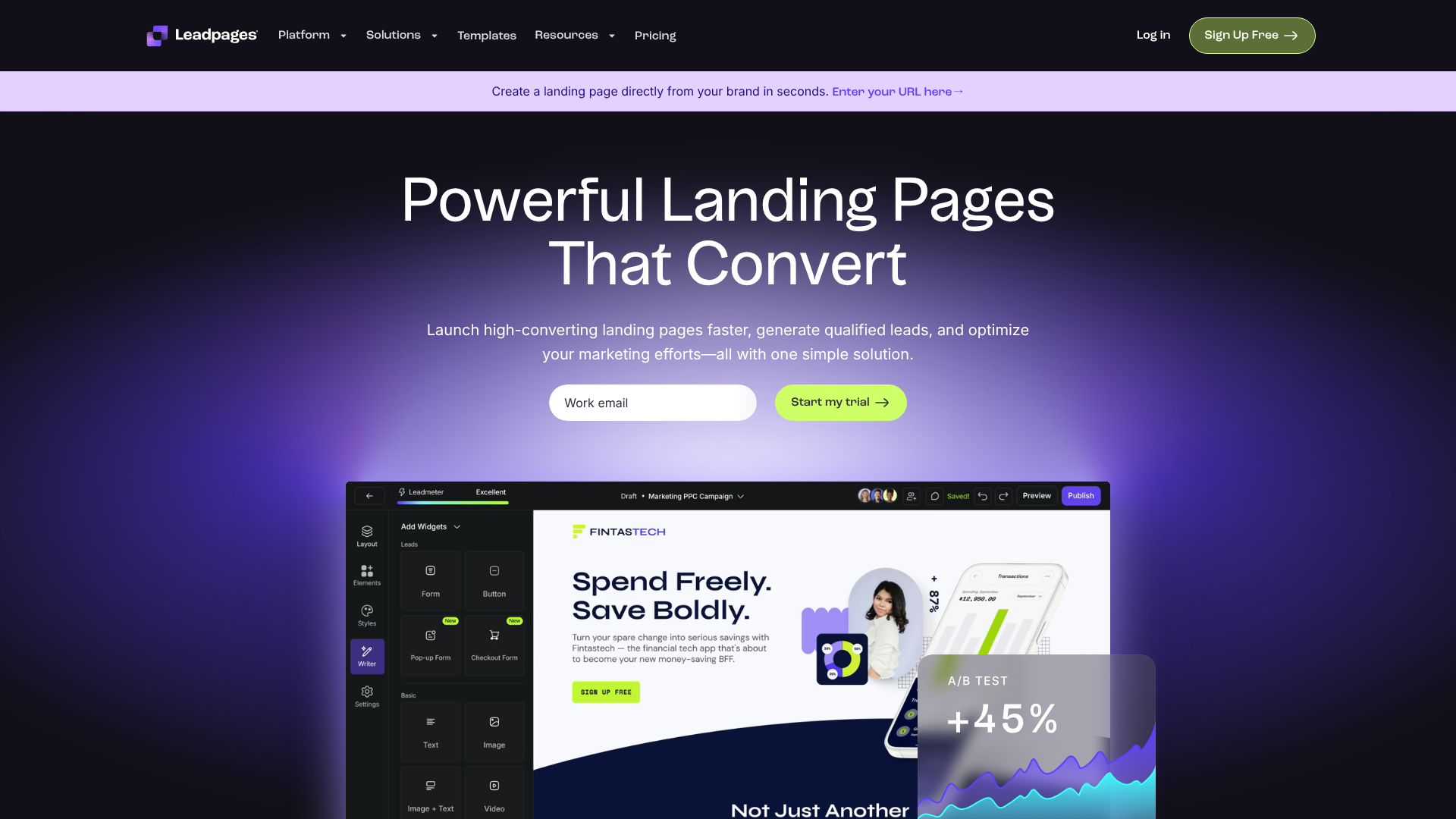
The centrepiece of the platform is its drag-and-drop editor. It allows you to build and customise pages visually, seeing changes in real-time. You can add, remove, and rearrange elements like text boxes, images, videos, forms, and buttons simply by dragging them into place. This code-free environment is perfect for beginners who want full control over their page layout without needing to hire a developer.
The builder is section-based, which keeps designs organised and ensures they remain mobile-responsive. You can customise colours, fonts, and spacing for every element, giving you enough flexibility to match your brand's look and feel. While it may not offer the pixel-perfect freedom of some competitors, this structured approach prevents users from accidentally creating a poorly designed or broken page, ensuring a professional outcome every time.
Extensive Template Library
One of the biggest time-savers in Leadpages is its library of over 200 professionally designed templates. These aren't just generic layouts; they are crafted for specific conversion goals, such as webinar registrations, ebook downloads, sales pages, and thank you pages. You can filter templates by industry or conversion rate, a unique feature that helps you start with a design that's already proven to perform well.
Every template is fully customisable, so you can use it as a starting point and adapt it to your specific campaign. They are all mobile-responsive, meaning they automatically adjust to look great on desktops, tablets, and mobile phones. This is crucial, as a significant portion of web traffic comes from mobile devices, and a poor mobile experience can drastically hurt conversion rates.
Leadmeter: Your Real-Time Conversion Assistant
The Leadmeter is an innovative feature that acts as a built-in conversion coach. As you build your landing page, this tool analyses your design and content in real-time, providing suggestions based on best practices and data from thousands of other pages. It checks for things like the clarity of your headline, the strength of your call-to-action (CTA), the use of social proof, and mobile-friendliness.
For each suggestion, the Leadmeter provides a clear explanation of why it matters and how to implement the change. This is incredibly valuable for users who may not be conversion rate optimisation (CRO) experts. It helps you avoid common mistakes and guides you towards creating a page that is more likely to convert, effectively building expertise as you work.
Pop-Ups and Alert Bars
Leadpages allows you to capture leads not just on its landing pages but across your entire website. You can design pop-up forms (also known as Leadboxes) that are triggered by a user's action, such as clicking a link, spending a certain amount of time on a page, or attempting to exit the site. These are highly effective for capturing email subscribers or promoting a special offer.
Similarly, you can create alert bars—thin banners that stick to the top or bottom of your website. These are perfect for making site-wide announcements, driving traffic to a specific page, or promoting a limited-time sale. Both pop-ups and alert bars can be added to any website, including WordPress, Shopify, or Squarespace, by simply adding a small snippet of code.
A/B Split Testing
To truly optimise your landing pages, you need to test what works. The A/B testing feature in Leadpages (available on the Pro plan) makes this easy. You can create a variation of your landing page—for example, with a different headline, button colour, or image—and Leadpages will automatically split your traffic between the original (A) and the variation (B).
The platform then tracks the conversion rate of each version, allowing you to see which one performs better. Once you have a statistically significant winner, you can direct all future traffic to that version. This data-driven approach removes guesswork and helps you systematically improve your results over time.
Who is the Leadpages Builder Best For?
The Leadpages landing page creator is not a one-size-fits-all solution. Its strengths in simplicity and speed make it a perfect fit for certain types of users, while others with more advanced needs might find it limiting. Understanding its ideal user profile is key to knowing if it's the right choice for you.
Small Business Owners and Entrepreneurs
If you're a small business owner or a solopreneur, your time is your most valuable asset. You likely wear many hats and can't afford to spend weeks learning a complex new software or troubleshooting code. Leadpages is designed for you. Its intuitive interface and template-driven approach mean you can have a professional, high-converting landing page live in a matter of hours, not days.
Whether you're promoting a local service, launching a new product, or simply trying to build your email list, Leadpages provides all the essential tools without overwhelming you with unnecessary complexity. The focus on conversion means you can directly tie your efforts to business growth.
Course Creators and Coaches
For those selling digital products, online courses, or coaching services, building an audience and converting prospects is critical. Leadpages excels in this area. You can use it to create compelling sales pages for your courses, landing pages for free lead magnets (like an ebook or checklist), and registration pages for webinars—a popular marketing tactic in this industry.
The platform's integrations with email marketing services like ActiveCampaign and payment gateways like Stripe (on the Pro plan) create a smooth workflow from lead capture to sale. This allows you to build a complete marketing funnel within a single, easy-to-manage ecosystem.
Digital Marketers and Agencies
While marketers in large enterprises might opt for more customisable solutions, Leadpages is a powerful tool for freelance marketers and small agencies. It enables them to quickly roll out campaigns for multiple clients without getting bogged down in technical development. The ability to create and manage pages for different clients under one account simplifies workflow.
The A/B testing and analytics features provide the data needed to demonstrate ROI to clients. For agencies focused on delivering results quickly, the speed and efficiency of the Leadpages builder are significant advantages.
Pro Tip: When choosing a template, don't just pick one that looks good. Use the 'Sort by Conversion Rate' filter. Starting with a template that is already a proven performer gives your campaign a significant head start.
How to Get Started with the Leadpages Page Builder Tool
Getting a landing page live with Leadpages is a refreshingly simple process. The platform is designed to guide you from start to finish, ensuring you can launch your campaign quickly. Here’s a step-by-step breakdown of how it works.
Step 1: Choose Your Goal and Template
After signing up for your Leadpages account (they offer a 14-day free trial), your first step is to decide what you want to achieve. Are you collecting email sign-ups, registering people for an event, or selling a product? Your goal will determine the type of page you need.
Next, you'll browse the template library. You can filter by page type (e.g., webinar, sales, thank you), industry, or even colour scheme. As mentioned, the most powerful filter is 'Sort by Conversion Rate'. Selecting a high-performing template gives you a design that is already optimised for success.
Step 2: Customise Your Page with the Drag-and-Drop Editor
Once you've selected a template, you'll be taken to the drag-and-drop editor. This is where you'll make the page your own. You can click on any element—text, images, buttons—to edit it. The left-hand sidebar contains 'Widgets' (the building blocks of your page) that you can drag onto the page, such as headlines, videos, countdown timers, and forms.
You'll want to replace the template's placeholder content with your own copy, images, and branding. This includes updating the text to reflect your offer, changing the colours to match your brand palette, and uploading your logo. The Leadmeter will be active during this process, offering real-time tips to improve your page's conversion potential.
Step 3: Configure Your Form and Integrations
Your landing page's form is where the magic happens. Click on the call-to-action button to edit the form fields. You can choose what information to collect (e.g., name, email, phone number). It's best practice to only ask for the information you absolutely need, as fewer fields generally lead to higher conversion rates.
This is also where you'll set up your integrations. You can connect your form to your email marketing service (like GetResponse or ActiveCampaign) so that new leads are automatically added to your list. You can also set up a 'lead magnet' delivery, where Leadpages automatically sends a file (like a PDF guide) to anyone who signs up.
Step 4: Set Up SEO and Analytics Settings
Before you publish, navigate to the 'Settings' tab. Here, you can set your page's SEO title and meta description, which is what will appear in Google search results. You can also add tracking codes, such as the Google Analytics tracking ID or a Facebook Pixel, to monitor your page's traffic and performance.
Step 5: Publish Your Page
With everything configured, you're ready to hit 'Publish'. Leadpages gives you a few publishing options. You can host the page on a Leadpages domain (your-domain.lpages.co), which is the quickest option. Alternatively, you can publish it directly to your own domain (e.g., yourwebsite.com/offer) for more professional branding.
They also offer a WordPress plugin that makes publishing to a WordPress site incredibly simple.
Once published, your landing page is live and ready to receive traffic. You can then monitor its performance in the Leadpages analytics dashboard.
Leadpages Pricing and Plans: A Cost Comparison
Leadpages offers a straightforward pricing structure with two main plans: Standard and Pro. Both plans include the core features like unlimited landing pages, pop-ups, alert bars, and hosting. The primary differences lie in the more advanced marketing and sales features. It's important to note that prices can change, so you should always check the official Leadpages website for the most current information.
Here’s a breakdown of what you generally get with each plan:
| Feature | Standard Plan | Pro Plan |
|---|---|---|
| Core Function | Lead Generation | Lead Generation & Sales |
| Landing Pages | Unlimited | Unlimited |
| Pop-Ups & Alert Bars | Unlimited | Unlimited |
| Traffic & Leads | Unlimited | Unlimited |
| Free Hosting | Included | Included |
| Integrations | 40+ Standard Integrations | 40+ Standard Integrations |
| A/B Split Testing | No | Yes |
| Online Sales & Payments | No | Yes |
| Unlimited 10% Off Coupons | No | Yes |
Standard Plan
The Standard plan is designed for businesses focused purely on lead generation. It provides everything you need to build and publish unlimited landing pages to collect email addresses and grow your audience. This plan is an excellent starting point for most small businesses, consultants, and creators who are building their email lists or promoting lead magnets.
If your primary goal is to capture leads and you don't need to conduct A/B tests or process payments directly on your pages, the Standard plan offers fantastic value. You get the full power of the drag-and-drop builder, all the templates, and the core conversion tools.
Pro Plan
The Pro plan builds on the Standard plan by adding features for optimisation and sales. The two biggest additions are A/B split testing and the ability to accept online payments via Stripe. A/B testing is essential for marketers who want to systematically improve their conversion rates by testing different elements of their pages.
The online sales feature transforms your landing pages into sales pages. You can sell products, services, or consultations directly from your page without needing to integrate a separate e-commerce platform. This makes the Pro plan ideal for businesses that want to create a direct path from promotion to purchase. If you're serious about optimising your funnels or selling directly, the Pro plan is the logical choice.
Pros and Cons of the Leadpages Landing Page Builder
No tool is perfect, and Leadpages is no exception. Its focus on simplicity comes with certain trade-offs. Here is a balanced look at its strengths and weaknesses to help you make an informed decision.
Pros of Using Leadpages
Exceptional Ease of Use: This is Leadpages' biggest selling point. The platform is incredibly intuitive, from the template selection to the drag-and-drop editor. You can genuinely go from sign-up to a published, professional-looking landing page in under an hour without any prior experience.
High-Quality, Conversion-Focused Templates: The template library is not just large; it's high-quality. The designs are modern, clean, and built with conversion principles in mind. The ability to sort by historical conversion rate is a unique and powerful feature that sets you up for success from the start.
Fast Page Loading Speeds: Leadpages hosts all your pages on its own optimised servers. This results in very fast loading times, which is a critical factor for both user experience and SEO. Slow pages can lead to high bounce rates and lower conversion rates, so this is a significant advantage.
Helpful Built-in Optimisation Tools: Features like the Leadmeter provide actionable advice that helps even novice marketers create more effective pages. It's like having a conversion expert looking over your shoulder as you build.
Unlimited Pages and Traffic: Unlike some competitors that limit pages or traffic on their lower-tier plans, Leadpages allows you to create as many pages as you want and send as much traffic as you can, even on the Standard plan.
Cons of Using Leadpages
Limited Design Flexibility: The trade-off for simplicity is a lack of granular design control. The builder is section-based and doesn't allow for the pixel-perfect placement of elements that you might find in more advanced tools like Unbounce or Instapage. For most users, this is a benefit that prevents design mistakes, but for experienced designers, it can feel restrictive.
A/B Testing is Not on the Base Plan: A/B testing is a fundamental part of conversion optimisation. Having this feature locked behind the more expensive Pro plan is a notable drawback for data-driven marketers on a tighter budget.
No Free Plan: While Leadpages offers a 14-day free trial, there is no permanently free plan. This can be a barrier for new businesses or individuals who are just starting out and have no budget for marketing tools.
Leadpages Alternatives: A Brief Comparison
While Leadpages is a strong contender, it's helpful to know how it compares to other popular landing page creators. The right choice often depends on your specific needs, budget, and technical skill level.
Leadpages vs. Unbounce
Unbounce is a more powerful and flexible page builder tool aimed at experienced marketers and larger teams. Its key advantage is its free-form drag-and-drop editor, which allows for pixel-perfect design control. It also has more advanced features like Dynamic Text Replacement for personalising pages for PPC campaigns.
However, this power comes with a steeper learning curve and a higher price point. Unbounce is generally more expensive than Leadpages. It's a better choice for marketing teams with design resources who need maximum customisation and advanced optimisation features. Leadpages is better for small businesses and solopreneurs who prioritise speed and ease of use.
Leadpages vs. Instapage
Instapage is another advanced landing page platform that focuses on enterprise-level clients and advertising teams. It's known for its collaboration tools, sophisticated A/B testing, and detailed analytics. It also boasts incredibly fast page load speeds and a feature called AdMap for connecting ads to relevant post-click landing pages.
The downside is that Instapage is significantly more expensive than Leadpages, placing it out of reach for most small businesses. It's built for teams managing large-scale advertising campaigns who need robust tools for personalisation and team workflow. Leadpages remains the more practical and affordable option for the individual user or small team.
Frequently Asked Questions (FAQ)
Here are answers to some of the most common questions people ask about the Leadpages landing page builder.
Is Leadpages worth the money?
For the right user, Leadpages is absolutely worth the money. If you are a small business owner, entrepreneur, or marketer who needs to create high-converting landing pages quickly and easily without coding, the value it provides is immense. The time saved and the potential increase in leads and sales can deliver a strong return on investment. However, if you require deep design customisation or are on an extremely tight budget, you might consider other options.
What is the best platform to build a landing page?
The "best" platform depends entirely on your needs. For simplicity, speed, and built-in conversion guidance, Leadpages is a top contender, especially for non-developers. For maximum design flexibility and advanced features for PPC, Unbounce is often preferred. For enterprise-level collaboration and personalisation at scale, Instapage is a leader.
For those on a budget, some email marketing tools like GetResponse offer basic landing page builders as part of their plans.
How much does it cost to get a landing page built?
The cost can vary dramatically. Hiring a freelance designer and developer to create a custom landing page can cost anywhere from a few hundred to several thousand pounds, depending on complexity. Using a tool like the Leadpages landing page builder is a much more cost-effective alternative. For a monthly subscription fee, you can create an unlimited number of pages yourself.
Is there a free alternative to Leadpages?
While Leadpages does not have a free plan, some other services offer free tiers for landing page creation, though they are often limited. For example, Mailchimp and Moosend offer basic landing page builders in their free plans, but they typically come with branding from the provider and restrictions on features and traffic. These can be a good starting point if you have zero budget, but for professional use, a dedicated tool like Leadpages is usually a better long-term solution.
Is Leadpages just for landing pages?
No, while it started as and is best known as a landing page creator, Leadpages has expanded its functionality. You can now use the Leadpages builder to create a full, multi-page website. It also includes tools for creating pop-up forms and alert bars that can be used on any website, not just those built with Leadpages. This makes it a more versatile marketing tool.
Final Thoughts: Is the Leadpages Builder Right for You?
After a thorough review, it's clear that the Leadpages landing page builder excels at its core mission: making it simple for small businesses to create pages that convert. Its greatest strengths are its ease of use, high-quality template library, and helpful conversion-focused features like the Leadmeter. It successfully removes the technical barriers that often prevent entrepreneurs from launching effective marketing campaigns.
The platform is an ideal choice for solopreneurs, consultants, course creators, and small business owners who value speed and efficiency over granular design control. If your goal is to get a professional, mobile-responsive, and optimised landing page live as quickly as possible, Leadpages is one of the best tools on the market for the job.
While the lack of A/B testing on the Standard plan is a drawback, the overall value proposition remains strong. For those who need a reliable, effective, and user-friendly page builder tool to grow their business, Leadpages is a solid and highly recommended investment. If it sounds like the right fit for your needs, taking advantage of the 14-day free trial is a risk-free way to see its power for yourself.