

Leadpages Landing Page Builder Review 2026: Is It Worth It for Small Businesses?
Generating leads is the lifeblood of any business, but turning website visitors into actual customers is a common challenge. You can have the best product or service in the world, but without an effective way to capture interest, growth stalls. This is where a dedicated tool like the Leadpages landing page builder comes in, designed specifically to create high-converting pages without needing a developer. This review breaks down everything you need to know about this popular platform, from its core features to its pricing, to help you decide if it’s the right investment for your business.
- In a Nutshell
- What Exactly is the Leadpages Landing Page Builder?
- A Deep Dive into Leadpages' Key Features and Benefits
- The Drag-and-Drop Page Builder Tool
- High-Converting Templates
- Lead Boxes (Pop-ups) and Alert Bars
- Built-in A/B Split Testing
- Analytics and Performance Tracking
- Integrations with Your Marketing Stack
- Who is the Leadpages Builder Best For?
- Small Business Owners and Entrepreneurs
- Digital Marketers and Agencies
- Course Creators and Coaches
- Who It's NOT For
- Leadpages Pricing: How Much Does It Cost in 2026?
- The Pros and Cons of Using Leadpages
- How Leadpages Compares to Alternatives
- Frequently Asked Questions (FAQ)
- Is Leadpages worth the money?
- Can Leadpages replace a website?
- How much do Leadpages cost?
- Is Leadpages free to use?
- What is the best landing page builder?
- Is there a free landing page builder?
- Final Verdict: Is the Leadpages Landing Page Builder Worth Your Investment?
We'll examine the drag-and-drop editor, the quality of its templates, and its built-in optimisation tools. The goal is to provide a clear, unbiased look at whether Leadpages delivers on its promise of simplifying lead generation and boosting conversions for entrepreneurs and small business owners.
In a Nutshell
- User-Friendly Focus: Leadpages is a landing page creator designed for non-coders. Its primary strength is its simplicity and speed, allowing you to launch professional-looking campaigns in minutes, not days.
- Core Features: The platform includes a drag-and-drop builder, a large library of mobile-responsive templates sorted by conversion rate, A/B testing capabilities, and built-in lead capture tools like pop-ups and alert bars.
- Ideal Audience: It's best suited for small businesses, course creators, consultants, and marketers who need to create effective landing pages, sales pages, and opt-in forms quickly without a steep learning curve.
- Value Proposition: While it may lack the deep customisation of more advanced platforms, its focus on conversion-optimised design and ease of use provides significant value for users who prioritise results over complex features.
What Exactly is the Leadpages Landing Page Builder?
At its core, the Leadpages platform is a specialised software tool for creating standalone web pages designed for a single, focused objective. This objective is usually to capture a visitor's information in exchange for something of value, such as an ebook, a webinar registration, or a product discount. This makes it fundamentally different from an all-in-one website builder like WordPress or Squarespace, which are designed to create multi-page websites with complex navigation, blogs, and broad information.
The Leadpages builder strips away the unnecessary complexity to focus entirely on conversion. Every feature, from the template design to the analytics, is geared towards one goal: persuading a visitor to take a specific action. This singular focus is critical for marketing campaigns where you're driving traffic from ads, social media, or email lists. Sending that traffic to a cluttered homepage can be confusing, whereas a dedicated landing page provides a clear, direct path to conversion.
Originally launched as a simple template engine, Leadpages has evolved into a more comprehensive page builder tool. It now offers a full drag-and-drop editor, allowing for greater customisation while still maintaining its foundational principle of ease of use. It's built for the entrepreneur or marketer who wears many hats and doesn't have time to become a web design expert but still needs professional, high-performing results.
A Deep Dive into Leadpages' Key Features and Benefits
Leadpages packs a variety of features aimed at simplifying the process of creating and optimising marketing campaigns. These tools work together to help you not only build pages but also ensure they perform effectively to generate leads and sales.
The Drag-and-Drop Page Builder Tool
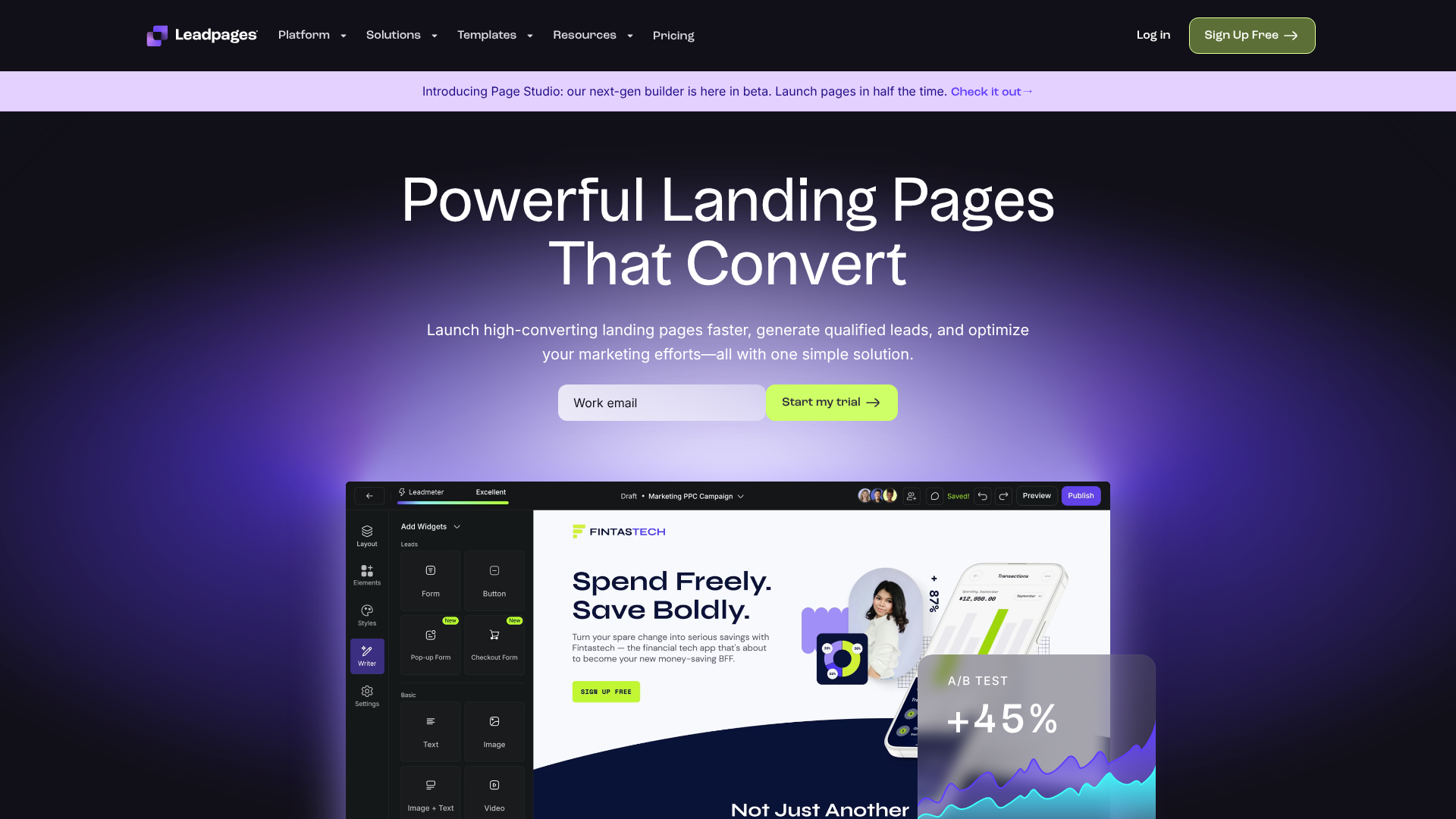
The centrepiece of the platform is its intuitive drag-and-drop editor. This interface allows you to build and customise pages visually, without touching a single line of code. You can add, remove, and rearrange elements like text boxes, images, videos, buttons, and forms simply by dragging them into place. The builder uses a section-based layout, which helps maintain a clean and organised structure, ensuring your pages look professional on any device.
Leadpages has invested significantly in refining its builder over the years. This commitment means the current version is fast, responsive, and reliable. You can easily adjust spacing, change colours, and select fonts to match your brand identity. While it doesn't offer the pixel-perfect control of some high-end competitors, it provides more than enough flexibility for the vast majority of marketing needs, striking a balance between creative freedom and simplicity.
High-Converting Templates
One of the most valuable assets within Leadpages is its extensive library of professionally designed templates. These aren't just pretty layouts; they are built based on data from millions of conversions and are structured to follow proven marketing principles. This saves you the immense effort of figuring out what layout converts best for a specific goal.
The templates are categorised by campaign type, such as webinar registrations, lead magnet downloads, sales pages, and event sign-ups. A unique and powerful feature is the ability to sort these templates by their historical conversion rate. This allows you to start with a design that is already proven to be effective, giving your campaign a significant head start.
Every template is fully mobile-responsive, meaning it automatically adjusts to look great on desktops, tablets, and mobile phones. Given that a large portion of web traffic comes from mobile devices, this is a non-negotiable feature for any modern marketing tool.
Pro Tip: When choosing a template, always use the 'Sort by Conversion Rate' filter. While a design might look appealing, starting with a layout that is statistically proven to perform well for your industry can dramatically improve your results with minimal effort.
Lead Boxes (Pop-ups) and Alert Bars
Beyond standard landing pages, Leadpages includes tools to capture leads across your entire website. Lead Boxes are customisable pop-up forms that can be triggered by various user actions, such as clicking a button, spending a certain amount of time on a page, or attempting to exit the site (exit-intent).
These are incredibly effective for building your email list. For example, you can create a two-step opt-in where a visitor clicks a link in your blog post like "Download the free checklist", which then triggers a Lead Box to appear. This method often converts better than a static form because it requires an initial micro-commitment from the user.
Alert Bars are thin banners that stick to the top or bottom of your website. They are perfect for making important announcements, promoting a limited-time offer, or driving traffic to a key landing page. Both Lead Boxes and Alert Bars can be added to any website, not just pages built with Leadpages, making them versatile tools for your marketing arsenal.
Built-in A/B Split Testing
To maximise your conversion rates, you need to test what works. The Leadpages builder includes a straightforward A/B split testing feature (available on the Pro plan) that lets you test variations of your landing pages. You can create a copy of your page, change an element like the headline, button colour, or main image, and Leadpages will automatically split incoming traffic between the two versions.
The platform then tracks the performance of each version and shows you which one is converting better. This data-driven approach removes guesswork from your marketing. Over time, these small, incremental improvements from split testing can lead to substantial increases in your overall lead generation and sales, directly impacting your bottom line.
Analytics and Performance Tracking
Leadpages provides a clean and easy-to-understand analytics dashboard right within the platform. You don't need to be a data scientist to figure out how your pages are performing. The dashboard displays key metrics at a glance, including unique visitors, total views, conversions, and, most importantly, your conversion rate.
This built-in tracking makes it simple to monitor campaign success without having to set up complex goals in external tools like Google Analytics (though you can easily integrate that as well). Seeing your conversion rate in real-time helps you make quick decisions, such as whether to tweak a page, update your ad copy, or double down on a successful campaign.
Integrations with Your Marketing Stack
A landing page creator is only as good as its ability to connect with the other tools you use. Leadpages offers a wide range of direct integrations with popular email marketing services, webinar platforms, and CRMs. This includes major players like ActiveCampaign, GetResponse, Mailchimp, ConvertKit, and HubSpot.
Setting up these integrations is typically a simple process of authorising your account. Once connected, any leads you capture on your Leadpages forms are automatically sent to the appropriate list or tag in your email service provider. For any tools not directly supported, Leadpages integrates with Zapier, which acts as a bridge to connect with thousands of other applications, ensuring your marketing workflow remains smooth and automated.
Who is the Leadpages Builder Best For?
Leadpages is a versatile tool, but it truly excels for specific types of users who value speed and efficiency over infinite customisation. Understanding its ideal user profile can help you determine if it's the right fit for your needs.
Small Business Owners and Entrepreneurs
For small business owners, time is the most valuable resource. You need to launch marketing campaigns, test ideas, and generate leads without getting bogged down in technical details. Leadpages is perfect for this scenario. You can go from an idea to a live, professional landing page in under an hour.
Whether you're validating a new service, promoting a local event, or building an email list for your shop, this page builder tool provides the fastest path to getting it done.
Digital Marketers and Agencies
Marketers managing multiple campaigns or clients need to produce results efficiently. Leadpages allows you to quickly create dedicated pages for different ad groups, social media promotions, or email segments. The ability to duplicate and tweak pages makes it easy to scale your efforts. For agencies, it's a reliable tool for delivering high-quality landing pages to clients without needing to rely on a development team, speeding up turnaround times and improving profitability.
Course Creators and Coaches
If you sell digital products, courses, or coaching services, your business relies on effective funnels. Leadpages offers a suite of templates designed specifically for these use cases. You can find proven layouts for webinar registrations, free guide downloads (lead magnets), waitlist sign-ups, and sales pages for your courses. The simplicity of the platform means you can focus on creating great content and marketing it, rather than struggling with web design.
Who It's NOT For
While Leadpages is excellent for many, it's not the perfect solution for everyone. Large enterprises with dedicated design and development teams may find the customisation options limiting. They often require pixel-perfect control and complex, bespoke integrations that are better handled by more advanced (and expensive) platforms like Unbounce or Instapage. Similarly, developers who prefer to build everything from scratch with custom code will not need a tool like Leadpages.
Leadpages Pricing: How Much Does It Cost in 2026?
Leadpages offers a straightforward pricing structure with two main tiers, designed to cater to different business needs. It's important to note that pricing can change, so you should always check the official Leadpages website for the most current information. All plans typically come with a 14-day free trial, allowing you to test the platform before committing.
Here’s a general breakdown of the typical plans:
| Feature | Standard Plan | Pro Plan |
|---|---|---|
| Price | Typically the lower-cost option | Higher monthly/annual cost |
| Landing Pages, Pop-Ups, Alert Bars | Unlimited | Unlimited |
| Leads & Traffic | Unlimited | Unlimited |
| Free Hosting & Domain | Yes, 1 custom domain | Yes, 3 custom domains |
| A/B Split Testing | No | Yes |
| Online Sales & Payments | No | Yes |
| Priority Tech Support | Email only | Email & Chat |
The Standard Plan is a great starting point for anyone who needs to create unlimited landing pages and capture leads. It includes the core drag-and-drop builder, all the templates, and integrations. Its main limitation is the absence of A/B testing and online payment integrations.
The Pro Plan is the more popular choice for serious marketers and businesses. It includes everything in the Standard plan plus the crucial A/B testing feature, which is essential for optimising campaigns for higher conversions. It also unlocks the ability to accept payments directly on your pages via Stripe, making it ideal for selling products or services without a separate e-commerce platform.
The Pros and Cons of Using Leadpages
No tool is perfect. A balanced look at Leadpages' strengths and weaknesses is essential for making an informed decision.
What We Like (Pros)
- Exceptional Ease of Use: Leadpages is arguably one of the easiest landing page creators on the market. The learning curve is minimal, and you can build and publish a page in a very short amount of time, even with no prior experience.
- Conversion-Focused Templates: The template library is a huge time-saver. Starting with a design that is already optimised for conversions removes a lot of the guesswork and helps you get better results, faster.
- Excellent Page Loading Speed: Leadpages hosts your pages on a fast infrastructure. Page speed is a critical factor for both user experience and SEO, and according to various industry tests, pages built with Leadpages consistently load very quickly.
- All-in-One Solution: The platform includes hosting for your pages, a free custom domain (on annual plans), and an SSL certificate. This simplifies the technical side of things and means there are no hidden costs.
- Useful Built-in Tools: Features like Lead Boxes (pop-ups) and Alert Bars add significant value, allowing you to implement lead capture strategies across your entire online presence, not just on dedicated landing pages.
Where It Could Improve (Cons)
- Limited Design Customisation: The trade-off for simplicity is a lack of granular design control. While you can customise layouts to a good degree, you can't achieve the pixel-perfect designs possible with more advanced builders like Unbounce. This can be a frustration for experienced designers.
- A/B Testing is Not on the Base Plan: A/B testing is a fundamental part of conversion optimisation. Placing this feature exclusively on the higher-priced Pro plan is a significant drawback for users on the Standard plan.
- Can Feel Basic for Advanced Users: If you're a power user who needs complex multi-step forms, dynamic text replacement for ad campaigns, or sophisticated analytics, you might find the Leadpages feature set to be a bit too basic for your needs.
How Leadpages Compares to Alternatives

To give you better context, it's helpful to see how Leadpages stacks up against some of its main competitors. This isn't about finding a single "best" tool, but rather the best tool for a specific job.
Leadpages vs. Unbounce
Unbounce is a more powerful and flexible landing page builder aimed at experienced marketers and larger teams. Its key advantage is its near-limitless design customisation; you can move any element anywhere on the page. It also offers advanced features like Dynamic Text Replacement, which personalises landing pages based on the user's search query.
However, this power comes with a steeper learning curve and a significantly higher price tag. Leadpages is the better choice for those who prioritise speed and simplicity, while Unbounce is for those who need maximum control and have the budget and time to use it effectively.
Leadpages vs. Instapage
Instapage positions itself as an enterprise-level solution focused on post-click optimisation for advertising campaigns. It boasts incredibly fast page speeds and advanced features like AdMap® for visualising ad campaign funnels and built-in collaboration tools for teams. Its personalisation features are top-of-the-line.
This level of sophistication comes at a premium price, making Instapage inaccessible for most small businesses and solopreneurs. Leadpages offers a much more affordable and practical solution for the everyday marketing tasks that most small to medium-sized businesses face.
Frequently Asked Questions (FAQ)
Here are answers to some of the most common questions people ask about Leadpages.
Is Leadpages worth the money?
For its target audience—small businesses, entrepreneurs, and marketers who need to create high-converting pages quickly—Leadpages is absolutely worth the money. The time it saves and the potential increase in lead generation can provide a significant return on investment. If a single new client or sale generated from a Leadpages page covers the monthly cost, it has paid for itself.
Can Leadpages replace a website?
Yes, for many businesses, it can. Leadpages now includes a full website builder that uses the same easy drag-and-drop interface. You can create a simple, professional-looking website with a homepage, about page, contact page, and service pages. If your primary goal is lead generation and you don't need complex features like a blog or an e-commerce store, Leadpages can serve as a lean, effective replacement for a traditional website.
How much do Leadpages cost?
Leadpages typically offers two main plans: Standard and Pro. The Standard plan is the more affordable option, while the Pro plan adds key features like A/B testing and online payments. Pricing varies based on monthly or annual billing, with annual plans offering a significant discount. It's best to visit their official website for the most up-to-date pricing information.
Is Leadpages free to use?
No, Leadpages is a premium, paid tool. It does not offer a free-forever plan. However, it provides a 14-day free trial that gives you full access to the platform's features, allowing you to build pages, test its functionality, and decide if it's the right fit for your business before you have to pay.
What is the best landing page builder?
The "best" landing page builder depends entirely on your specific needs, budget, and technical skill. Leadpages is one of the best for ease of use and speed. Unbounce is often considered best for design flexibility and advanced marketers. Instapage is a top choice for enterprise-level advertising optimisation.
The best one for you is the one that aligns with your business goals.
Is there a free landing page builder?
Yes, there are free landing page builders available, often as part of larger marketing platforms like Mailchimp or HubSpot's free CRM. These are good for those on a zero budget but are typically very limited in terms of templates, features, customisation, and often include the provider's branding on your page. For serious marketing efforts, a dedicated paid tool like Leadpages almost always provides better results.
Final Verdict: Is the Leadpages Landing Page Builder Worth Your Investment?
After a thorough review, the Leadpages landing page builder stands out as an excellent choice for a specific, and very large, segment of the market. Its core strength lies in its unwavering focus on simplicity and conversion. It successfully removes the technical barriers that often prevent small businesses and entrepreneurs from launching effective marketing campaigns.
If you are a solopreneur, a consultant, a course creator, or a small business owner who values speed and proven results over granular design control, then Leadpages is a fantastic investment. The ability to quickly launch a professional, high-performing landing page, pop-up, or sales page without hiring a designer or developer is a powerful advantage. The conversion-optimised templates alone can save countless hours of guesswork and deliver a tangible return.
However, if you are a design agency needing pixel-perfect control or a large corporation with complex technical requirements and a big budget, you may find its capabilities limiting. For everyone else looking for a reliable, effective, and user-friendly landing page creator, Leadpages delivers on its promises. It's a solid, dependable tool designed to do one thing very well: turn your traffic into leads.
Ready to see if it's the right fit for you? You can explore all the features and build your first page with the 14-day free trial of Leadpages.