
Online Ordering for Panera Bread: A Step-by-Step Guide for Easy Meals
Getting your favourite Panera Bread meal, whether it's a creamy Broccoli Cheddar soup or a tangy Bacon Turkey Bravo sandwich, is easier than ever. The process of online ordering for Panera Bread transforms how you get your food, allowing you to skip the queue, customise your meal down to the last ingredient, and earn rewards along the way. This system is designed for convenience, putting the entire menu at your fingertips.
- What You'll Learn
- What Exactly is Online Ordering for Panera Bread?
- The Core Benefits: Why Order Panera Bread Online?
- Choosing Your Platform: App vs. Website vs. Third-Party Services
- The Official Panera Bread App: The Power User's Choice
- The Panera Bread Website: Accessible and Straightforward
- Third-Party Delivery Apps (Grubhub, DoorDash): The Convenience Factor
- A Step-by-Step Guide to Placing Your Panera Bread Online Order
- Step 1: Choose Your Platform and Sign In
- Step 2: Select Your Order Type and Location
- Step 3: Browse the Menu and Add Items to Your Bag
- Step 4: Customise Your Order to Perfection
- Step 5: Review Your Bag and Apply Rewards
- Step 6: Checkout and Payment
- Step 7: Track Your Order and Receive Your Meal
- Understanding the Costs: A Look at Pricing and Fees
- Pros and Cons of the Panera Online Ordering System
- Frequently Asked Questions (FAQ)
- How does Panera online ordering work?
- Can I customise my MyPanera order online?
- How much does Panera charge for delivery?
- Does Panera have a senior discount?
- What is the most popular soup at Panera?
- Can you buy just the bread bowl from Panera?
- Final Thoughts: Is Online Ordering the Best Way to Enjoy Panera?
This guide will walk you through everything you need to know. We'll cover how to place a Panera Bread online order using the app and website, compare the benefits of different platforms, and share tips for making the most of the MyPanera rewards programme. By the end, you'll be able to navigate the system like a pro, ensuring your next meal is just a few clicks away.
What You'll Learn
- Multiple Platforms: Panera offers online ordering through its official website, dedicated mobile app, and various third-party delivery services, each with unique benefits.
- Key Features: The main advantages include extensive menu customisation, scheduling orders for future pickup or delivery, and seamless integration with the MyPanera rewards programme.
- Ordering Process: Placing an order involves selecting your location and order type (pickup or delivery), customising your items, applying rewards, and paying securely online.
- Cost Considerations: Delivery fees can vary based on your location and the service you use, and menu prices may be slightly higher on third-party apps compared to ordering directly from Panera.
- Rewards are Key: Using the official Panera app or website is the best way to earn and redeem MyPanera rewards, which can include free items and personalised discounts.
What Exactly is Online Ordering for Panera Bread?
At its core, online ordering for Panera Bread is a digital service that allows you to browse the full menu, build your meal, pay in advance, and choose how you want to receive it, all from your computer or mobile phone. It eliminates the need to wait in line or place your order over the phone, streamlining the entire experience from start to finish. This system is built around providing flexibility and control to the customer.
There are three primary ways to access this service:
- The Official Panera Bread Website: Accessible from any web browser, this is a straightforward way to place an order without needing to download anything. It offers the full menu, customisation options, and MyPanera account integration.
- The Panera Bread Mobile App: Available for both iOS and Android devices, the app provides the most integrated experience. It's designed for on-the-go ordering and includes features like saved favourites, order history, and app-exclusive promotions.
- Third-Party Delivery Partners: Services like Grubhub, DoorDash, and Uber Eats also list Panera Bread on their platforms. While convenient, using them can sometimes mean higher menu prices and missing out on MyPanera rewards.
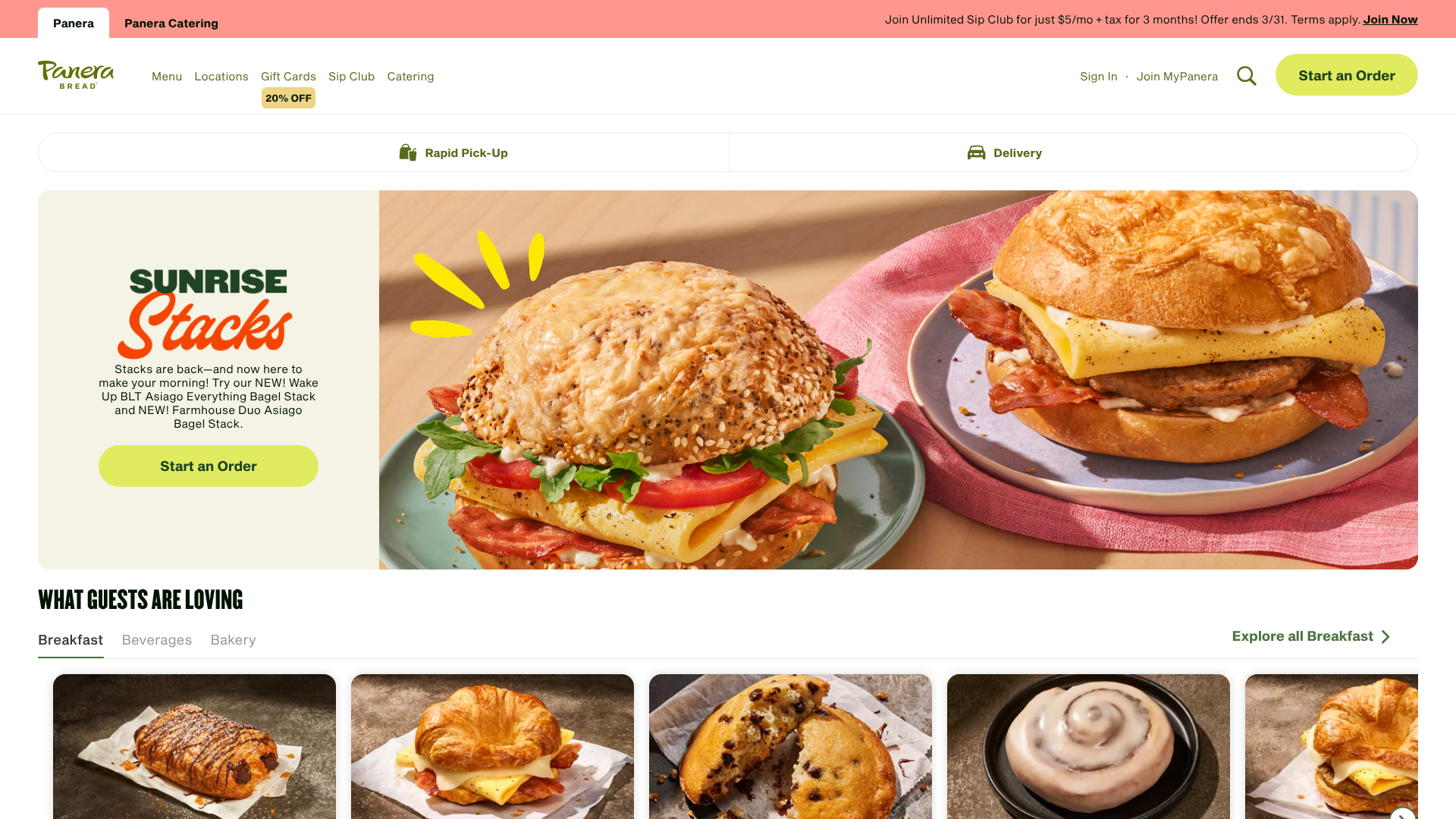
Regardless of the platform, you can select from several fulfilment options. Rapid Pick-Up® lets you place an order and find it waiting for you on a designated shelf inside the cafe. Curbside Pickup allows you to stay in your car while a Panera associate brings your order out to you. And, of course, Panera Bread delivery brings your meal directly to your home or office.
The Core Benefits: Why Order Panera Bread Online?
Moving your ordering habits online comes with a host of benefits designed to make your life easier and your meals more enjoyable. The system is more than just a convenience; it's a tool for getting exactly what you want, when you want it, while being rewarded for your loyalty. Understanding these advantages can help you make the most of the service.
Unmatched Convenience and Time-Saving
The most obvious benefit is the time you save. During a busy lunch rush, the queue at a Panera cafe can be long. Online ordering lets you bypass it completely. You can place your order from your desk at work, from home before you leave, or even from the car park, and have it ready and waiting for you when you walk in.
This convenience extends to planning. If you know you have a packed day, you can schedule your lunch order in the morning and set a specific pickup time. This level of control removes the stress of figuring out meals during a hectic schedule, making it a powerful tool for time management.
Deep Menu Customisation
Have you ever wanted extra avocado on your sandwich or wanted to hold the onions in your salad? The online system makes customisation incredibly simple and clear. Every customisable ingredient is presented as an option, allowing you to add, remove, or request extra of almost anything. This ensures your order is made precisely to your liking, reducing the potential for miscommunication that can sometimes happen when ordering in person.
This feature is perfect for those with dietary preferences or restrictions. You can easily remove cheese to make a sandwich dairy-free or swap out a dressing to suit your taste. The visual interface confirms your choices before you pay, giving you confidence that your meal will be just right.
Access to MyPanera Rewards
One of the biggest incentives to order Panera Bread online directly through their platforms is the seamless integration with the MyPanera rewards programme. Every order you place while logged into your account contributes towards earning personalised rewards. These aren't generic coupons; they are tailored to your ordering habits.
Rewards can range from a free pastry or coffee to dollars off your next meal or a complimentary soup. The app and website make it incredibly easy to see your available rewards and apply them to your order with a single click during checkout. This direct link between ordering and earning makes loyalty feel genuinely beneficial.
Choosing Your Platform: App vs. Website vs. Third-Party Services
Deciding where to place your order can impact your experience, cost, and rewards. While all options will get you your food, they cater to different needs and priorities. Here’s a breakdown to help you choose the right one for you.
The Official Panera Bread App: The Power User's Choice
For frequent Panera customers, the mobile app is the undisputed champion. It's built to provide the fastest and most personalised experience. Your past orders are saved, allowing for quick reordering of your favourite customised meals. Your MyPanera rewards are front and centre, and you may receive app-exclusive offers that aren't available elsewhere.
- Pros: Full MyPanera integration, one-tap reordering of favourites, push notifications for order status, and potential for exclusive deals.
- Cons: Requires downloading and taking up space on your mobile phone, and like any app, it can occasionally experience technical glitches.
The Panera Bread Website: Accessible and Straightforward
The website is an excellent alternative for those who order less frequently or prefer using a larger screen like a laptop or desktop computer. It offers all the same core functionalities as the app—full menu, customisation, and MyPanera login—without requiring a download. It's a reliable and universally accessible option.
- Pros: No installation needed, easy to navigate on a larger screen, and provides access to all essential ordering features.
- Cons: The mobile web experience isn't as polished as the dedicated app, and you won't receive real-time push notifications about your order's progress.
Third-Party Delivery Apps (Grubhub, DoorDash): The Convenience Factor
If you're already a heavy user of an app like Grubhub or DoorDash and have a subscription service like DashPass, ordering Panera through them can be convenient. You can sometimes bundle orders from multiple places and use a familiar interface. However, this convenience often comes at a cost.
- Pros: Familiar interface if you already use the app, ability to combine with other orders, and potential benefits from delivery subscriptions.
- Cons: Menu prices are often higher to offset the platform's commission fees. Crucially, you typically cannot earn or redeem MyPanera rewards, and you'll likely pay additional service fees on top of the
Panera Bread deliverycharge.
A Step-by-Step Guide to Placing Your Panera Bread Online Order
Ready to place your first order? The process is intuitive, but this detailed walkthrough will guide you through each step, ensuring a smooth experience from start to finish. We'll use the mobile app as the primary example, but the steps are nearly identical on the website.
Step 1: Choose Your Platform and Sign In
First, download the Panera Bread app from the Apple App Store or Google Play Store, or navigate to the Panera Bread website. The first thing you should do is create or sign in to your MyPanera account. This is essential for earning rewards and saving your order history.
Step 2: Select Your Order Type and Location
Next, the system will ask you to choose a cafe. You can search by city or postcode, or allow the app to use your device's location to find the nearest one. Once you've selected a cafe, you'll need to choose your order type: Rapid Pick-Up®, Curbside, or Delivery. If you choose delivery, you'll be prompted to enter your address.
Step 3: Browse the Menu and Add Items to Your Bag
Now for the fun part. You can browse the menu by category, such as Sandwiches, Salads, Soups, or Bakery. You can also view seasonal specials or new menu items. When you find something you like, tap on it to see more details and then tap the "Add to Order" button.
Step 4: Customise Your Order to Perfection
After adding an item, you'll be taken to the customisation screen. Here, you can make changes. For example, if you order a You Pick Two®, you'll choose your two half-items and your complimentary side (an apple, a bag of crisps, or a French Baguette). For a sandwich, you can remove ingredients like tomatoes, add extras like avocado, or swap the type of bread.
Pro Tip: Don't forget to check the "Special Instructions" box at the bottom of the customisation screen if you have a request that isn't covered by the standard options, such as asking for a dressing on the side.
Step 5: Review Your Bag and Apply Rewards
Once you've added everything, tap the shopping bag icon to review your order. Double-check that all items and customisations are correct. This is also where you can apply any available MyPanera rewards or enter a promotional code. The system will clearly show you which rewards are available for your current order.
Step 6: Checkout and Payment
Proceed to checkout. You'll be asked to confirm your pickup or delivery time. You can choose "As Soon As Possible" or schedule it for a later time or even a future day. Finally, enter your payment information.
Panera accepts major credit cards, Panera Bread gift cards, and often mobile payment options like Apple Pay or Google Pay.
Step 7: Track Your Order and Receive Your Meal
After payment, you'll receive a confirmation screen and an email receipt. If you're using the app, you can track the progress of your order in real-time. For Rapid Pick-Up®, simply head to the designated shelf in the cafe at your scheduled time. For delivery, the app will notify you when your driver is on the way.
Understanding the Costs: A Look at Pricing and Fees
While online ordering offers immense convenience, it's important to understand the associated costs to avoid surprises. The final price on your bill can be influenced by menu pricing differences, delivery fees, and other charges, especially when using third-party services.
Menu Pricing: Direct vs. Third-Party
One of the most important factors to consider is that menu prices on third-party apps like Grubhub or Uber Eats are often slightly higher than the prices you'd find when ordering directly from Panera's app or website. These platforms charge restaurants a commission fee, and restaurants often pass a portion of that cost on to the customer through inflated menu prices. For the best value, ordering direct is almost always the cheaper option.
Panera Bread Delivery Fees Explained
When you opt for delivery, a fee is typically added to your order. This fee is not a tip for the driver; it covers the operational costs of the delivery service. The amount can vary significantly based on your distance from the cafe, the time of day, and overall demand. Panera sometimes offers promotions for free or reduced-price delivery, which you can usually find in the "Deals" section of the app.
Service Fees and Tipping
Third-party platforms often add a "service fee" on top of the delivery fee. This is another charge that goes to the platform itself. When ordering directly through Panera, you generally avoid these extra service fees. Tipping, on the other hand, is always separate and goes directly to your delivery driver.
Whether you order direct or through a third party, tipping is encouraged to thank the driver for their service.
Pros and Cons of the Panera Online Ordering System
Like any technology, Panera's online ordering platform comes with a set of advantages and potential drawbacks. A balanced view can help you decide if it's the right choice for your needs.
The Advantages (Pros)
- Efficiency: The system drastically reduces waiting time, making it ideal for quick meal pickups during busy hours.
- Accuracy: By entering your order and customisations yourself, you minimise the chance of human error that can occur with in-person or phone orders.
- Rewards Integration: The seamless link to the MyPanera programme ensures you never miss out on earning points and can easily redeem rewards.
- Flexibility: The ability to schedule orders for later, save favourites for quick reordering, and choose between pickup and delivery offers a high degree of control.
The Potential Downsides (Cons)
- Technology Reliance: The experience is dependent on a stable internet connection and a functioning app or website. Occasional technical glitches can be frustrating.
- Lack of Personal Interaction: Some people enjoy the in-cafe experience and the brief interaction with staff, which is largely absent from the online process.
- Potential for Errors: While customisation is a strength, highly complex special instructions could be missed during a busy rush in the kitchen.
- Added Costs: Delivery, in particular, can add a significant cost to your meal through fees and tips, making it a more expensive option than picking it up yourself.
Frequently Asked Questions (FAQ)
Here are answers to some of the most common questions people have about the Panera Bread online order system.
How does Panera online ordering work?
Panera's online ordering system allows you to place an order through their official website or mobile app. You start by selecting your local cafe and choosing an order type (Rapid Pick-Up®, Curbside, or Delivery). You then browse the digital menu, add items to your cart, customise them to your preference, apply any MyPanera rewards, and pay securely online with a credit card or gift card.
Can I customise my MyPanera order online?
Yes, absolutely. Extensive customisation is one of the biggest strengths of the online ordering platform. For most items like sandwiches, salads, and bowls, you can add or remove individual ingredients, request extra portions of certain items, and swap out sides or dressings. The system provides a clear, user-friendly interface to make these changes, ensuring your meal is prepared exactly how you like it.
How much does Panera charge for delivery?
The delivery fee for a Panera order is not a flat rate. It varies based on several factors, including your distance from the cafe, the total cost of your order, and current demand. Generally, you can expect the fee to be a few pounds. Panera often runs promotions for discounted or free delivery, which are typically advertised in the app or via email to MyPanera members.
Does Panera have a senior discount?
Panera Bread does not offer a standard, company-wide senior discount. However, since many Panera cafes are independently owned and operated franchises, some individual locations may offer a local discount at their discretion. The best way to find out is to contact your nearest Panera cafe directly and ask about their policy.
What is the most popular soup at Panera?
While Panera offers a beloved rotating selection of soups, the Broccoli Cheddar Soup is widely considered to be their most popular and iconic menu item. It's a creamy, cheesy soup filled with broccoli and carrots, and it's a fan favourite that has been on the menu for years. It's often served in a signature sourdough bread bowl.
Can you buy just the bread bowl from Panera?
Yes, in most cases, you can purchase a sourdough bread bowl on its own. It is often listed as a side item in the bakery section of the online menu. This is a great option if you want to enjoy a Panera bread bowl with your own homemade soup or stew.
Final Thoughts: Is Online Ordering the Best Way to Enjoy Panera?
For the vast majority of customers, the answer is a resounding yes. The combination of convenience, control, and rewards makes the online ordering system a superior way to enjoy Panera Bread. It empowers you to craft your perfect meal, fit it into your schedule, and get rewarded for your loyalty in a way that the traditional in-cafe experience cannot match.
While third-party apps offer an alternative, the official Panera Bread app and website provide the most value. You get access to the full suite of features, avoid inflated menu prices, and most importantly, can participate fully in the MyPanera rewards programme. For your next craving for a warm bowl of soup or a fresh, toasted sandwich, trying the online system is a decision you won't regret.