
Synthesia AI Video Generator Review: Is It Right for Your Business?
Creating professional-quality video content has traditionally been a costly and time-consuming process, requiring cameras, actors, studios, and extensive editing skills. The Synthesia AI video generator aims to change that by allowing anyone to create realistic, avatar-led videos from just a text script. This platform replaces the entire physical production process with powerful artificial intelligence, enabling businesses to produce training, marketing, and internal communications videos at a fraction of the time and cost. It offers a studio in your browser, complete with AI avatars, voiceovers in over 120 languages, and customisable templates.
- Quick Summary
- What is the Synthesia AI Video Generator?
- A Deep Dive into Synthesia's Key Features
- AI Avatars: Digital Presenters on Demand
- AI Voices and Multilingual Support
- AI Script Assistant and Templates
- Media Library and Brand Consistency
- How to Create a Video with the Synthesia Video Maker
- 1. Choose a Template and Avatar
- 2. Write or Generate Your Script
- 3. Customise Visuals and Branding
- 4. Generate and Share Your Video
- Top Business Use Cases for Synthesia AI
- Corporate Training and Onboarding
- Marketing and Sales Videos
- Customer Support and How-To Guides
- Internal Communications
- Synthesia's User Experience and Interface
- The Technology Powering Synthesia
- Synthesia vs. The Competition: How Does It Compare?
- The Real Benefits of Using an AI Video Creator
- Synthesia Pricing Plans and Subscription Tiers
- The Future of AI Video Generation
- Frequently Asked Questions
- Is Synthesia video free?
- How much does Synthesia AI video generator cost?
- Is Synthesia a good AI video generator?
- What are the disadvantages of Synthesia?
- Do I own the copyright to AI-generated videos?
- Who competes with Synthesia?
- Final Thoughts
This review breaks down everything you need to know about Synthesia. We'll explore its core features, walk through the creation process, analyse its best use cases, and see how it stacks up against other AI video tools on the market. By the end, you'll have a clear understanding of whether this AI video creator is the right investment for your business needs in 2025.
Quick Summary
- What it is: Synthesia is a leading AI video generation platform that creates videos with realistic AI avatars from text scripts, eliminating the need for cameras or actors.
- Key Features: It boasts over 160 diverse AI avatars, AI voiceovers in more than 120 languages, customisable video templates, and an AI script assistant to streamline content creation.
- Best For: Businesses of all sizes looking to scale video production for corporate training, marketing, sales, and internal communications without high production costs.
- Pricing: Synthesia offers tiered plans, including options for individuals and enterprise teams. For the most current details, it's best to visit their official website.
- Verdict: Synthesia is a powerful and user-friendly tool that significantly lowers the barrier to video creation. Its high-quality avatars and extensive language support make it a top choice for global businesses.
What is the Synthesia AI Video Generator?

The Synthesia AI video generator is a cloud-based platform designed to create synthetic videos using artificial intelligence. At its core, the technology takes a text script you provide and transforms it into a video featuring a photorealistic AI avatar who speaks the text. This process bypasses the need for traditional video production elements like cameras, microphones, actors, and film studios. Instead, you work within a digital environment to produce polished, professional-looking videos.
Founded in 2017, Synthesia has established itself as a frontrunner in the AI-generated media space. Its primary goal is to make video creation as simple and accessible as creating a slide presentation. Users can select from a vast library of stock AI avatars or even create a custom digital twin of themselves or a key team member. This customisation allows businesses to maintain brand consistency and a personal touch in their communications.
The platform also supports an impressive number of languages and accents, making it an ideal solution for global companies aiming to localise content efficiently.
Unlike some AI tools that focus on turning text into animated clips or stock footage compilations, Synthesia's specialty is the human-centric, presenter-led video. This makes it particularly effective for content where a human connection is important, such as employee onboarding, software tutorials, and corporate announcements. The platform is built for scalability, allowing a single script to be translated and generated in multiple languages with different avatars in minutes, a task that would take weeks and significant budget using traditional methods.
A Deep Dive into Synthesia's Key Features
Synthesia's power lies in its comprehensive set of features designed to make video creation intuitive and efficient. These tools work together to provide a complete production studio within your web browser.
AI Avatars: Digital Presenters on Demand
At the heart of the Synthesia video maker are its AI avatars. The platform offers a library of over 160 stock avatars representing a wide range of ethnicities, ages, and styles. This diversity ensures you can find a presenter that aligns with your brand and connects with your target audience. Each avatar is generated from footage of a real actor, which contributes to their realistic appearance and natural-looking micro-expressions.
For businesses seeking a higher level of brand integration, Synthesia offers the ability to create a custom AI avatar. This involves a one-time studio recording of a person of your choice—perhaps a CEO, a key trainer, or a brand ambassador. Once created, this exclusive digital twin can be used in any video, ensuring a consistent and recognisable face for your company's communications. This feature is particularly valuable for building brand trust and familiarity.
AI Voices and Multilingual Support
To complement its visual avatars, Synthesia provides a powerful text-to-speech engine with over 120 languages and accents. This allows you to produce content for a global audience without hiring voice actors for each language. You can simply paste your script, select the desired language and voice style, and the AI generates a natural-sounding voiceover synchronised perfectly with the avatar's lip movements.
Users can also clone their own voice to be paired with their custom avatar, creating a truly authentic digital replica. The quality of the AI voices is remarkably high, with options to adjust pace, pitch, and pauses to fine-tune the delivery. This level of control helps avoid the robotic sound often associated with older text-to-speech technologies.
AI Script Assistant and Templates
Starting a video from scratch can be daunting. To help with this, Synthesia includes an AI Script Assistant. Powered by generative AI similar to ChatGPT, this tool can help you brainstorm ideas, draft a script, or refine existing text. You can provide a simple prompt, and the assistant will generate a structured script, saving significant time in the pre-production phase.
Furthermore, the platform comes with over 60 pre-designed video templates. These templates cover common use cases like training modules, marketing presentations, and how-to guides. They provide a professional layout with placeholders for text, media, and your avatar, allowing you to create a polished video quickly. You can customise these templates with your own branding, including logos, fonts, and colour schemes.
Media Library and Brand Consistency
No video is complete without supporting visuals. Synthesia includes a built-in media library with access to millions of royalty-free images, videos, icons, and shapes from Unsplash and Shutterstock. You can also upload your own assets, such as screen recordings, product images, or branded graphics. This makes it easy to create visually engaging and informative content.
To ensure all videos align with your corporate identity, Synthesia allows you to create a brand kit. You can upload your logo, define your brand colours, and set default fonts. These assets are then readily available in the editor, making it simple for anyone on your team to create on-brand videos without needing to consult a style guide every time.
How to Create a Video with the Synthesia Video Maker
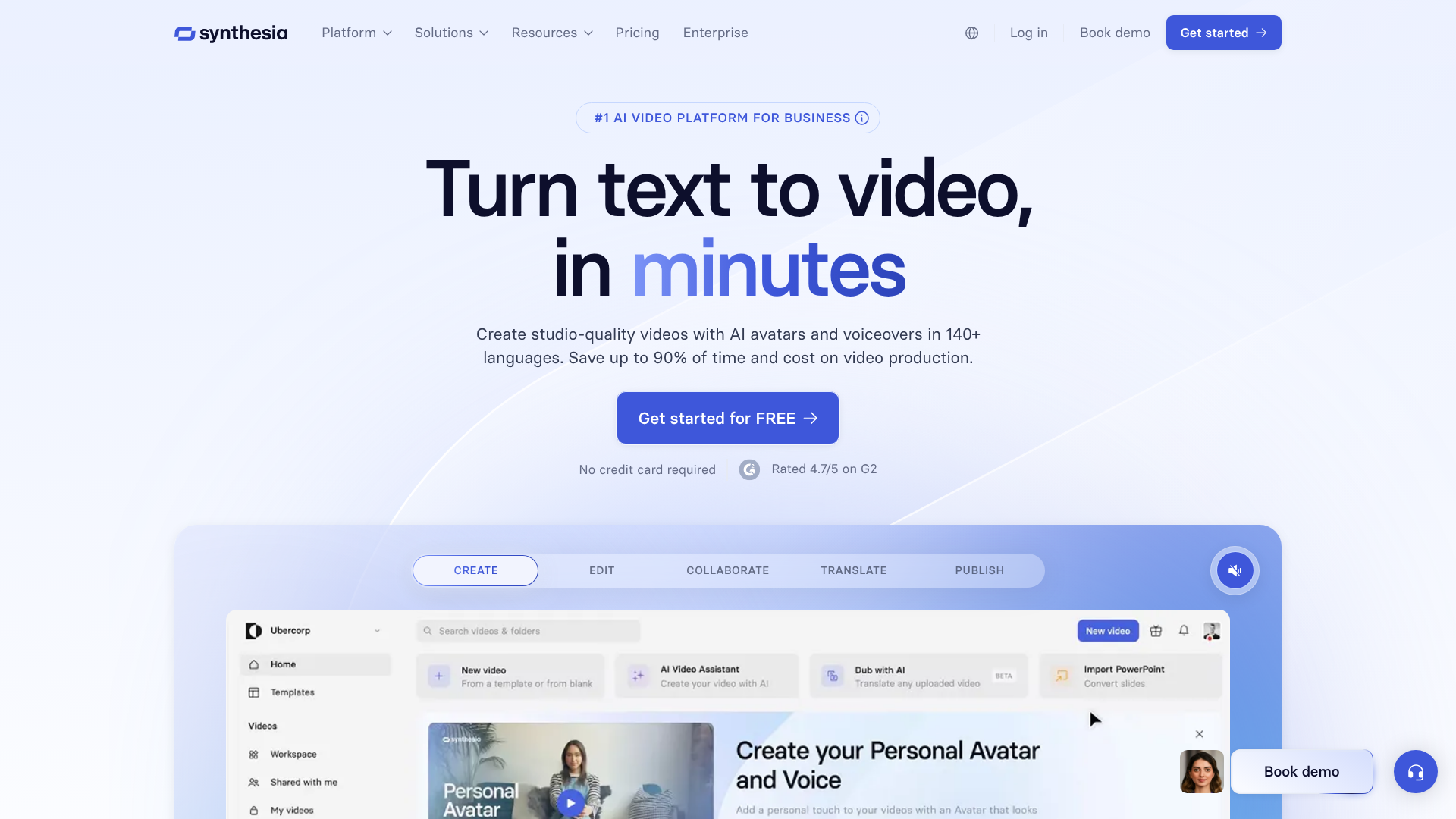
One of the main draws of Synthesia is its straightforward, user-friendly workflow. Creating a professional video can be done in four simple steps, all within an intuitive interface that feels similar to using presentation software like PowerPoint or Google Slides.
1. Choose a Template and Avatar
Your first step is to select a starting point. You can begin with a blank canvas or choose from over 60 professionally designed templates tailored for different purposes, such as training, sales pitches, or news updates. These templates provide a solid structure, saving you time on design and layout.
Once you have your template, you'll select an AI avatar to be your presenter. You can browse Synthesia's extensive library of 160+ stock avatars to find one that fits your video's tone and audience. If your organisation has invested in a custom avatar, you can select it here to maintain brand consistency.
2. Write or Generate Your Script
Next, you need to provide the script for your video. You can type or paste your text directly into the script box scene by scene. Each scene corresponds to a different slide or segment of your video. This is where you input the words your avatar will speak.
If you're facing writer's block or need to generate content quickly, you can use the built-in AI Script Assistant. Simply provide a prompt, like "Create a 3-scene script for a video about cybersecurity best practices," and the AI will generate a draft for you. You can then edit and refine the text to match your specific needs. After finalising the script, you select the language and voice style for the narration.
3. Customise Visuals and Branding
With your script and avatar in place, it's time to enhance your video with visuals. Synthesia's editor allows you to add text overlays, upload images, and incorporate screen recordings or background videos. You can access a rich library of royalty-free stock media directly within the platform or upload your own branded assets.
You can adjust the position of your avatar, change background colours to match your brand palette, and add your company logo. The drag-and-drop interface makes it easy to arrange elements on each scene, ensuring your video is not only informative but also visually appealing and on-brand.
4. Generate and Share Your Video
Once you are happy with the script and visuals, the final step is to click the "Generate" button. Synthesia's AI engine will then process your project, which typically takes a few minutes. The platform renders the video in the cloud, creating the avatar's performance, synchronising the lip movements with the audio, and combining all your visual elements.
After the video is generated, you can preview it, download it as an MP4 file, or share it directly via a link. Synthesia also provides an embed code, allowing you to easily add the video to your website, learning management system (LMS), or knowledge base.
Top Business Use Cases for Synthesia AI
The versatility of the Synthesia AI video generator makes it a valuable tool across various business functions. Its ability to produce high-quality, scalable video content quickly opens up numerous applications that were previously too expensive or resource-intensive.
Corporate Training and Onboarding
This is one of the most popular use cases for Synthesia. Companies can create engaging and consistent training materials for employees worldwide. Instead of flying trainers to different offices or scheduling repetitive live sessions, L&D teams can produce a library of training videos covering topics like compliance, software tutorials, and company policies.
Videos can be easily updated whenever information changes—just edit the script and regenerate the video. With support for over 120 languages, global companies can localise their training content effortlessly, ensuring every employee receives the same high-quality instruction in their native language.
Marketing and Sales Videos
Marketing teams can use Synthesia to create a wide range of content, from social media ads and product explainers to personalised sales outreach videos. An AI video creator allows for rapid A/B testing of different scripts or presenters to see what resonates most with the target audience. Sales teams can create customised video messages for potential clients at scale, adding a personal touch to their communication without spending hours recording.
For example, a software company could generate hundreds of personalised demo videos, each addressing a specific client's pain points, simply by changing a few lines in the script. This level of personalisation can significantly improve engagement and conversion rates.
Customer Support and How-To Guides
Clear, concise instructional videos can drastically reduce the burden on customer support teams. Synthesia is perfect for creating step-by-step tutorials, FAQ videos, and troubleshooting guides. These videos can be embedded in a company's knowledge base or sent to customers in response to support tickets.
Because the videos are easy to update, support content can always remain current with the latest product features or policy changes. This not only improves the customer experience by providing immediate, easy-to-digest answers but also frees up support agents to handle more complex issues.
Internal Communications
From CEO announcements to departmental updates, video is a more engaging medium for internal communications than email or text. Leaders can use their custom digital avatars to deliver consistent messages to the entire organisation. This is especially useful for global companies with employees across different time zones, as everyone can receive the same message in a personal format, on their own schedule.
HR departments can use it for benefits explanations, and project managers can create video updates on project milestones. The speed of production means that even time-sensitive information can be shared quickly and professionally.
Synthesia's User Experience and Interface
Synthesia has clearly prioritised ease of use in its design. The platform's interface is clean, modern, and highly intuitive, drawing inspiration from familiar presentation software. This design choice significantly lowers the learning curve, allowing users without any video editing experience to start creating content almost immediately. The main workspace is organised logically, with a central canvas for the video scene, a script panel on the right, and a slide navigator on the left.
Adding and customising elements is a straightforward drag-and-drop affair. Whether you're positioning an avatar, adding a text box, or inserting an image from the media library, the controls are responsive and predictable. The timeline is simplified into scenes, which is a much more accessible concept for beginners than the complex multi-track timelines found in traditional video editors like Adobe Premiere Pro.
One of the standout aspects of the user experience is the speed of iteration. In traditional video production, making a small change—like correcting a misspoken word—can require a full reshoot. With Synthesia, it's as simple as editing a word in the script box and regenerating the video. This agile workflow encourages experimentation and refinement, as changes are low-cost and quick to implement.
The platform's performance is also solid, with video generation typically completing in under 10 minutes, allowing for a fast turnaround from concept to final product.
Pro Tip: When generating your first few videos, experiment with punctuation in your script. Adding commas can create natural pauses, while a question mark will subtly change the avatar's intonation. Small tweaks like these can make the AI's delivery sound much more human and engaging.
The Technology Powering Synthesia
Behind Synthesia's simple interface lies a complex and sophisticated technological stack. The platform's core capabilities are driven by advancements in several areas of artificial intelligence, primarily Generative Adversarial Networks (GANs) and Natural Language Processing (NLP).
GANs are the technology responsible for creating the realistic AI avatars. A GAN consists of two neural networks—a generator and a discriminator—that compete against each other. The generator creates synthetic images (in this case, video frames of the avatar), while the discriminator tries to determine whether the images are real or fake. Through this adversarial process, the generator becomes progressively better at creating photorealistic and lifelike human figures.
This is what allows the avatars to have natural-looking facial expressions, movements, and lip-syncing.
Natural Language Processing is the engine that drives the text-to-speech functionality. Advanced NLP models analyse the input script, breaking it down into phonetic components. The AI then synthesises a human-sounding voice that speaks these components with appropriate intonation, rhythm, and emphasis. Synthesia's technology is advanced enough to synchronise the generated audio perfectly with the avatar's mouth movements, a critical element for maintaining the illusion of a real person speaking.
As noted by industry observers on platforms like LinkedIn, Synthesia continues to integrate new models, such as FLUX.2 for image generation, to enhance the visual elements within videos.
Finally, the entire platform is built on a scalable cloud infrastructure, leveraging services like Amazon Web Services (AWS). This allows Synthesia to handle the computationally intensive task of video rendering for thousands of users simultaneously. By offloading the processing to the cloud, users can generate videos from any device with a web browser, without needing powerful local hardware.
Synthesia vs. The Competition: How Does It Compare?
Synthesia operates in a growing market of AI video generation tools, each with its own strengths. While Synthesia excels at creating avatar-led, presenter-style videos, other platforms may focus on different types of video content. Here’s a brief look at how it compares to some popular alternatives.
HeyGen is perhaps Synthesia's most direct competitor, offering a similar feature set with AI avatars, voice cloning, and templates. Both platforms produce high-quality, realistic avatars. The choice between them often comes down to specific preferences in avatar styles, voice options, or interface design. HeyGen has gained attention for its real-time translation features, while Synthesia is often praised for the polish and realism of its premium avatars.
Pictory and Invideo take a different approach. These platforms are primarily AI video creators that specialise in turning scripts or articles into videos using a vast library of stock footage, images, and music. They don't focus on AI avatars. Instead, their AI analyses the text and automatically selects relevant stock media to create a dynamic, montage-style video.
These tools are excellent for creating content for blogs and social media where you want to visualise concepts with diverse imagery rather than having a single presenter.
Here is a high-level comparison:
| Feature | Synthesia | HeyGen | Pictory | Invideo |
|---|---|---|---|---|
| Primary Use Case | Avatar-led presenter videos | Avatar-led presenter videos | Stock footage videos from text | Template-based video editing |
| AI Avatars | Yes (160+ stock & custom) | Yes (100+ stock & custom) | No | No |
| Multilingual Support | 120+ languages | 40+ languages | N/A | Multiple languages supported |
| AI Scripting | Yes | Yes | No | Yes |
| Ease of Use | Very High | Very High | High | High |
| Best For | Corporate training, sales, L&D | Marketing, personalised outreach | Blog-to-video, social media | Quick social videos, ads |
Ultimately, the best tool depends on your specific needs. If your goal is to create professional, presenter-led videos for training or corporate communications, the Synthesia AI video generator is a top-tier choice. If you need to quickly convert articles into engaging social videos with stock footage, Pictory might be a better fit.
The Real Benefits of Using an AI Video Creator
Adopting an AI video generator like Synthesia can bring transformative benefits to an organisation's content strategy, fundamentally changing the economics and logistics of video production.
One of the most significant advantages is cost savings. Traditional video production is expensive. Costs include hiring actors, renting a studio, paying a film crew, and post-production editing. A single professional video can easily cost thousands of pounds.
An AI video creator eliminates nearly all of these expenses, replacing them with a predictable monthly or annual subscription fee. This democratises video production, making it accessible to businesses and teams with smaller budgets.
Another key benefit is time efficiency. A traditional video project can take weeks or even months from scripting to final delivery. With a tool like Synthesia, a finished video can be produced in minutes or hours. This speed allows teams to be much more agile and responsive.
For example, an important company announcement can be scripted and turned into a professional video on the same day, rather than waiting weeks for a production team.
Scalability is a third major advantage. Imagine you need to create a training video in ten different languages. Traditionally, this would require hiring ten different voice actors and extensive editing to sync the new audio. With Synthesia, you can simply translate the script and generate ten versions of the video with a few clicks.
This makes it feasible to create highly localised and personalised content at a scale that was previously unimaginable.
Finally, AI video generation improves accessibility and consistency. Content can be easily updated to reflect new information, ensuring accuracy without costly reshoots. Everyone in an organisation, regardless of their technical skill, can create high-quality, on-brand videos, leading to more consistent and professional communication across the board.
Synthesia Pricing Plans and Subscription Tiers
Synthesia offers several pricing plans designed to cater to different types of users, from individuals to large enterprise teams. It's important to note that pricing for software-as-a-service (SaaS) products can change, so you should always visit the official Synthesia website for the most current and detailed information.
Typically, the pricing structure is tiered:
Personal Plan: This plan is aimed at individual creators and users who want to experiment with the platform. It usually includes a limited number of video minutes per month, access to the stock avatars and voices, and the core creation features. This is a great entry point for those new to AI video generation.
Creator/Pro Plan: Geared towards professionals and small businesses, this plan offers more video minutes, access to premium features, and greater customisation options. It often includes features like premium voices and access to the template library.
Enterprise Plan: This is a custom plan designed for larger organisations. It includes everything from the lower tiers plus advanced features crucial for business use. These often include the ability to create custom avatars, voice cloning, brand kits, collaboration tools for teams, and dedicated customer support. Pricing for the Enterprise plan is typically tailored to the specific needs of the company.
When evaluating the cost, it's crucial to consider the return on investment. Compare the subscription cost to the expense of producing just one traditional video. For most businesses that regularly create video content, the savings in time, resources, and direct production costs often make a subscription a highly cost-effective solution.
The Future of AI Video Generation
The field of AI-generated media is evolving at a rapid pace, and the technology behind platforms like Synthesia is continuously improving. We can expect several key trends to shape the future of AI video generation in the coming years.
One major area of development is hyper-realism and emotional expression. While current AI avatars are already impressive, future iterations will likely feature even more nuanced facial expressions, subtle body language, and the ability to convey a wider range of emotions. The goal is to create digital humans that are virtually indistinguishable from real ones, capable of delivering performances with genuine empathy and charisma.
Another exciting frontier is real-time generation and interactivity. Imagine an AI avatar that can act as a real-time customer service agent, responding to user queries with dynamically generated video answers. This could lead to interactive training modules where an AI tutor adapts its explanations based on a learner's responses, or highly personalised marketing where an AI presenter addresses a customer by name and references their specific interests.
We will also see greater integration and automation. AI video creators will become more deeply embedded in other business workflows. For example, a system could automatically generate a weekly video summary of sales performance by pulling data directly from a CRM, or create a new product tutorial video the moment a software update is pushed. This will further reduce the manual effort required to create and distribute video content, making it a truly automated part of business operations.
Frequently Asked Questions
Is Synthesia video free?
Synthesia is a paid platform, but it often provides a free demo or trial that allows you to create a short sample video to test its capabilities. This lets you see the quality of the avatars and voices firsthand before committing to a subscription. The full feature set and ability to create longer videos are available through their paid plans.
How much does Synthesia AI video generator cost?
Synthesia offers several pricing tiers, including plans for individuals and custom enterprise solutions for businesses. The exact cost depends on the plan you choose, which determines factors like the number of video minutes you can generate per month and access to premium features like custom avatars. For the most accurate and up-to-date pricing, it is best to check their official website.
Is Synthesia a good AI video generator?
Yes, Synthesia is widely regarded as one of the best AI video generators on the market, particularly for creating professional, presenter-led videos. Its strengths lie in the high quality and realism of its AI avatars, its extensive library of over 120 languages, and its user-friendly interface. It is an excellent choice for businesses focused on corporate training, marketing, and internal communications.
What are the disadvantages of Synthesia?
While powerful, Synthesia has some limitations. The primary one is that the AI avatars, while realistic, may not yet convey the full emotional range of a human actor, which can be a drawback for highly emotive or creative content. Additionally, the cost of custom avatars and enterprise plans can be a significant investment for smaller businesses. Finally, like all AI tools, there is a slight learning curve to mastering all its features to produce the most polished results.
Do I own the copyright to AI-generated videos?
The copyright of AI-generated content is a complex and evolving area of law. Generally, with platforms like Synthesia, when you create a video using your own original script, you own the rights to that final video and can use it for commercial purposes as per their terms of service. However, you do not own the underlying AI avatar or voice technology. It's always recommended to review the platform's specific terms and conditions regarding content ownership.
Who competes with Synthesia?
Synthesia's main competitors in the AI avatar video space include HeyGen, D-ID, and Colossyan. Other companies in the broader AI video market, like Pictory and Invideo, compete by focusing on turning text into videos using stock footage rather than avatars. Each platform has slightly different features, avatar styles, and pricing, catering to different segments of the market.
Final Thoughts
The Synthesia AI video generator stands out as a powerful, polished, and highly capable platform for businesses looking to scale their video content production. It successfully lowers the significant barriers of cost, time, and technical skill that have traditionally limited the use of video in corporate environments. The quality of its AI avatars and the breadth of its language support are industry-leading, making it an exceptional tool for global training, marketing, and communications.
While it may not be the right fit for projects requiring the deep emotional nuance of a human actor, it excels at its core purpose: creating clear, professional, and engaging presenter-led videos efficiently and at scale. The user-friendly interface ensures that anyone on a team can become a video creator, empowering organisations to communicate more effectively.
If your business is looking for a way to produce more video content without a Hollywood budget, Synthesia is undoubtedly a solution worth exploring. It represents a significant step forward in making video a truly accessible medium for all. For those ready to see how it can transform their content workflow, you can learn more and get started on the Synthesia website.