
How to Master Online Ordering for Panera Bread: A Beginner's Guide
Craving a warm bowl of Broccoli Cheddar Soup or a fresh Fuji Apple Chicken Salad but don't have the time to wait in a queue? Mastering the system for online ordering for Panera Bread is your ticket to skipping the line and getting your favourite meals with ease. Whether you prefer the convenience of delivery to your doorstep or a quick in-store pickup, Panera's digital tools are designed to make the process straightforward. This guide will walk you through everything you need to know, from placing your first order to understanding fees and unlocking rewards.
- What You'll Learn
- What Exactly is Panera Bread's Online Ordering System?
- The Core Benefits: Why You Should Order Panera Online
- A Step-by-Step Guide to Placing Your First Panera Bread Online Order
- Choosing Your Platform: Panera Direct vs. Third-Party Apps
- Ordering Directly from Panera (App/Website)
- Ordering via Third-Party Services (DoorDash, Grubhub, etc.)
- Understanding the Costs: A Breakdown of Fees and Pricing
- For Restaurant Owners: Lessons from Panera's Digital Success
- Frequently Asked Questions about Ordering Panera Online
- How does Panera online ordering work?
- How much does Panera charge for delivery?
- Is there a senior discount at Panera?
- What is the minimum order for Panera delivery?
- Can I make changes to my Rapid Pick-Up or Delivery order?
- Final Thoughts: Is Online Ordering for Panera Bread Worth It?
We'll break down the differences between using the Panera app, their website, and third-party delivery services. By the end, you'll be able to navigate the options like a pro, ensuring you get your meal exactly how you want it, every time.
What You'll Learn
- Multiple Ways to Order: Panera offers online ordering through its official website, a dedicated mobile app, and third-party delivery partners like DoorDash and Grubhub, each with unique features.
- Key Benefits: The primary advantages of ordering online include skipping queues with Rapid Pick-Up, easily customising your meal, and earning loyalty points through the MyPanera rewards programme.
- Cost Considerations: Be mindful of potential delivery fees and service charges, which often differ between ordering directly from Panera versus using a third-party app. Choosing pickup is the best way to avoid extra costs.
- Best Option for Regulars: For frequent customers, the official Panera Bread app is the most beneficial platform due to its seamless integration with the MyPanera rewards programme and access to exclusive offers.
What Exactly is Panera Bread's Online Ordering System?
At its core, Panera Bread's online ordering system is a digital platform that allows you to browse the menu, customise your food, and pay for it without ever stepping up to a cashier. It's an integrated ecosystem designed for modern convenience, catering to different needs through several distinct services. Understanding these options is the first step to making the most of your experience.
The system is accessible through three main channels: the official Panera Bread website, the Panera Bread mobile app for iOS and Android, and various third-party food delivery companies. Each channel offers access to the same delicious menu but provides a slightly different user experience and cost structure.
The primary services you can choose from are:
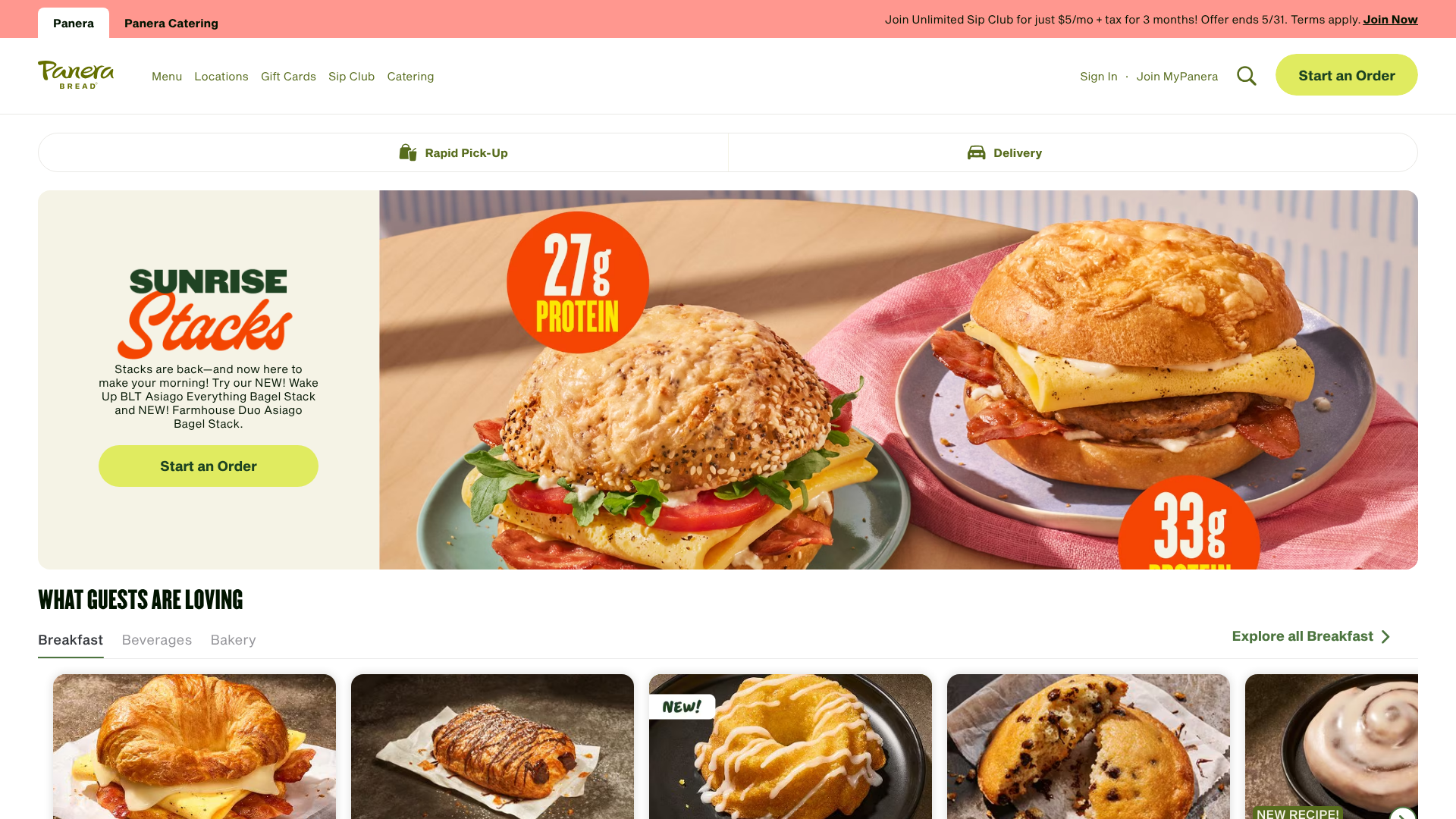
- Rapid Pick-Up: This is the most popular feature. You place your order online, pay in advance, and Panera gives you a designated time. You can then walk into the cafe, head to the special Rapid Pick-Up shelf, and grab your order without any interaction or waiting. It's ideal for busy lunch breaks or grabbing a quick dinner on the way home.
- Panera Bread Delivery: If you prefer to stay put, you can have your order brought directly to your home or office. You place a
Panera Bread deliveryorder through the app or website, and a driver will bring it to you. This service includes a delivery fee and is perfect for cosy nights in or when you're tied up at work. - Dine-In Ordering: Some locations allow you to order from your table using the app. You simply scan a QR code, place your order digitally, and a staff member will bring the food to your table when it's ready. This combines the ease of online ordering with the experience of eating in the cafe.
This multi-faceted approach ensures that whether you're at home, in the office, or on the go, a customised Panera meal is just a few clicks away.
The Core Benefits: Why You Should Order Panera Online
Switching from ordering in-person to using the digital platform comes with a host of benefits that enhance the entire Panera experience. It’s not just about technology for its own sake; it’s about making your meal more convenient, personalised, and rewarding.
First and foremost is the incredible convenience and time-saving aspect. Imagine it's a rainy Tuesday, and the lunch queue is snaking out the door. With a Panera Bread online order, you can build your perfect sandwich from your desk, pay for it, and receive a notification when it's ready. You can then stroll past the entire queue, grab your clearly labelled bag from the Rapid Pick-Up shelf, and be on your way in under a minute.
This feature alone transforms a potential 20-minute ordeal into a seamless in-and-out experience.
Next is the power of deep customisation. While you can always ask for modifications at the counter, the online interface makes it foolproof. You can easily request no onions on your salad, add avocado to your sandwich, or swap the type of bread with a simple click. The visual menu lays out all available options, ensuring you don't forget anything and that your request is transmitted to the kitchen with perfect accuracy, reducing the chance of human error.
Perhaps the most significant benefit for regular customers is the MyPanera Rewards integration. Every time you order Panera online through the official app or website while logged into your account, your purchase is automatically tracked. This earns you points and personalised rewards, such as free pastries, money off your next order, or a complimentary drink. Ordering in-store without identifying yourself means you miss out on these valuable perks that accumulate over time.
Finally, the system remembers you. It securely saves your payment information for quick checkouts and, more importantly, keeps a history of your past orders. If you have a go-to favourite, you can reorder it with a single tap, saving you the trouble of building it from scratch every time. This level of personalisation makes the entire process feel effortless and tailored specifically to you.
A Step-by-Step Guide to Placing Your First Panera Bread Online Order
Ready to place your first order? The process is intuitive, but we'll walk you through it step-by-step to ensure it's completely stress-free. The steps are very similar whether you're using the website or the mobile app, but we'll highlight any key differences.
Using the Panera Bread Website
Select Your Cafe and Order Type: Go to the Panera Bread website. The first thing it will ask is for you to find a local cafe. You can enter your postcode or allow the site to use your location. Once you've selected a cafe, you'll choose your service: Rapid Pick-Up or Delivery.
Browse and Add to Your Order: Now for the fun part. You can browse the full menu, from sandwiches and salads to soups and baked goods. Click on an item you'd like, and it will open a customisation screen. Here you can make any changes, such as removing tomatoes or adding extra cheese.
Review Your Cart: Once you've added an item, it will appear in your cart, typically shown on the right side of the screen. You can continue adding more items or click "Checkout" when you're ready. Double-check your order here to make sure everything is correct.
Checkout and Pay: During checkout, you'll be prompted to sign in to your MyPanera account to earn rewards. If you don't have one, you can check out as a guest. You'll confirm your pickup time or delivery address, enter your payment details, and place your order. You'll receive a confirmation email shortly after.
Using the Panera Bread Mobile App
The mobile app offers a slightly more streamlined experience and is perfect for ordering on the go.
Download and Log In: First, download the Panera Bread app from the Apple App Store or Google Play Store. For the best experience, create or log in to your MyPanera account. This will save your favourites and track rewards automatically.
Start Your Order: The app's home screen makes it easy to start. Tap "Order" and choose your preferred cafe and service type (Pick-Up or Delivery). The app will remember your most recent cafe, making reordering even faster.
Build Your Meal: Navigating the menu on the app is simple. Tap through categories, select your items, and use the intuitive interface to make customisations. Add your completed items to your bag.
Complete Checkout: Tap the bag icon to review your order. The app will guide you through the final steps, including selecting a pickup time and confirming your payment method. If you have rewards available, the app will prompt you to apply them here. Once you place the order, you can even track its progress in real-time.
Pro Tip: When using the app, add your favourite customised meals to your "Saved Orders." This allows you to reorder your perfect lunch with just two taps, saving you significant time on future orders.
Choosing Your Platform: Panera Direct vs. Third-Party Apps
When you decide to order Panera online, you face a key choice: use Panera's own platforms (their app or website) or a third-party service like DoorDash, Uber Eats, or Grubhub. While both get you the same food, the experience, cost, and benefits can be very different. Making the right choice depends on your priorities.
Ordering Directly from Panera (App/Website)
This is the method Panera encourages, and for good reason. When you order direct, you're interacting with Panera's ecosystem. This is almost always the best option for loyal customers.
Pros:
Full MyPanera Rewards: Every pound you spend earns you credit towards free items and personalised discounts. This is the single biggest advantage. – Lower Costs: You generally avoid the extra service fees that third-party apps charge. Menu prices are the same as in-store.
Full Menu Access: You'll always see the complete, up-to-date menu, including special offers or new items that might not appear on other platforms. – Direct Customer Service: If there's an issue with your order, you're dealing directly with the Panera cafe, which can make resolving problems quicker.
Cons:
- Limited Delivery Area: Panera's in-house or partnered delivery service may have a smaller radius compared to the vast network of drivers on major third-party apps.
Ordering via Third-Party Services (DoorDash, Grubhub, etc.)
These platforms act as a marketplace, listing Panera alongside hundreds of other restaurants. They are a convenient option, especially if you already use them for other takeaways.
Pros:
- Wider Delivery Reach: Their large driver networks mean they can often deliver to areas that Panera's direct service cannot reach.
- Subscription Perks: If you have a subscription like DashPass or Uber One, you might get free delivery on your Panera order, which could offset other fees.
- All-in-One App: You can order from multiple restaurants using a single app that you're already familiar with.
Cons:
- No MyPanera Rewards: You cannot earn or redeem any MyPanera loyalty points when ordering through these apps.
- Higher Overall Cost: These services typically add a service fee and sometimes a small order fee. Menu prices can also be slightly inflated to cover the commission fees the restaurant pays.
- Customer Service Layers: If something is wrong, you often have to go through the third-party app's customer service first, which can add a layer of complication.
| Feature | Panera Direct (App/Website) | Third-Party Apps (DoorDash, etc.) |
|---|---|---|
| MyPanera Rewards | Yes, full integration | No |
| Menu Prices | Standard in-store prices | Often slightly higher |
| Service Fees | None | Yes, varies by app |
| Delivery Area | Limited to Panera's radius | Often much wider |
| Special Offers | Access to exclusive deals | General app promotions only |
| Customer Support | Direct to the cafe | Through the third-party app |
Our Recommendation: For anyone who eats at Panera more than once or twice a year, ordering directly through the Panera app or website is the superior choice. The ability to earn rewards alone makes it more valuable in the long run. The costs are more transparent and generally lower. Use third-party apps only when you are outside Panera's direct delivery zone or if a specific promotion on that app makes it a better deal for a one-off order.
Understanding the Costs: A Breakdown of Fees and Pricing
One of the most common questions about any Panera Bread delivery or online order revolves around the cost. Is it more expensive than just going to the store? The answer depends entirely on how you order and what service you choose. Let's break down the potential charges so you can order without any surprises.
Panera's Direct Ordering Fees
When you use the official Panera app or website, the pricing is very straightforward. The prices for all menu items—sandwiches, salads, soups—are typically identical to what you would pay if you ordered at the counter in the cafe. There are no hidden markups on the food itself.
- For Rapid Pick-Up: There are no extra fees. You pay the menu price plus tax, just as you would in person. This makes it the most cost-effective way to order online.
- For Delivery: Panera charges a delivery fee. This fee is not a fixed amount; it can vary based on your distance from the cafe and the current demand. You will always see the exact fee listed clearly at checkout before you confirm your payment. Additionally, there is usually a minimum order value required to qualify for delivery, often around £5-£10.
Third-Party Service Fees
This is where the costs can become more complex. Third-party platforms like DoorDash and Uber Eats have their own fee structures to cover their operational costs and pay their drivers.
- Inflated Menu Prices: The first thing to check is the price of the food itself. Restaurants often increase menu prices on these platforms by 10-20% to help offset the hefty commission fees (up to 30%) they are charged by the app.
- Delivery Fee: This is the standard fee for the delivery service, similar to Panera's direct fee.
- Service Fee: This is an additional fee charged by the platform on most orders. It's a percentage of your subtotal and helps fund the platform's operations.
- Small Order Fee: If your order total is below a certain threshold (e.g., £10), you may be charged an extra fee of a few pounds.
Pro Tip: Always compare the total cost at checkout. An order that looks cheaper at first on a third-party app due to a "free delivery" promotion might actually be more expensive overall once inflated menu prices and service fees are factored in.
How to Save Money on Your Panera Order
- Choose Pick-Up: The easiest way to save is by selecting Rapid Pick-Up. You get all the convenience of ordering ahead without any of the delivery-related costs.
- Use MyPanera Rewards: Consistently ordering through your account will earn you free items and discounts that directly reduce your spending.
- Look for Promo Codes: Panera occasionally releases promotional codes for discounts or free delivery. Check the "Offers" section of the app.
- Join the Unlimited Sip Club: If you're a frequent visitor who loves their drinks, the Sip Club subscription can offer tremendous value, covering all self-serve beverages for a flat monthly fee.
For Restaurant Owners: Lessons from Panera's Digital Success
If you're a cafe or restaurant owner, you might look at Panera's sophisticated digital ecosystem with a mix of admiration and envy. Their success in driving online orders is a powerful case study in owning the customer relationship. Panera heavily promotes its own app and website because it allows them to retain customer data, build loyalty through rewards, and avoid paying high commission fees to third-party marketplaces.
Building a custom app and ordering system from scratch is a massive undertaking, but you don't have to. The strategy of prioritising direct orders is accessible to independent restaurants as well. Services have emerged that empower smaller businesses to compete by providing them with the same kind of powerful digital tools.
One excellent example of this is ChowNow. Unlike third-party marketplaces that list you next to competitors and take a large cut of each sale, ChowNow builds a branded online ordering system specifically for your restaurant. It can be integrated directly into your website and social media, giving your customers a seamless way to order from you directly.
By using a service like ChowNow, you can:
- Avoid Commission Fees: They typically operate on a flat monthly subscription model, meaning you keep 100% of the revenue from each order. This is a huge financial advantage over the 20-30% commissions charged by other apps.
- Own Your Customer Data: You get access to your customers' information, allowing you to run your own marketing campaigns and build direct relationships, much like the MyPanera programme does.
- Strengthen Your Brand: The ordering experience features your logo and your branding, not someone else's. This reinforces customer loyalty to your restaurant, not to a delivery app.
Panera's digital strategy shows that the most valuable customer is the one who orders directly. For independent restaurants looking to achieve similar results, leveraging a platform like ChowNow can be a critical step in building a sustainable and profitable online business.
Frequently Asked Questions about Ordering Panera Online
Here are answers to some of the most common questions people have when they first start using the Panera online ordering service.
How does Panera online ordering work?
It's a simple process. You use the Panera Bread website or mobile app to select a nearby cafe, choose between pickup or delivery, and browse the digital menu. You add items to your cart, customise them as needed, and pay in advance with a credit card or digital wallet. For pickup, you'll be given a time to go to the store and collect your order from a designated shelf.
For delivery, a driver will bring it to your specified address.
How much does Panera charge for delivery?
The delivery fee charged by Panera directly is not a flat rate. It varies depending on your distance from the restaurant and can fluctuate with demand. The exact fee is always displayed at checkout before you finalise your order. There is also typically a minimum order amount required to be eligible for delivery.
To avoid delivery fees entirely, you can always choose the free Rapid Pick-Up option.
Is there a senior discount at Panera?
Panera Bread does not offer a nationwide, corporate-mandated senior discount. However, since many Panera cafes are independently owned and operated franchises, some individual locations may offer a local discount at their own discretion. The best way to find out is to call your local Panera and ask the manager directly. This type of discount, if available, would typically only apply to in-store orders.
What is the minimum order for Panera delivery?
Yes, there is usually a minimum order value for Panera delivery to make the service cost-effective. This amount can vary by location but is often in the range of £5 to £10 before taxes and fees. The app or website will alert you if your cart total is below the minimum required for delivery, prompting you to add more items to proceed.
Can I make changes to my Rapid Pick-Up or Delivery order?
Once an online order is placed and confirmed, it is sent directly to the kitchen to be prepared, so it generally cannot be changed or cancelled through the app or website. If you realise you've made a mistake immediately after ordering, your best bet is to call the specific Panera cafe you ordered from as quickly as possible. If they haven't started making your food yet, they may be able to accommodate a change, but it is not guaranteed.
Final Thoughts: Is Online Ordering for Panera Bread Worth It?
After breaking down the process, benefits, and costs, the conclusion is clear: using the online ordering system for Panera Bread is absolutely worth it, especially for anyone who values their time. The ability to skip long queues with Rapid Pick-Up is a significant advantage that transforms the fast-casual dining experience, making it truly fast and efficient.
For the best overall value and experience, ordering directly through the Panera Bread mobile app is the recommended path. It not only provides the most streamlined interface but also ensures you're earning valuable rewards on every single purchase through the MyPanera programme. While third-party apps offer a convenient alternative, particularly for those outside Panera's direct delivery range, they often come at a higher cost and without the loyalty benefits.
So next time you're craving that signature soup in a bread bowl, give the app a try. The convenience of customising your meal, paying in advance, and grabbing it on the go will likely make it your new favourite way to enjoy Panera.