

Synthesia AI Video Maker Review: Is It Right for Your Business?
Creating professional-quality video content has traditionally been a costly and time-consuming process, requiring cameras, studios, actors, and extensive editing. The Synthesia AI video maker aims to change that by allowing anyone to create realistic, presenter-led videos from just a text script. This platform uses artificial intelligence to generate lifelike avatars that speak your words in over 160 languages, effectively replacing the need for a physical film shoot. For businesses looking to scale their video production for training, marketing, or internal communications, this technology presents a compelling alternative to traditional methods.
- Quick Summary
- What Exactly is the Synthesia AI Video Maker?
- Unpacking the Key Features of the Synthesia Video Tool
- Diverse AI Avatars and Customisation
- Advanced AI Voice Generation in 160+ Languages
- Intuitive Script-to-Video Editor
- Media Library and Brand Consistency
- The Core Benefits: Why Choose an AI Video Creator?
- Drastically Reduce Production Time and Costs
- Achieve Scalability for Corporate Training and Marketing
- Ensure Consistency Across All Video Content
- How to Create Your First Video with Synthesia: A Step-by-Step Guide
- 1. Choose Your Avatar and Voice
- 2. Write or Paste Your Script
- 3. Customise Your Video Scene
- 4. Generate and Share Your Video
- Synthesia Pricing and Plans Explained
- Synthesia Pros and Cons: A Balanced View
- Who is the Synthesia AI Video Maker Best For?
- Corporate Learning & Development (L&D) Teams
- Marketing Departments
- Sales Enablement
- Small Business Owners
- Frequently Asked Questions (FAQ)
- Is Synthesia AI video free?
- Is there any 100% free AI video generator?
- What are the limitations of Synthesia AI?
- Are AI-generated videos allowed on YouTube?
- Final Thoughts: Is the Synthesia AI Video Maker Worth It?
But does it live up to the hype? This comprehensive review breaks down everything you need to know about the Synthesia platform. We'll explore its core features, analyse its benefits and limitations, detail the pricing structure, and help you decide if this AI video creator is the right investment for your specific needs.
Quick Summary
- What It Is: Synthesia is a leading AI video generation platform that creates videos with realistic AI avatars from text scripts, eliminating the need for cameras or microphones.
- Key Features: It offers over 175 diverse stock AI avatars, voice cloning, AI script assistance, and supports video creation in more than 160 languages and accents.
- Primary Use Cases: The tool is ideal for creating corporate training materials, marketing videos, product demonstrations, and internal communications at scale.
- Main Benefit: It significantly reduces the time and cost associated with traditional video production, allowing for rapid content creation and localisation.
- Potential Drawbacks: The technology can sometimes fall into the "uncanny valley," and achieving nuanced emotional expression from avatars remains a challenge. Custom avatars are only available on higher-tier enterprise plans.
What Exactly is the Synthesia AI Video Maker?
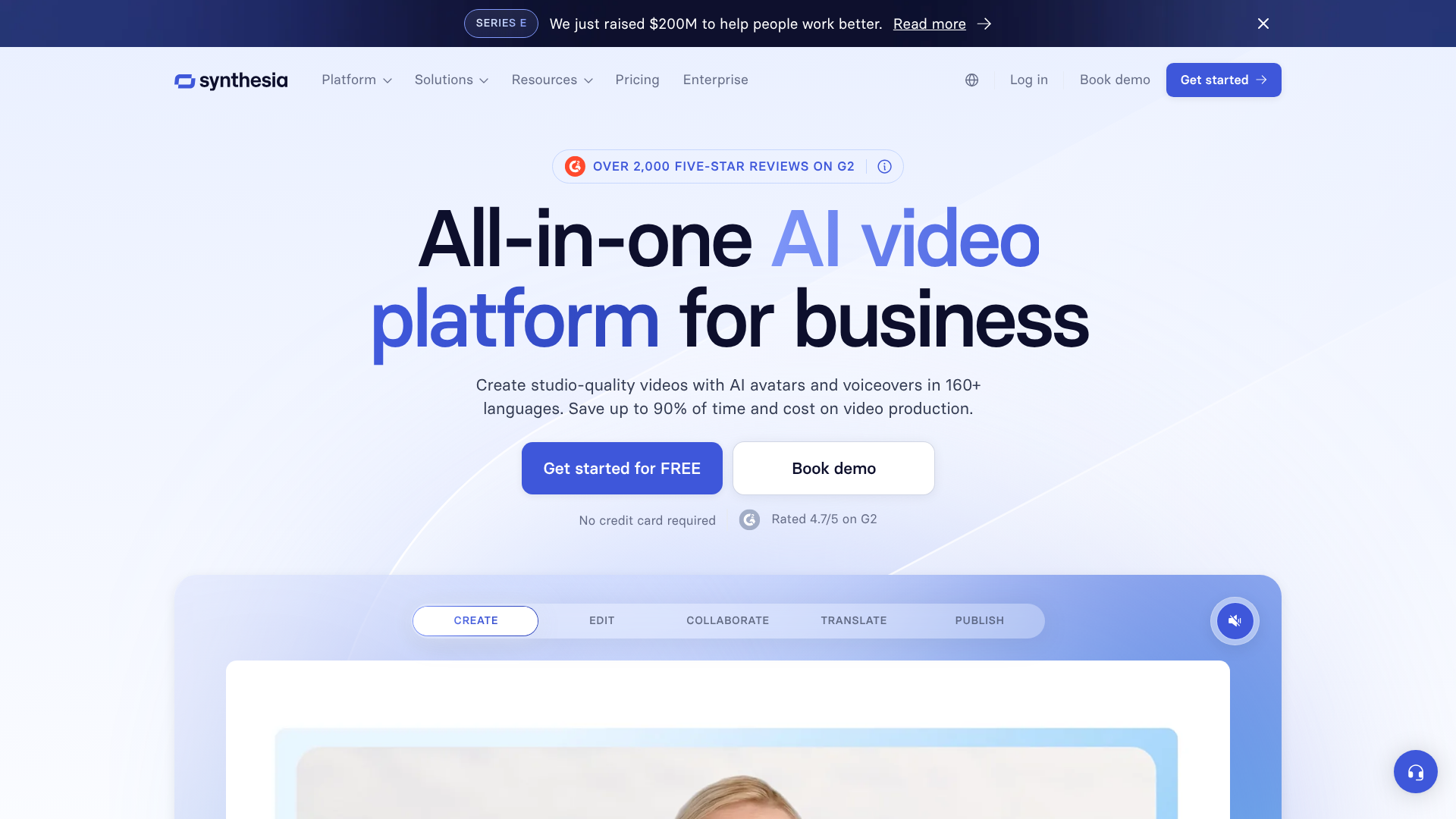
The Synthesia AI video maker is a software-as-a-service (SaaS) platform that uses advanced artificial intelligence, deep learning, and computer graphics to produce synthetic videos. At its core, the technology takes a text input—your script—and transforms it into a video featuring a photorealistic AI-generated human presenter, or 'avatar', who speaks that script aloud. This process synthesises both the visual element (the avatar's speech and movements) and the audio element (a text-to-speech voice).
Unlike simple animation or slideshow tools, Synthesia focuses on creating videos that mimic a real person speaking directly to the camera. This is particularly effective for content where a human connection is important, such as employee onboarding, software tutorials, or sales pitches. You can choose from a large library of pre-existing stock avatars or, with an enterprise plan, create a custom digital twin of a real person, like your company's CEO or a specific brand ambassador.
The platform operates entirely in a web browser, making it accessible without requiring powerful hardware or complex software installations. Users interact with a simple editor where they can type or paste their script, select an avatar, choose a voice and language, and add background visuals, text, and other media elements. Once the scene is set, the AI engine processes the information and renders a complete video file, ready for download and distribution.
Unpacking the Key Features of the Synthesia Video Tool
Synthesia's power lies in its rich feature set, designed to make AI video creation as straightforward and flexible as possible. These tools work together to provide a comprehensive solution for businesses and creators.
Diverse AI Avatars and Customisation
Choice is central to the Synthesia experience. The platform provides access to a library of over 175 stock AI avatars. These avatars represent a wide range of ethnicities, ages, and styles, ensuring you can find a presenter that aligns with your brand and audience. You can select an avatar and place it against a custom background, add your company logo, and adjust its positioning on the screen.
For organisations seeking a higher level of brand consistency, Synthesia offers the ability to create a custom avatar. This involves a one-time studio recording process with a real person, whose likeness and voice are then used to create an exclusive, photorealistic digital twin. This feature is a significant advantage for companies wanting a consistent and recognisable presenter for all their video communications, but it's important to note this is an enterprise-level feature.
Advanced AI Voice Generation in 160+ Languages
The platform's audio capabilities are just as impressive as its visuals. The synthesia video tool supports text-to-speech in over 160 languages and a vast array of accents. This makes it an incredibly powerful tool for global companies that need to localise training or marketing content quickly. Instead of re-shooting a video for each region, you can simply translate the script and generate a new version with a native-sounding voice.
Furthermore, Synthesia offers voice cloning technology. This allows you to create a custom AI voice that matches a specific person's tone and cadence, which can be paired with a custom avatar for a truly personalised digital presenter. The quality of the AI voices is generally high, with natural-sounding inflections that avoid the robotic feel of older text-to-speech systems.
Intuitive Script-to-Video Editor
Ease of use is a primary design principle of the Synthesia platform. The video editor is built to be intuitive, even for users with no prior video editing experience. The workflow is straightforward: you create slides (or scenes), and for each scene, you type or paste the corresponding part of your script into a text box.
You can then add visual elements to each scene, such as background images, videos, screen recordings, text overlays, and shapes. The interface resembles a simplified version of presentation software like PowerPoint, making it familiar to most business users. This simple, slide-based approach allows you to build complex videos scene by scene without getting lost in complicated timelines or editing panels.
Media Library and Brand Consistency
To help users create visually appealing content, Synthesia includes a built-in media library with royalty-free images, videos, icons, and music tracks from sources like Unsplash and Pexels. This saves you the time and expense of sourcing assets from third-party sites.
For businesses, maintaining brand consistency is crucial. Synthesia addresses this with a 'Brand Kit' feature. You can upload your company's logo, fonts, and colour palette, ensuring that every video created on the platform adheres to your brand guidelines. This feature helps teams produce professional, on-brand content without needing a graphic designer to review every video.

The Core Benefits: Why Choose an AI Video Creator?
Using an AI video maker like Synthesia offers several tangible advantages over traditional video production methods. These benefits are primarily centred around efficiency, scalability, and cost-effectiveness.
Drastically Reduce Production Time and Costs
Traditional video production is a resource-intensive process. It involves scheduling shoots, hiring actors, setting up equipment, and post-production editing, which can take weeks or even months and cost thousands of pounds. An AI video creator condenses this entire workflow into a matter of minutes or hours.
With Synthesia, you can produce a finished video in the time it takes to write a script and arrange some visual assets. There are no cameras, microphones, or actors to coordinate. This speed allows businesses to be more agile, responding to market changes or internal needs with timely video content. The cost savings are also substantial, as the subscription fee for the platform is often a fraction of the cost of producing a single professional video traditionally.
Achieve Scalability for Corporate Training and Marketing
One of the most powerful benefits of using an AI video maker is scalability. Imagine you need to create a series of 20 training modules for a new software rollout. Doing this with a live-action crew would be a massive project. With Synthesia, once you have the scripts, you can generate all 20 videos in a day.
This scalability extends to updates and edits. If a process changes or information needs to be updated, you don't need to reshoot the entire video. You simply open the project in Synthesia, edit the text in the script, and regenerate the video. This makes maintaining a large library of video content manageable and affordable.
Ensure Consistency Across All Video Content
Maintaining a consistent look, feel, and tone across all company communications is a challenge. When different teams or individuals create videos, the results can vary widely. Using a tool like Synthesia enforces consistency by design.
By using the same brand kit, a select group of company avatars, and a consistent video structure, all content produced will have a uniform, professional appearance. This strengthens brand identity and ensures that whether a customer is watching a marketing video or an employee is taking a compliance course, the experience is cohesive.
Pro Tip: For maximum consistency in training materials, create a master video template in Synthesia. Include your branded intro/outro, logo placement, and text styles. Teams can then duplicate this template for new videos, ensuring every piece of content is perfectly on-brand.
How to Create Your First Video with Synthesia: A Step-by-Step Guide
Getting started with the Synthesia AI video maker is a surprisingly simple process. The platform is designed to be user-friendly, guiding you from script to finished video without a steep learning curve. Here’s a basic walkthrough of how to create your first AI-powered video.
1. Choose Your Avatar and Voice
Once you've started a new video project, your first step is to select your presenter. You can browse Synthesia’s extensive library of over 175 stock avatars to find one that fits your message and brand. After selecting an avatar, you'll choose a voice. You can listen to samples from a huge list of languages and accents to find the perfect match.
You can also adjust the voice by adding pauses or changing the pronunciation of specific words to make the delivery sound more natural.
2. Write or Paste Your Script
With your presenter chosen, it's time to provide the content. In the script box, you can either type your script directly, paste it from another document, or use the integrated AI script assistant to help you generate ideas. The platform breaks down the video into scenes, so you'll typically add the script for one scene at a time. This modular approach makes it easy to organise your thoughts and structure the video logically.
3. Customise Your Video Scene
This is where you bring your video to life visually. For each scene, you can set a background. You can upload your own image or video, choose one from the integrated stock media library, or simply use a solid colour. You can also add text overlays, shapes, and images to highlight key points.
Using the brand kit, you can apply your company's fonts and colours for a professional, on-brand look. You can resize and reposition your avatar on the screen to best fit the visual layout of your scene.
4. Generate and Share Your Video
After you've created all your scenes and are happy with the script and visuals, you simply click the 'Generate' button. Synthesia's AI engine will then process your project, which can take a few minutes depending on the video's length. Once it's ready, you'll receive a notification. You can then preview the final video, download it as an MP4 file, or share it directly via a public link.
If you spot a mistake, you can easily go back, edit the script, and regenerate the video without starting from scratch.
Synthesia Pricing and Plans Explained
Synthesia offers several pricing tiers designed to cater to different types of users, from individuals to large enterprises. The pricing structure is based on factors like the number of users, video duration per month, and access to advanced features. As pricing can change, it's always best to visit the official Synthesia website for the most current information.
However, the plans generally fall into these categories:
Personal Plan: Aimed at individual creators, this plan typically offers a single user seat and a limited number of video minutes per month (e.g., 10 minutes). It provides access to the core features, including most stock avatars and voices. This is a great starting point for trying out the platform for smaller projects.
Creator Plan: This plan is designed for professionals and small teams who need to create more video content. It usually includes more video minutes per month, access to premium features like built-in screen recording, and a wider selection of stock assets. The cost is higher than the Personal plan but offers more creative freedom and capacity.
Enterprise Plan: This is a custom solution for larger organisations with specific needs. Pricing is tailored based on the company's requirements. The Enterprise plan unlocks all of Synthesia's most powerful features, including the ability to create custom AI avatars, voice cloning, extensive team collaboration tools, and dedicated security and support options. This plan is necessary for any business wanting to create a digital twin of an employee or brand ambassador.
Synthesia also offers a free AI video generator demo on their website. This allows you to create a very short sample video to see how the technology works before committing to a paid plan. It's a useful way to test the quality of the avatars and voices.
Synthesia Pros and Cons: A Balanced View
No tool is perfect, and while Synthesia is a powerful AI video creator, it has both strengths and weaknesses. Understanding these is key to determining if it's the right fit for your workflow.
Pros
- Unmatched Efficiency: The ability to go from a script to a finished video in minutes is a massive advantage. It dramatically cuts down production timelines and allows for rapid content creation.
- Significant Cost Savings: Compared to the high costs of traditional video shoots (equipment, actors, locations, crew), Synthesia's subscription model is incredibly cost-effective, especially for businesses that need to produce video content regularly.
- Exceptional Scalability: Creating multiple versions of a video for different languages, audiences, or product updates is effortless. This level of scalability is nearly impossible to achieve with live-action video.
- Extensive Language Support: With over 160 languages and various accents, Synthesia is an outstanding tool for global companies needing to localise content without the expense of hiring regional talent.
- Ease of Use: The platform is designed for non-technical users. Anyone familiar with presentation software can start creating professional-looking videos with minimal training.
Cons
- The "Uncanny Valley" Effect: While the avatars are highly realistic, they can sometimes lack the subtle nuances of human expression. This can occasionally result in a slightly unnatural or 'uncanny' appearance that viewers might find off-putting.
- Limited Emotional Range: Conveying complex emotions like excitement, empathy, or humour through the AI avatars can be challenging. The delivery is generally neutral, which works well for instructional content but may fall flat for more emotive marketing messages.
- Customisation is Costly: The most powerful feature—creating a custom avatar—is locked behind the expensive Enterprise plan, making it inaccessible for smaller businesses or individual creators.
- No Spontaneous Gestures: The avatars have a set range of pre-programmed gestures. They cannot interact with on-screen elements or perform spontaneous actions, which can limit creative possibilities.
Who is the Synthesia AI Video Maker Best For?
The platform's unique capabilities make it an ideal solution for specific professional use cases where clarity, consistency, and scalability are more important than cinematic artistry or deep emotional connection.
Corporate Learning & Development (L&D) Teams
This is arguably Synthesia's strongest use case. L&D departments can use the tool to rapidly create and update a vast library of training materials, from software tutorials and compliance courses to employee onboarding videos. The ability to easily localise content for a global workforce is a huge advantage.
Marketing Departments
Marketers can use Synthesia to create personalised sales videos, product explainers, and social media content at scale. For example, a B2B company could create slightly different versions of a demo video tailored to various industries by simply changing the script.
Sales Enablement
Sales teams can create customised video pitches for potential clients without needing any filming. A salesperson could quickly generate a short video addressing a specific client's pain points, featuring a professional avatar to deliver the message.
Small Business Owners
For small businesses without the budget for a full video production team, Synthesia provides a way to create professional-looking video content for their websites, social media channels, and customer support hubs. It levels the playing field, allowing them to compete with larger companies in the video space.
Frequently Asked Questions (FAQ)
Here are answers to some of the most common questions people have about the Synthesia platform and AI video generation in general.
Is Synthesia AI video free?
Synthesia is not a free tool, but it does offer a free demo. The demo allows you to create a very short video to test the technology and see the quality of the output. To create full-length videos and access all the features, you need to subscribe to one of their paid plans, such as the Personal, Creator, or Enterprise plan.
Is there any 100% free AI video generator?
There are some AI video tools that offer a free tier, but they are typically very limited. These free plans often come with significant restrictions, such as heavy watermarking, very low limits on video length or monthly creations, and reduced access to avatars and voices. While useful for experimentation, they are generally not suitable for professional or commercial use. A truly 100% free, unlimited, and high-quality AI video generator does not currently exist.
What are the limitations of Synthesia AI?
The main limitations of Synthesia revolve around the nuances of human expression. The AI avatars have a limited emotional range and can sometimes appear slightly robotic or fall into the 'uncanny valley'. They cannot perform unscripted actions or interact dynamically with on-screen elements. Furthermore, the most advanced features, like creating a custom digital twin of a person, are restricted to the highest-priced Enterprise plans, making them inaccessible to many users.
Are AI-generated videos allowed on YouTube?
Yes, AI-generated videos are generally allowed on YouTube. However, YouTube's policies require creators to disclose when their content is synthetic or altered in a way that could mislead viewers, especially for sensitive topics. For most standard business use cases like tutorials or marketing, this is not an issue. It's always a good practice to be transparent with your audience about the use of AI, and YouTube is developing labels to help creators do this easily.
Final Thoughts: Is the Synthesia AI Video Maker Worth It?
After a thorough review, it's clear that the Synthesia AI video maker is a powerful and highly practical tool for a specific set of users. For businesses and professionals in corporate training, marketing, and internal communications, the platform offers a revolutionary way to produce high-quality video content at a scale and speed that was previously unimaginable.
The ability to eliminate the logistical and financial burdens of traditional video production is its greatest strength. The platform's ease of use, combined with its vast language support and brand consistency features, makes it an invaluable asset for any organisation looking to scale its video strategy efficiently.
However, it's not a replacement for all types of video. If your content relies heavily on genuine human emotion, dynamic action, or cinematic storytelling, traditional video production remains the superior choice. But for the vast majority of corporate and instructional video needs, Synthesia provides a compelling, cost-effective, and incredibly efficient solution. If your goal is to create clear, professional, and scalable presenter-led videos, then Synthesia is absolutely worth the investment.