
Synthesia AI Video Generator Review: Is It Right for Your Business?
Creating professional-quality video content is often a slow, expensive, and complex process involving cameras, actors, and editing software. The Synthesia AI video generator offers a different approach, allowing you to create polished, presenter-led videos from just a text script. This platform replaces traditional video production with AI avatars and voiceovers, aiming to make video creation as simple as writing a document. But does it deliver on its promise, and is it the right solution for your specific needs?
- Quick Summary
- What Exactly is the Synthesia AI Video Generator?
- A Deep Look at Synthesia's Key Features
- Diverse AI Avatars and Custom Clones
- Multi-Language Voice Generation
- Intuitive Script-Based Editing
- Templates and Rich Media Library
- How to Create Your First Video with the Synthesia Video Maker
- Step 1: Choose a Template and Avatar
- Step 2: Write or Paste Your Script
- Step 3: Customise Your Scenes
- Step 4: Generate and Share Your Video
- Who is This AI Video Generator For? (Ideal Use Cases)
- Corporate Training and Learning & Development (L&D)
- Marketing and Sales Teams
- Customer Support and How-To Guides
- Synthesia Pricing and Plans: What's the Cost?
- The Pros and Cons of Using the Synthesia AI Tool
- Frequently Asked Questions (FAQ)
- Is Synthesia AI video free?
- Can Synthesia AI create realistic videos?
- What is the difference between Synthesia AI and ChatGPT?
- What are the limitations of Synthesia AI?
- Are AI-generated videos allowed on YouTube?
- Final Verdict: Is the Synthesia AI Video Generator Worth It?
This comprehensive review breaks down everything you need to know about this popular Synthesia platform. We'll explore its core features, pricing structures, ideal use cases, and the real-world pros and cons. By the end, you'll have a clear understanding of whether this powerful AI video generator is the key to scaling your video content strategy.
Quick Summary
- What It Is: Synthesia is a leading AI video generation platform that creates videos with realistic AI avatars and voiceovers from text scripts, eliminating the need for cameras or microphones.
- Key Features: It offers over 160 diverse AI avatars, voice generation in more than 130 languages, custom avatar creation, a library of templates, and an intuitive script-based editor.
- Best For: Businesses focused on corporate training, learning and development (L&D), marketing explainers, and internal communications that need to produce video content at scale.
- Main Benefit: Drastically reduces the time and cost associated with traditional video production, allowing for rapid content updates and localisation.
- Primary Limitation: While impressive, the AI avatars can sometimes lack the full emotional range of a human presenter, and the credit-based pricing model may not suit infrequent users.
What Exactly is the Synthesia AI Video Generator?
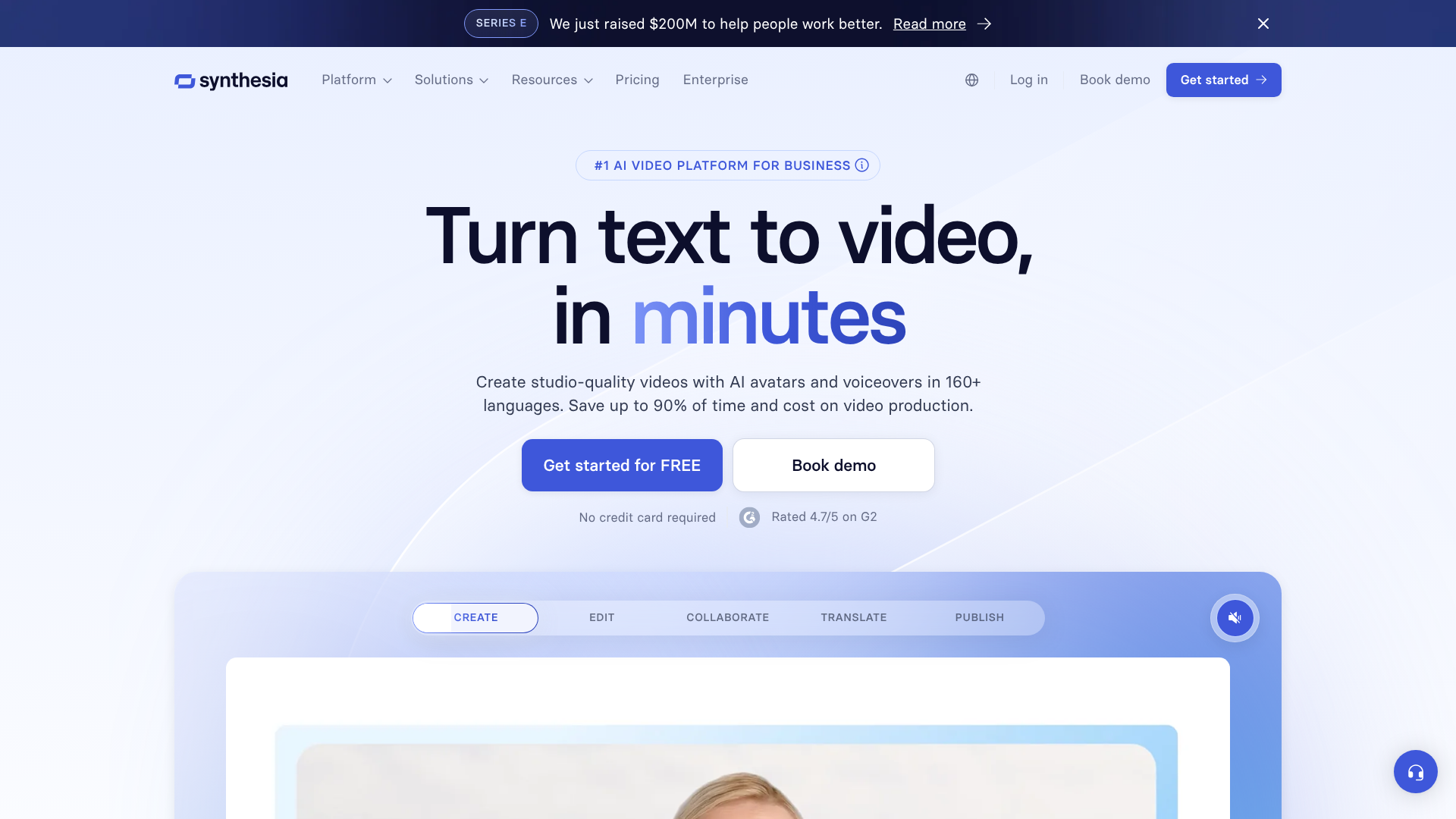
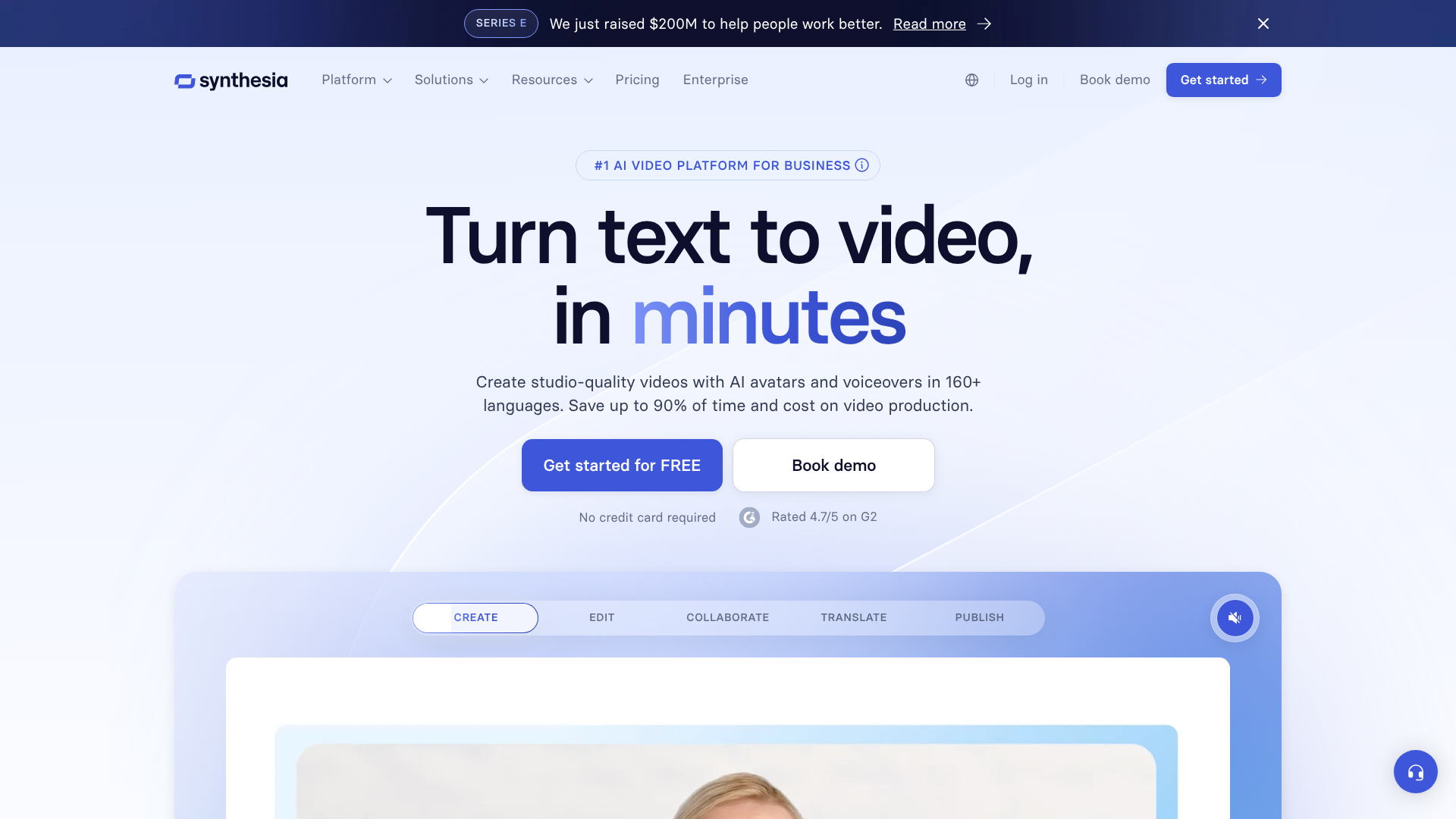
The Synthesia AI video generator is a cloud-based platform designed to transform text into video. At its core, it uses a combination of artificial intelligence, machine learning, and natural language processing to generate a video featuring a digital presenter, or 'avatar', who speaks your written script aloud. This process sidesteps the entire physical production pipeline: there are no actors to hire, no studios to book, and no complex editing software to master.
You simply choose an avatar, type or paste your script, select a voice and language, and customise the background and on-screen elements. The platform then processes this information and renders a complete video file. This makes it fundamentally different from traditional video editors like Adobe Premiere Pro, which require you to supply your own footage. Synthesia creates the primary footage for you, based entirely on your text input.
The technology behind it is sophisticated. The avatars are based on real actors, and the platform uses advanced algorithms to synchronise their lip movements with the generated audio, creating a lifelike appearance. The synthesia AI tool is particularly powerful for businesses that need to create large volumes of informational content, such as employee onboarding modules, software tutorials, or marketing updates, where consistency and speed are more important than cinematic artistry.
A Deep Look at Synthesia's Key Features
Synthesia's effectiveness stems from a powerful set of features designed to make video creation accessible and scalable. These tools work together to provide a comprehensive solution for businesses looking to integrate AI-driven video into their workflows.
Diverse AI Avatars and Custom Clones
One of the platform's most prominent features is its extensive library of stock AI avatars. With over 160 options available, you can choose presenters from various ethnicities, ages, and styles of dress to match your brand's tone and audience. This diversity is crucial for creating content that feels inclusive and relatable to a global workforce or customer base.
For businesses seeking ultimate brand consistency, Synthesia offers a custom avatar service. This premium feature allows you to create a digital replica of a specific person, such as a company executive, a brand ambassador, or a top trainer. While this involves an additional investment, it provides a unique level of personalisation that stock avatars cannot match, ensuring all your video communications have a familiar and authoritative face.
Multi-Language Voice Generation
Breaking down language barriers is a significant challenge in global business communication. The synthesia video maker addresses this directly with its text-to-speech engine, which supports over 130 languages and a wide array of accents. This means you can create a single video script and generate dozens of localised versions in minutes, not weeks.
This feature is invaluable for international companies deploying training materials or marketing campaigns. Instead of re-shooting a video for each region, you can simply translate the script and generate a new version with a native-sounding voiceover. The platform also includes options for voice cloning, allowing you to replicate a specific voice for use across all your video projects for consistent audio branding.
Intuitive Script-Based Editing
Perhaps the most user-friendly aspect of Synthesia is its editor. The entire video creation process is managed through a simple, slide-based interface that feels more like using PowerPoint than a complex video editing suite. You write your script on a per-scene basis, and any changes to the text are automatically reflected in the avatar's narration.
This 'edit-like-a-document' approach democratises video production. Team members without any video editing experience can easily update, correct, or create new content. If a product feature changes or a policy is updated, you don't need to organise a reshoot; you just open the project, edit the text, and regenerate the video. This agility saves an enormous amount of time and resources.
Templates and Rich Media Library
To speed up the creation process, Synthesia provides a collection of professionally designed video templates. These templates cover common use cases like presentations, how-to guides, and corporate announcements, giving you a solid starting point for your project. You can customise colours, logos, and fonts to align with your brand guidelines.
Furthermore, the platform allows you to enrich your videos with other media. You can upload your own images, video clips, and background music. It also includes a built-in screen recorder, which is perfect for creating software tutorials or product demonstrations where you need to show on-screen actions. This combination of AI-generated presenters and traditional media allows for dynamic and engaging final videos.
How to Create Your First Video with the Synthesia Video Maker
Getting started with the synthesia video maker is a straightforward process. The platform is designed for users of all skill levels, focusing on a simple, step-by-step workflow. Here’s a practical guide to creating your first AI-generated video.
Step 1: Choose a Template and Avatar
Once you log into your Synthesia account, your first step is to select a starting point. You can begin with a blank canvas or choose from dozens of pre-built templates. These templates are organised by use case, such as 'Training', 'Sales Pitch', or 'How-To', and come with pre-designed layouts, backgrounds, and text placeholders.
After selecting a template, you'll choose your AI avatar. You can browse the extensive library of over 160 stock avatars. Consider your target audience and the tone of your message when making your selection. You can preview each avatar to see their general demeanour and presentation style before adding them to your project.
Step 2: Write or Paste Your Script
This is where your message comes to life. In the script box for each scene, you can type, paste, or import your text. The platform will automatically convert this text into speech. You have granular control over the delivery; you can add pauses, adjust pronunciation using phonetic spelling, and choose from different voices and languages.
For longer videos, it's best to break your script down into smaller chunks, with each part corresponding to a scene or slide. This makes the video more dynamic and easier for the viewer to follow. As you write, you can preview the audio to ensure the pacing and tone are correct before generating the full video.
Step 3: Customise Your Scenes
With your script and avatar in place, you can now customise the visual elements of your video. You can change the background by uploading an image, a video, or selecting a solid colour. You can also add text overlays, shapes, and other graphics to highlight key points.
Synthesia allows you to upload your own brand assets, including logos and custom fonts, to maintain brand consistency. If you're creating a tutorial, you can use the built-in screen recorder to capture your screen and insert it as a background or side-by-side element with your avatar. This flexibility allows you to create rich, informative content that goes beyond a simple talking head.
Step 4: Generate and Share Your Video
Once you're happy with all the scenes, the final step is to generate the video. Simply click the 'Generate' button, and Synthesia's AI engine will get to work. The rendering process typically takes a few minutes, depending on the length and complexity of your video. You'll receive an email notification when it's ready.
After generation, you can download the video as an MP4 file, share it via a public link, or use an embed code to add it to your website or learning management system (LMS). The platform also includes features for creating closed captions automatically, enhancing the accessibility of your content.
Pro Tip: Before generating a long video, create a short, one-scene test video first. This allows you to check the avatar's delivery, the voice's pronunciation of key terms, and the overall visual look without using up a large portion of your video credits.
Who is This AI Video Generator For? (Ideal Use Cases)
While the technology is impressive, the AI video generator from Synthesia is not a one-size-fits-all solution. It excels in specific business contexts where its unique strengths—speed, scalability, and ease of use—provide the most value.
Corporate Training and Learning & Development (L&D)
This is arguably Synthesia's strongest use case. L&D departments are constantly tasked with creating and updating training materials for employee onboarding, compliance, and skill development. Traditional video production for these materials is a major bottleneck.
With Synthesia, trainers can convert dense training manuals and presentations into engaging video modules in a fraction of the time. When a policy or procedure changes, they can simply edit the script and regenerate the video, ensuring all training content is always up-to-date. The multi-language support is also a massive benefit for global organisations needing to deploy consistent training across different regions.
Marketing and Sales Teams
Marketing teams can use Synthesia to create a variety of content, from social media explainers to product demonstration videos. It's particularly effective for top-of-funnel content that aims to educate potential customers about a product or service. The ability to quickly create multiple versions of a video for A/B testing ad campaigns is another powerful application.
For sales, the platform can be used to create personalised outreach videos at scale. A sales representative could use a template to create a short, customised video for a key prospect, addressing their specific pain points. This adds a personal touch that stands out from standard email communication without requiring the representative to be on camera themselves.
Customer Support and How-To Guides
Clear, concise instructional videos are essential for customer support. They can reduce support ticket volume and improve customer satisfaction. Synthesia is an excellent tool for creating a library of video-based answers to frequently asked questions or step-by-step guides for using a product.
Because the videos are so easy to update, support teams can ensure their tutorials always reflect the latest software version or product features. This agility is difficult to achieve with live-action video, where even a small user interface change would necessitate a complete reshoot.
Synthesia Pricing and Plans: What's the Cost?
Understanding the pricing structure is crucial before committing to any software platform. Synthesia offers several plans tailored to different types of users, from individuals to large enterprises. It's important to note that pricing models can change, so you should always check the official Synthesia website for the most current information.
As of late 2026, Synthesia's pricing is primarily based on a subscription model that includes a set number of 'video minutes' per year. One minute of credit is used for each minute of video you generate.
Plan Tiers
Personal Plan: This plan is designed for individual creators and small-scale projects. It typically includes a limited number of video minutes per year (e.g., 10 minutes), access to the stock avatars and voices, and the core creation features. This is a good entry point for testing the platform's capabilities but can be restrictive for business use.
Creator Plan: Aimed at professionals and small teams, this plan offers a more substantial allocation of video minutes and access to more advanced features. It's a popular choice for content creators and small businesses that need to produce video content regularly.
Enterprise Plan: This is a custom plan for larger organisations. It includes a generous or unlimited number of video minutes, premium features like custom avatars and voice cloning, advanced security and compliance options, and dedicated account management. Pricing is customised based on the company's specific needs.
Understanding the Credit System
The video minute credit system is a key aspect to understand. Every time you generate a video, you consume credits equal to its duration. This includes regenerating a video after making a small text correction. Therefore, it's important to proofread your scripts carefully to avoid using credits unnecessarily.
While this model encourages careful planning, it can feel punitive if you make a simple mistake and have to use up more of your valuable minutes.
The Pros and Cons of Using the Synthesia AI Tool
No tool is perfect, and the synthesia AI tool has a distinct set of advantages and disadvantages. A balanced look at both sides is essential for determining if it's the right fit for your organisation's goals.
Advantages of Synthesia
- Speed and Efficiency: The most significant benefit is the dramatic reduction in production time. A video that would take weeks to script, shoot, and edit with a traditional crew can be created in under an hour. This speed allows teams to be incredibly agile and responsive.
- Cost-Effectiveness: For businesses that produce content at scale, Synthesia is significantly cheaper than hiring actors, renting equipment, and paying for post-production. It turns a variable, project-based cost into a predictable subscription fee.
- Scalability and Localisation: Creating multiple versions of a video for different languages or audiences is incredibly simple. This makes it an ideal solution for global companies that need to scale their communications without scaling their budget proportionally.
- Ease of Use: The platform is designed for non-technical users. Anyone comfortable with creating a slide presentation can learn to use Synthesia, removing the barrier to entry for video creation.
- Consistency: Using the same avatars and brand assets across all your videos ensures a high level of brand consistency in your communications, which can be difficult to maintain with live-action shoots involving different actors and locations.
Potential Limitations and Drawbacks
- The 'Uncanny Valley': While the avatars are highly realistic, they can sometimes fall into the 'uncanny valley'—the point where a human-like figure looks almost, but not exactly, like a real human, causing a sense of unease. For content requiring deep emotional connection, a real human presenter is still superior.
- Limited Emotional Range: AI avatars currently struggle to convey nuanced emotions like excitement, empathy, or humour with the same authenticity as a human actor. Their delivery is generally professional and informative, which is perfect for training but may fall flat for more persuasive or emotive marketing content.
- Credit-Based Model: The pricing model based on video minutes can be a drawback. A simple typo can force you to use up valuable credits to regenerate a video, which can be frustrating. It requires careful proofreading and planning.
- Cost for Individuals: While cost-effective for businesses, the subscription plans may be too expensive for individual creators or those with very infrequent video needs.
Frequently Asked Questions (FAQ)
Here are answers to some of the most common questions people have about the Synthesia platform.
Is Synthesia AI video free?
Synthesia is not a free tool, but it does offer a free AI video generator demo on its website. This allows you to create a very short sample video to test the technology and see the quality of the output. To create full videos and access all the features, you need to subscribe to one of their paid plans.
Can Synthesia AI create realistic videos?
Yes, Synthesia can create highly realistic videos. The avatars are based on real people, and the lip-syncing technology is among the best in the industry. However, 'realism' can be subjective. While the visual quality is high, the avatars may not yet capture the full range of subtle human expressions and emotions, which can sometimes make them feel slightly artificial to a discerning viewer.
What is the difference between Synthesia AI and ChatGPT?
Synthesia AI and ChatGPT are fundamentally different tools. ChatGPT is a large language model designed to generate human-like text. You can ask it questions, have it write essays, or generate code. Synthesia is an AI video generator; its primary function is to take text (which could even be written by ChatGPT) and turn it into a video with a speaking avatar.
One creates text, the other creates video.
What are the limitations of Synthesia AI?
The main limitations are the avatar's emotional range, the potential for an 'uncanny valley' effect, and the credit-based pricing system which can be costly if not managed well. It's best suited for informational and instructional content rather than videos that require strong emotional persuasion or entertainment value. Additionally, the creative possibilities are constrained by the available templates and features within the platform.
Are AI-generated videos allowed on YouTube?
Yes, AI-generated videos are generally allowed on YouTube. However, YouTube's policies require creators to disclose when their content is synthetic or altered in a way that could mislead viewers, especially for sensitive topics. It's important to be transparent with your audience. Many businesses use Synthesia videos on YouTube for tutorials and explainers without any issues.
Final Verdict: Is the Synthesia AI Video Generator Worth It?
After a thorough review, it's clear that the Synthesia AI video generator is a powerful and highly effective tool for a specific set of users. It successfully solves a major pain point for businesses: the high cost and complexity of video production. For organisations focused on corporate training, internal communications, and scalable marketing content, Synthesia is an exceptional investment.
The platform's ease of use, combined with its ability to rapidly produce and localise content, offers a clear return on investment by saving countless hours and significant budget. The quality of the AI avatars and voice generation is top-tier, providing a professional finish that is more than suitable for most corporate and instructional purposes.
However, it's not the right tool for everyone. If your content relies heavily on emotional storytelling, humour, or building a deep personal connection with your audience, the current limitations of AI avatars might be a barrier. Similarly, individual creators or those with sporadic video needs might find the subscription model too costly. For its target audience, though, Synthesia is a transformative platform that truly makes video creation accessible, scalable, and efficient.