
Is Synthesia Worth It? A 2026 Review of the AI Video Maker
Creating professional-quality video content has traditionally been a resource-intensive process, requiring cameras, microphones, actors, and significant editing time. The rise of AI has introduced a new way forward, and the Synthesia AI video maker is at the forefront of this shift. This platform allows anyone to create polished, studio-quality videos from just a text script, using realistic AI avatars to present the information. It effectively replaces the need for physical filming, making video production more accessible and scalable than ever before.
- Quick Summary
- An Overview of the Synthesia AI Video Maker
- A Deep Dive into Synthesia's Key Features
- AI Avatars: Stock, Custom, and Expressive
- AI Voices and Multi-Language Support
- Video Editor and Templates
- Integrations and API
- How to Create Videos Using the Synthesia Video Tool
- Practical Applications of Synthesia in Marketing
- Comparing Synthesia with Other AI Video Makers
- Best Practices for Engaging Videos with Synthesia
- Synthesia Pricing and Subscription Options
- User Testimonials and Real-World Impact
- The Future of AI Video Creation
- Ethical Considerations of AI Video Content
- Frequently Asked Questions (FAQ)
- Is Synthesia AI video generator free?
- How much does Synthesia AI video cost?
- Can Synthesia AI create realistic videos?
- What's better than Synthesia?
- Why do people use Synthesia?
- Is Synthesia worth the investment?
- Is AI video allowed on YouTube?
- Final Thoughts: The Verdict on Synthesia
This review explores every aspect of the Synthesia video tool, from its core features and pricing to its practical applications in marketing and corporate training. We'll analyse its strengths, acknowledge its limitations, and compare it to other tools on the market. By the end, you'll have a clear understanding of whether Synthesia is the right AI video creator for your specific needs.
Quick Summary
- What It Is: Synthesia is a leading AI video generation platform that creates professional videos using AI avatars and voices from text scripts, eliminating the need for cameras or actors.
- Best For: It's ideally suited for businesses creating corporate training materials, marketing explainers, internal communications, and product demonstrations at scale.
- Key Features: The platform boasts over 160 diverse AI avatars, voice generation in more than 130 languages, custom avatar creation, and a user-friendly video editor with templates.
- The Verdict: While it's a powerful and efficient tool that can dramatically reduce video production time and costs, the subscription price may be a consideration for individuals or very small teams. The technology is impressive, though the emotional range of avatars is still an area of development for all AI video tools.
An Overview of the Synthesia AI Video Maker
Synthesia is a web-based platform designed to simplify and scale video creation. Its core function is to transform written text into a video presented by a photorealistic AI avatar. You type or paste a script, choose an avatar, select a background, and the platform generates a video where the avatar speaks your text with synchronised lip movements and realistic intonation. This process takes minutes, a fraction of the time required for traditional video production.
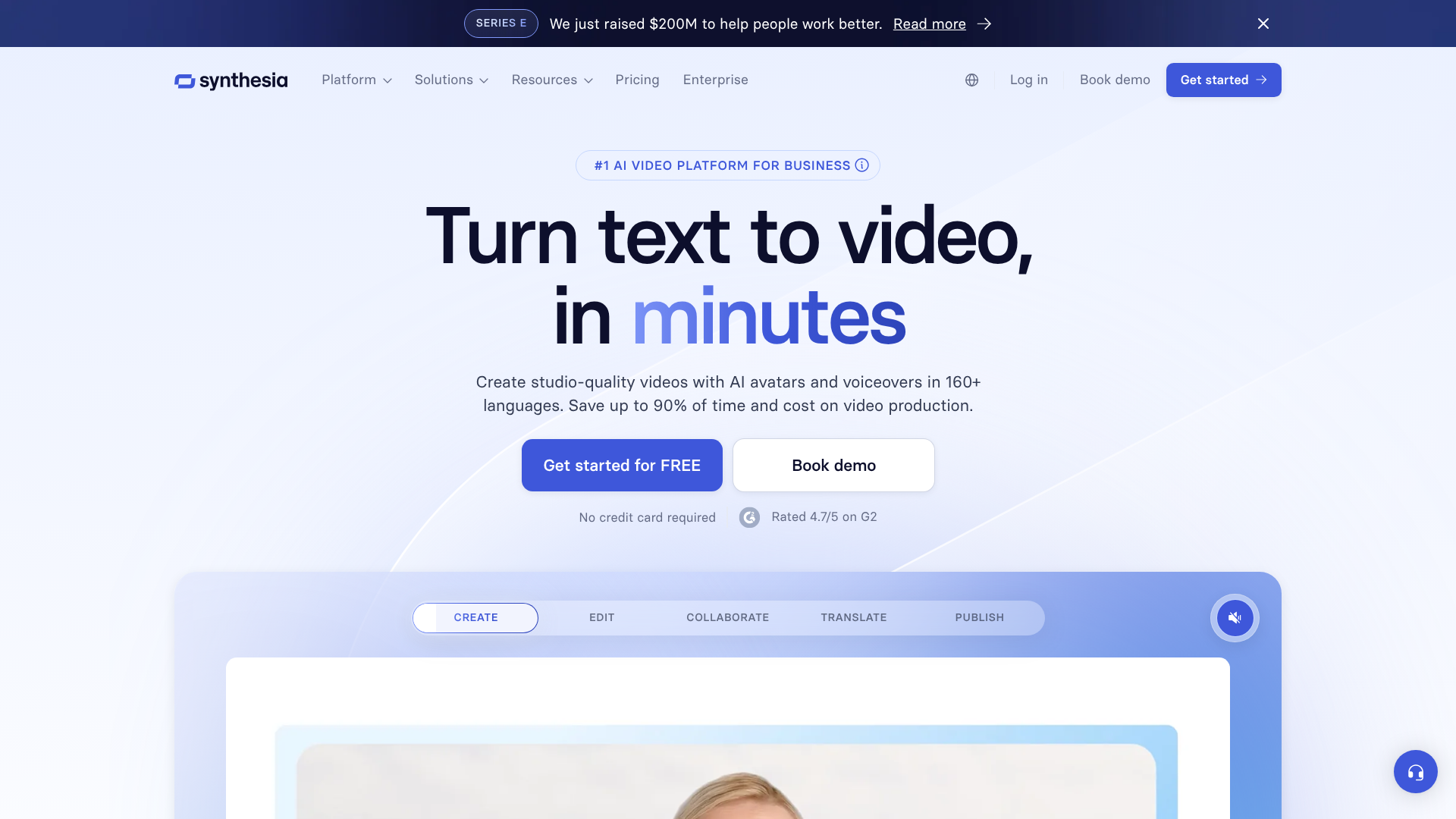
The primary audience for this AI video maker is the business and corporate world. Marketing teams use it for creating promotional content and social media ads. Human Resources and Learning & Development departments use it to produce consistent and easily updatable training modules for employees. Sales teams can even create personalised video messages for prospective clients, increasing engagement without needing to be on camera for every take.
The platform's main value lies in its efficiency and scalability. A company can produce hundreds of videos in multiple languages for a global workforce without the logistical nightmare of coordinating film shoots in different locations. If information in a training video becomes outdated, you don't need to reshoot the entire thing; you simply edit the script and regenerate the video in minutes. This agility makes it a compelling tool for fast-moving organisations.
A Deep Dive into Synthesia's Key Features
Synthesia's power comes from a collection of well-integrated features that work together to create a smooth video production workflow. These tools are designed to give users control over the final output while keeping the process simple.
AI Avatars: Stock, Custom, and Expressive
The most prominent feature is the library of over 160 stock AI avatars. These avatars represent a wide range of ethnicities, ages, and styles, allowing businesses to find a presenter that aligns with their brand and audience. Each avatar is based on a real actor, which contributes to their realistic appearance.
For businesses seeking a unique brand identity, Synthesia offers the ability to create a custom AI avatar. This involves a one-time studio recording process with an actor of your choice (or yourself). Once created, this exclusive avatar is available only in your account, ensuring brand consistency across all video communications. As noted by industry observers on platforms like LinkedIn, recent updates have started to introduce full-body avatars that can move and gesture, moving beyond the static "talking head" format.
AI Voices and Multi-Language Support
To accompany the avatars, Synthesia provides AI-generated voices in more than 130 languages and accents. This is a massive advantage for global companies needing to create content for different regions. You can take a single English script and have it spoken in German, Japanese, or Spanish with just a few clicks. The quality of the voices is generally high, with natural-sounding intonation.
Furthermore, the platform offers a voice cloning feature. This allows you to create a digital replica of a specific person's voice, which can then be used to narrate any video. This is perfect for maintaining a consistent brand voice, especially if a company's content is typically associated with a specific executive or spokesperson.
Video Editor and Templates
Synthesia isn't just an avatar generator; it's a complete AI video creator with a built-in editor. The interface is intuitive, resembling a simplified version of slide presentation software like PowerPoint. Users can add text overlays, upload images, add background music, and incorporate their own screen recordings or video clips.
To speed up the creation process, Synthesia includes a library of over 60 professionally designed video templates. These templates provide a pre-built structure for common use cases like training presentations, marketing updates, or news reports. Users can simply select a template, customise it with their brand colours and logo, and add their script.

Integrations and API
For larger organisations, Synthesia offers integrations with various tools to streamline workflows. For example, you can integrate it with your Learning Management System (LMS) or create automated video workflows using its API. This allows for the programmatic creation of videos, such as generating thousands of personalised sales videos, each with a unique customer name and message, triggered by an action in a CRM.
How to Create Videos Using the Synthesia Video Tool
Creating a video with Synthesia is a straightforward process designed for users without any prior video editing experience. The platform guides you through a logical sequence of steps to get from a simple idea to a finished video in minutes.
Here is a step-by-step breakdown of how it works:
Choose Your Foundation: Template and Avatar
The first step is to select a starting point. You can begin with a blank canvas or choose from one of Synthesia's pre-designed templates. Once you've selected a template, you browse the avatar library and pick the AI presenter that best fits your message and brand. You can position the avatar on the screen, resize it, and choose between a full-body shot, a circle bubble, or just the voiceover.Bring Your Message to Life: Add Your Script
This is where your content comes in. In the script box, you can type your text directly or paste it from another document. For each scene or slide, you enter the corresponding portion of the script. You can also select the language and voice style you want the avatar to use. The platform provides options to add pauses or specify the pronunciation of certain words to ensure the delivery sounds natural.Customise the Visuals
With the script and avatar in place, you can focus on the visual elements. Synthesia's editor allows you to change the background by uploading an image, selecting a solid colour, or using stock videos. You can add text overlays, shapes, and upload your company logo to maintain brand consistency. If you need to demonstrate a process, you can even upload your own screen recordings and have the avatar narrate them.Generate and Share Your Video
Once you are happy with the script and visuals, you simply click the "Generate" button. Synthesia's AI engine gets to work, processing the script, rendering the avatar's movements, and combining all the elements. This process typically takes a few minutes, depending on the length of the video. After it's complete, you'll receive a notification. You can then download the video file (in full HD 1080p) or share it directly using a link.
Pro Tip: For longer scripts, break your text into smaller sentences or paragraphs in the script box. This gives the AI more natural places to pause and breathe, resulting in a more human-like delivery. You can use the "." and "," punctuation to control the pacing.
Practical Applications of Synthesia in Marketing
For marketing departments, the Synthesia AI video maker opens up new possibilities for content creation at scale. It addresses the constant demand for fresh video content while keeping production costs under control. The ability to produce high-quality videos quickly allows teams to be more agile and responsive to market trends.
One of the most common applications is creating explainer videos. Complex products or services can be broken down into simple, easy-to-understand videos presented by a friendly and professional AI avatar. These can be embedded on landing pages to increase conversion rates or used in email campaigns to educate potential customers. The key benefit here is consistency; every viewer gets the exact same perfectly delivered message.
Social media content is another area where Synthesia excels. Marketers can rapidly produce short-form videos for platforms like LinkedIn, Instagram, or TikTok. For example, a team could create a weekly news update series or short tips related to their industry. Because the videos are easy to edit, they can be quickly adapted with new information or localised for different international audiences without requiring a new shoot.
Finally, the platform enables hyper-personalised sales outreach. Instead of sending generic text-based emails, a sales team can use Synthesia's API to generate thousands of unique videos. Each video could address the recipient by name and mention their company or a specific pain point, creating a powerful and memorable first impression that is far more engaging than a standard email.
Comparing Synthesia with Other AI Video Makers
Synthesia is a major player in the AI video generation space, but it's not the only option. Tools like HeyGen, Pictory, and InVideo also offer AI-powered video creation, but they often focus on different aspects of the process. Understanding these differences is key to choosing the right tool.
Synthesia's primary strength lies in the quality and realism of its AI avatars. The company invests heavily in the technology behind its avatars, resulting in some of the most lifelike and least robotic presenters on the market. Its focus on enterprise-level features, such as custom avatars, robust security protocols (like SOC 2 compliance), and API access, makes it a preferred choice for larger corporations.
HeyGen is a close competitor that also focuses on AI avatars. It is often praised for its competitive pricing and a wide array of creative templates and avatar styles. However, Synthesia is generally considered to have a slight edge in terms of avatar realism and its comprehensive feature set for corporate use cases.
Pictory, on the other hand, takes a different approach. It is an AI video creator that specialises in turning long-form content, like blog posts or webinars, into summary videos using stock footage and AI voiceovers. It doesn't focus on AI avatars in the same way. This makes Pictory excellent for content repurposing, while Synthesia is better for creating original, presenter-led video content from scratch.
Here’s a simplified comparison:
| Feature | Synthesia | HeyGen | Pictory |
|---|---|---|---|
| Primary Use Case | Presenter-led corporate videos | AI avatar videos for marketing | Repurposing text into video |
| Avatar Quality | Very High | High | N/A |
| Language Support | 130+ Languages | 40+ Languages | AI voiceovers in English |
| Custom Avatars | Yes (Enterprise Plan) | Yes | No |
| Best For | Corporate Training, L&D, Sales | Social Media, Small Businesses | Bloggers, Content Marketers |
Ultimately, the choice depends on your goal. If you need high-quality, branded, presenter-led videos for training or corporate communication, the Synthesia video tool is arguably the market leader. If your focus is on quickly converting articles to videos with stock footage, Pictory might be a better fit.
Best Practices for Engaging Videos with Synthesia
While the technology is powerful, creating a truly engaging video with an AI video maker still requires a human touch. Following a few best practices can elevate your content from being merely functional to genuinely compelling.
First, write your script for the spoken word, not for reading. This means using shorter sentences, a conversational tone, and clear language. Read your script out loud before generating the video. If it sounds unnatural or difficult to say, it will sound robotic when the AI avatar speaks it.
Use contractions like "it's" and "you're" to make the delivery feel more human.
Second, choose the right avatar and voice for your audience and message. A formal presentation for executives might call for an avatar in business attire with a clear, authoritative voice. A marketing video for a younger audience might benefit from a more casual avatar and an energetic, friendly tone. Don't just default to the first avatar you see; consider the impression you want to make.
Third, make effective use of pauses and visual cues. Don't just feed the AI a solid wall of text. Add short pauses (using punctuation or the built-in pause feature) to give viewers time to process information. Use on-screen text, images, and screen recordings to illustrate your points.
A video with just a talking head can become monotonous; supporting visuals keep the audience engaged.
Pro Tip: Use the "Speech Regeneration" feature if a particular word or phrase doesn't sound right. This allows you to generate alternative pronunciations or intonations for a selected piece of text without having to regenerate the entire video, saving you time and credits.
Synthesia Pricing and Subscription Options
Synthesia's pricing is structured in tiers, primarily targeting professional and business users rather than casual hobbyists. The model reflects the platform's focus on providing a scalable solution for organisations.
As of 2026, there are generally three main plans:
Personal Plan: This plan is aimed at individual creators and is the most affordable entry point. It typically includes a set number of video minutes per month, access to the stock avatars and voices, and the core editing features. It's a good option for freelancers or individuals wanting to experiment with the technology for their own projects.
Creator Plan: This is a step up, designed for small teams and professional content creators who need more video minutes and collaboration features. This tier often includes higher limits on video generation and may offer access to more advanced features.
Enterprise Plan: This is a custom plan for larger organisations. It includes everything from the lower tiers plus premium features like custom AI avatars, API access, dedicated support, and enhanced security and compliance features. Pricing for this plan is tailored to the specific needs of the company.
It's important to note that Synthesia does not typically offer a free plan. They sometimes provide a free AI video generator demo on their website, which allows you to create a very short sample video to test the technology. For the latest and most accurate pricing information, it is always best to visit the official Synthesia website, as plans and features can change.
User Testimonials and Real-World Impact
The true measure of any tool is how it performs in the real world. Synthesia is used by thousands of companies, from small businesses to large multinational corporations like Johnson & Johnson and Xerox. The feedback often centres on three main benefits: speed, cost savings, and scalability.
Users frequently report a dramatic reduction in production time. A process that used to take weeks—involving scripting, casting, filming, and editing—can now be completed in under an hour. This agility is a significant advantage in industries where information changes rapidly. For example, an L&D department can update a compliance training video across the entire company in a single afternoon.
Cost savings are another major factor. According to industry reports, a professionally produced corporate video can cost thousands of pounds. Synthesia's subscription model allows companies to produce a high volume of videos for a predictable monthly or annual fee, resulting in a much lower cost per video. This democratises video production, allowing departments with smaller budgets to create high-quality content.
As Alexandru Voica of Synthesia noted on LinkedIn, the platform is evolving to solve the problem of static talking heads by introducing customisable avatars that can perform actions, making explainer content much more dynamic. This continuous innovation, highlighted by leaders within the company, shows a commitment to addressing user needs and pushing the boundaries of what AI video can do.
The Future of AI Video Creation
The field of AI video generation is advancing at an incredible pace, and Synthesia is a key driver of that innovation. The technology we see today is just a glimpse of what's to come. Several trends are shaping the future of tools like this AI video creator.
One of the most exciting developments is the move towards more expressive and dynamic avatars. As mentioned by observers like Andrew Bolis, AI avatars are gaining full-body movement and the ability to act out scenes in a 3D space. This will transform them from simple presenters into true digital actors, capable of demonstrating physical tasks, interacting with virtual objects, and conveying a much wider range of emotions.
Another trend is the deep integration with other generative AI models. Dirk Zee pointed out on LinkedIn that Synthesia is already integrating models like FLUX.2, allowing users to generate high-quality visuals, infographics, and backgrounds directly within the video creation process. In the future, you might be able to simply describe a scene—"an avatar explaining a chart in a modern office setting"—and have the AI generate the entire visual context instantly.
Finally, real-time generation and interactivity are on the horizon. Imagine a customer support chatbot that isn't just text, but a helpful AI avatar that can speak to you and answer your questions in real-time. Or a personalised learning module where an AI tutor adapts its explanation on the fly based on a student's responses. This level of interactivity will make AI-generated video a much more dynamic and engaging medium.
Ethical Considerations of AI Video Content
With any powerful technology, there comes a responsibility to use it ethically. The rise of AI video makers has sparked important conversations about transparency, authenticity, and the potential for misuse. Synthesia is proactive in addressing these concerns, but it's crucial for users to be aware of them.
The most significant concern is the potential for creating misleading or malicious "deepfakes". To combat this, Synthesia has a strict content moderation policy that prohibits the creation of content related to political, sexual, or discriminatory topics. They also have a verification process for creating custom avatars to ensure you have the explicit consent of the person being digitised.
Transparency is another key ethical principle. It's widely considered best practice to disclose when content is generated by AI. Viewers have a right to know if they are watching a real person or a digital creation. Many companies using Synthesia include a small disclaimer in their videos to maintain trust with their audience.
As AI videos become more realistic, this practice will become even more important.
Finally, there are questions about the impact on jobs traditionally held by actors and video production professionals. While AI tools may automate certain tasks, they also create new opportunities. The need for skilled scriptwriters, creative directors, and people who can effectively manage AI-driven workflows is growing. The technology is best viewed as a tool that augments human creativity rather than replacing it entirely.
Frequently Asked Questions (FAQ)
Is Synthesia AI video generator free?
No, Synthesia is a premium subscription-based service and does not offer a permanent free plan. They do, however, frequently offer a free demo on their website. This demo allows you to create a very short video to see how the technology works and evaluate the quality of the avatars and voices before committing to a paid plan.
How much does Synthesia AI video cost?
Synthesia's pricing is tiered to accommodate different types of users, from individuals to large enterprises. The "Personal" plan is the most affordable entry point, while the "Creator" and custom "Enterprise" plans offer more features, video minutes, and collaboration tools. Since pricing and plan details can change, it is always best to visit their official website for the most current information.
Can Synthesia AI create realistic videos?
Yes, Synthesia is known for producing some of the most realistic AI-generated videos available today. The avatars are based on real actors, and the lip-syncing technology is highly accurate. While there can still be subtle signs that the presenter is not human, particularly in emotional expression, the level of realism is sufficient for professional business and training content and is continuously improving.
What's better than Synthesia?
Whether another tool is "better" than Synthesia depends entirely on your specific needs. For high-quality AI avatars and enterprise-level features for corporate content, Synthesia is a top contender. A competitor like HeyGen is also strong in avatars and may be preferred by some for its user interface or pricing. For turning blog posts into videos with stock footage, a tool like Pictory would be a better choice. The best tool is the one that aligns with your workflow and goals.
Why do people use Synthesia?
People use Synthesia primarily for efficiency, scalability, and cost savings. It allows them to create professional-looking videos in minutes without the high cost and time commitment of traditional video production. It's particularly useful for creating training content, marketing videos, and internal communications that need to be produced at scale or updated frequently.
Is Synthesia worth the investment?
For businesses that need to produce a significant volume of video content, Synthesia is often a worthwhile investment. The cost of a subscription is typically far less than the cost of hiring a video production crew for even a single project. The return on investment comes from saved time, reduced production costs, and the ability to communicate more effectively and consistently with audiences through video.
Is AI video allowed on YouTube?
Yes, AI-generated video is allowed on YouTube. However, YouTube has policies that require creators to disclose when their content is altered or synthetically generated in a way that could mislead viewers, especially for sensitive topics. It is considered best practice to be transparent with your audience and indicate that the video was created using AI.
Final Thoughts: The Verdict on Synthesia
The Synthesia AI video maker stands out as a polished, powerful, and professional tool in the rapidly growing field of generative video. It successfully delivers on its promise to make video production faster, cheaper, and more scalable, particularly for the corporate world. Its high-quality avatars, extensive language support, and user-friendly interface make it an accessible platform for anyone, regardless of their technical skill.
It is not a tool for every single use case. Creative filmmakers or those seeking deep emotional performances will still find human actors irreplaceable. Furthermore, the subscription cost, while justifiable for businesses, may place it out of reach for casual hobbyists. However, for its target audience—marketing, sales, and L&D departments—Synthesia provides a clear and compelling value proposition.
If your organisation needs to produce consistent, high-quality training, marketing, or communication videos at scale, then Synthesia is more than worth the investment. It's a forward-thinking solution that streamlines a traditionally complex process, freeing up your team to focus on the message, not the mechanics of production. To see if it's the right fit for you, exploring the demo on their website is a logical next step.
Ready to transform your video creation process? Explore Synthesia today and see how AI can streamline your content production.