

Leadpages Landing Page Builder Review (2026): Is It Right For You?
Creating a landing page that actually converts visitors into leads or customers can feel like a major hurdle, especially if you're not a web developer. You need something fast, effective, and easy to manage. This is where the Leadpages landing page builder enters the conversation, promising a code-free way to publish professional-looking pages in minutes. But does it live up to the hype?
- Quick Summary
- What is the Leadpages Landing Page Builder? An Overview
- The Core Features of the Leadpages Builder
- Drag-and-Drop Page Builder
- Extensive Template Library
- Pop-Ups and Alert Bars
- A/B Split Testing
- Leadmeter: Real-Time Conversion Assistant
- Website Building Capabilities
- How to Create a High-Converting Landing Page with Leadpages (Step-by-Step)
- Step 1: Choose Your Goal and Template
- Step 2: Customise Your Page with the Drag-and-Drop Editor
- Step 3: Integrate Your Email Marketing Service
- Step 4: Configure SEO and Tracking Settings
- Step 5: Publish Your Landing Page
- Leadpages vs. The Competition: How Does It Compare?
- Best Practices for Designing Landing Pages That Convert
- Write a Compelling, Benefit-Oriented Headline
- Use a Single, Clear Call-to-Action (CTA)
- Leverage Social Proof
- Optimise for Mobile Devices
- Keep it Simple and Focused
- Integrating Leadpages with Your Marketing Stack
- Measuring Success: How to Analyse Your Landing Page Performance
- Real-World Success: Case Studies of Pages Built with Leadpages
- Case Study 1: The Online Fitness Coach
- Case Study 2: The SaaS Company
- Case Study 3: The Local Plumbing Business
- Optimising Your Leadpages for SEO
- Leadpages Pricing Plans: Which One is the Best Value?
- FAQ: Your Questions About Leadpages Answered
- Is Leadpages good for beginners?
- What is the difference between a landing page and a website?
- Can you use Leadpages for free?
- Why does Leadpages seem expensive?
- What is better than Leadpages?
- Final Verdict: Is the Leadpages Landing Page Builder Worth Your Investment?
This in-depth review breaks down everything you need to know about Leadpages. We'll explore its core features, walk through the creation process, compare it to competitors, and analyse its pricing to help you decide if it's the right page builder tool for your business goals in 2026.
Quick Summary
- What it is: Leadpages is a user-friendly landing page creator designed for speed and high conversion rates, requiring no coding knowledge.
- Key Features: It includes a drag-and-drop builder, over 200 mobile-responsive templates, A/B testing, pop-ups, and a real-time conversion optimisation assistant called the Leadmeter.
- Best For: Small businesses, marketers, course creators, and entrepreneurs who need to launch marketing campaigns quickly and efficiently without a steep learning curve.
- The Catch: While incredibly easy to use, it may not offer the granular design freedom or advanced features found in more expensive, developer-focused platforms like Unbounce or Instapage.
What is the Leadpages Landing Page Builder? An Overview
The Leadpages landing page builder is a dedicated software tool designed to help users create, test, and deploy high-converting landing pages. Its primary mission is to simplify lead generation. Instead of wrestling with complex code or clunky website editors, Leadpages provides a visual, intuitive environment where you can build pages for specific marketing campaigns.
It's built for the non-technical user: the small business owner running a local ad, the digital marketer launching a new ebook, or the consultant promoting a webinar. The platform removes the technical barriers, allowing you to focus on your marketing message and offer. This focus on simplicity and speed is what sets it apart from more general-purpose website builders.
At its heart, Leadpages is more than just a page creator; it's a conversion toolkit. It comes equipped with features specifically aimed at persuading a visitor to take one specific action, whether that's downloading a guide, signing up for a newsletter, or registering for an event. This singular focus is what makes a dedicated landing page tool so effective.
The Core Features of the Leadpages Builder
Leadpages packs a lot of functionality into its platform, all geared towards making your marketing efforts more effective. These aren't just bells and whistles; they are practical tools designed to improve your conversion rates.
Drag-and-Drop Page Builder
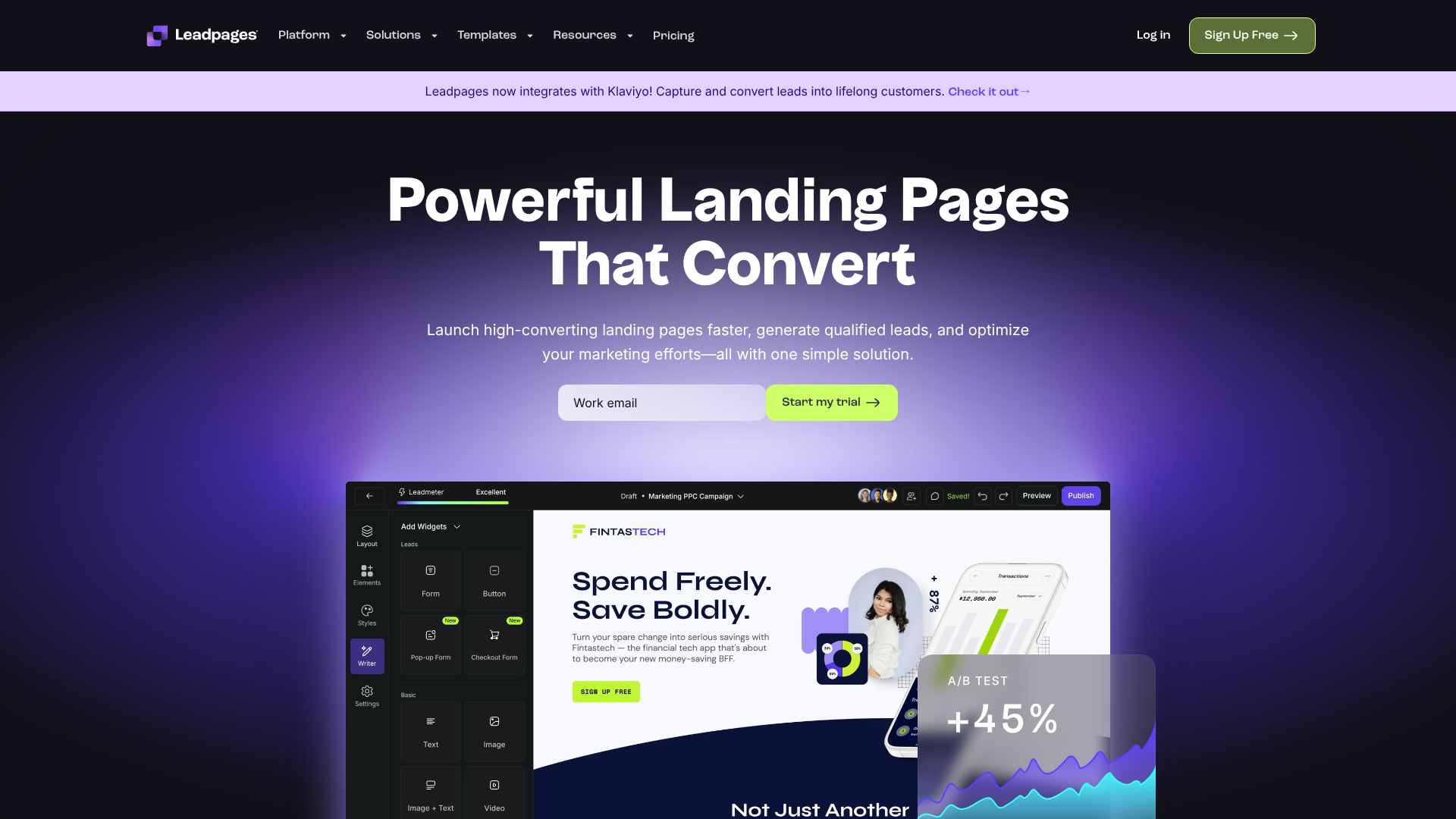
The centrepiece of the Leadpages experience is its drag-and-drop editor. This interface allows you to build and customise your pages visually. You can add, remove, and rearrange elements like text boxes, images, videos, forms, and buttons simply by dragging them into place. This makes the design process feel more like arranging blocks than coding a webpage.
The builder includes a library of pre-designed 'Sections'—like hero banners, testimonials, or pricing tables—that you can drop onto your page to build it out quickly. Each element can be customised, from colours and fonts to spacing and alignment, giving you a good degree of control without overwhelming you with options.
Extensive Template Library
For those who don't want to start from a blank canvas, Leadpages offers a library of over 200 professionally designed templates. These aren't just random designs; they are conversion-optimised and categorised by goal. You can find templates for webinar registrations, lead magnet downloads, sales pages, event sign-ups, and more.
Every template is mobile-responsive, meaning it will automatically adjust to look great on any device, from a desktop monitor to a mobile phone. You can even sort templates by their historical conversion rate, giving you a head start by choosing a layout that is already proven to perform well.
Pop-Ups and Alert Bars
Lead generation doesn't stop at the landing page itself. Leadpages includes tools to capture leads across your entire website. You can design pop-up forms that appear based on specific triggers, such as when a user is about to leave the page (exit-intent), after they've been on the page for a certain amount of time, or when they click a specific link.
Alert Bars (or sticky bars) are thin banners that remain at the top or bottom of the screen as the user scrolls. They are a less intrusive way to promote an offer, announce a sale, or drive traffic to a key landing page. Both pop-ups and alert bars are built using the same easy-to-use editor.
A/B Split Testing
How do you know if a green button converts better than a blue one? You test it. A/B split testing is a critical part of optimising for conversions, and the Leadpages builder makes it accessible. You can easily create a variation of your landing page to test different headlines, images, calls-to-action, or layouts.
Leadpages will then split your traffic evenly between the original page (the 'control') and the new version (the 'variation'). The platform tracks the performance of each and shows you which one is generating more conversions, allowing you to make data-driven decisions to improve your results over time.
Leadmeter: Real-Time Conversion Assistant
The Leadmeter is a unique and genuinely helpful feature. As you build your page in the editor, this tool analyses your content and design in real-time, providing a predictive conversion score and a checklist of suggestions for improvement. It acts like a built-in marketing coach.
It might suggest you shorten your headline, add more social proof, or improve the colour contrast on your CTA button. This guidance is based on an analysis of thousands of landing pages and helps you follow best practices without having to be a conversion expert yourself. It's especially valuable for beginners who are still learning what makes a landing page effective.
Website Building Capabilities
One common question is whether you can build a full website on Leadpages. The answer is yes. While it excels as a landing page creator, it also includes a full website builder. You can create a homepage, about page, contact page, and more, all using the same drag-and-drop interface.
This makes it a great all-in-one solution for small businesses or consultants who need a simple, professional web presence without the complexity of platforms like WordPress. However, its primary strength and most advanced features are still centred on creating single-purpose landing pages for marketing campaigns.
How to Create a High-Converting Landing Page with Leadpages (Step-by-Step)
Getting a landing page live with Leadpages is a straightforward process. Here’s a breakdown of the key steps, from choosing a template to hitting the publish button. For a visual walkthrough, the video below provides an excellent tutorial.
Step 1: Choose Your Goal and Template
First, log in to your Leadpages account and decide on the primary goal of your page. Are you trying to capture email addresses for a newsletter, register attendees for a webinar, or sell a product directly? Your goal will dictate the type of template you choose.
Navigate to the 'Landing Pages' section and click 'Create New Landing Page'. You can browse the extensive template library, filtering by page type (e.g., Lead Capture, Sales, Webinar) or industry. You can also preview each template to see how it looks on desktop and mobile devices before making your selection.
Step 2: Customise Your Page with the Drag-and-Drop Editor
Once you've chosen a template, you'll be taken to the drag-and-drop editor. This is where you'll make the page your own. Click on any element—a headline, an image, a button—to edit it. A contextual menu will appear on the left, allowing you to change text, swap images, adjust colours, and modify styles.
Use the 'Widgets' tab to drag new elements onto the page, such as a countdown timer to create urgency or a video player to embed a product demo. Pay attention to the Leadmeter on the left side of the screen. It will give you real-time feedback and suggestions to ensure your page is optimised for conversions.
Pro Tip: Keep your design clean and focused. Remove any elements that don't directly contribute to your single conversion goal. This includes navigation menus, social media links, or anything else that might distract the visitor from taking the desired action.
Step 3: Integrate Your Email Marketing Service
Your landing page isn't very useful if the leads it captures have nowhere to go. To connect your form, click on the call-to-action button. This will open the form editor. Here, you can add or remove form fields (like name, email, phone number).
Next, click on the 'Integrations' tab within the form settings. You can connect to dozens of popular email marketing services like ActiveCampaign, GetResponse, or Moosend. Once connected, you can choose which specific list or tag new subscribers should be added to. This automates the entire lead capture process.
Step 4: Configure SEO and Tracking Settings
Before you publish, you need to configure your page's settings. Under the 'Settings' tab, you can define the SEO details, including the page title and meta description that will appear in Google search results. This is also where you can set a social sharing image (the image that appears when the link is shared on platforms like Facebook).
In the 'Analytics' section, you can easily add your tracking codes. This is essential for measuring your campaign's performance. You can paste in your Google Analytics tracking ID, your Facebook Pixel, or any other third-party tracking script.
Step 5: Publish Your Landing Page
With everything configured, you're ready to go live. Click the 'Publish' button in the top-right corner. Leadpages gives you several publishing options. The quickest way is to use the dynamic URL provided by Leadpages (e.g., your-domain.lpages.co/your-page-name).
For a more professional look, you can connect your own custom domain. Leadpages provides clear instructions on how to do this. If you have a WordPress site, you can use the Leadpages plugin to publish the page directly to your site with just a few clicks. Choose your preferred method, and your page will be live and ready to receive traffic.

Leadpages vs. The Competition: How Does It Compare?
Leadpages operates in a competitive market. While it's a fantastic tool, it's important to understand how it stacks up against other popular landing page creators to know if it's the best fit for your specific needs.
| Feature | Leadpages | Unbounce | Instapage | ClickFunnels |
|---|---|---|---|---|
| Primary Use Case | Fast landing pages & lead gen | Advanced A/B testing & customisation | Enterprise collaboration & personalisation | Complete sales funnels |
| Ease of Use | Very Easy | Moderate | Moderate | Complex |
| A/B Testing | Yes (Pro Plan) | Advanced | Advanced | Yes |
| Pop-ups & Bars | Yes | Yes | No (focus on pages) | Yes |
| Pricing | $$ | $$$$ | $$$$$ | $$$$ |
| Best For | Small Businesses, Marketers | Agencies, Performance Marketers | Large Teams, Enterprise | Info Products, Funnel Hackers |
Leadpages vs. Unbounce
Unbounce is a powerful page builder tool known for its flexibility and advanced features. Its drag-and-drop editor offers more granular control, allowing you to place elements anywhere on the page with pixel-perfect precision. It also has more sophisticated A/B testing and dynamic text replacement features for PPC campaigns.
The trade-off is complexity and price. Unbounce has a steeper learning curve and is significantly more expensive than Leadpages. Leadpages is the better choice for users who prioritise speed and simplicity over ultimate design freedom.
Leadpages vs. Instapage
Instapage is geared towards larger teams and enterprise clients. Its strengths lie in collaboration features, allowing multiple team members to work on and approve pages. It also boasts incredibly fast page load speeds and advanced tools for ad-to-page personalisation.
However, Instapage is one of the most expensive options on the market, putting it out of reach for most small businesses. Leadpages offers a much better value proposition for solo entrepreneurs and smaller marketing teams who don't need enterprise-level collaboration tools.
Leadpages vs. ClickFunnels
This is a common but often misunderstood comparison. Leadpages is a landing page builder. ClickFunnels is a sales funnel builder. While ClickFunnels can create landing pages, its core purpose is to build multi-step funnels that include upsells, downsells, and order forms.
ClickFunnels is more complex, more expensive, and designed for a different job. If you just need to create a standalone landing page to capture leads or promote an offer, Leadpages is the simpler, more focused, and more affordable tool. If you need to build an entire automated sales process, ClickFunnels is the more appropriate choice.
Best Practices for Designing Landing Pages That Convert
Having a great tool is only half the battle. To get the best results from the Leadpages builder, you need to follow proven conversion design principles. Here are some essential best practices.
Write a Compelling, Benefit-Oriented Headline
Your headline is the first thing a visitor reads, and it may be the only thing they read. It must grab their attention and clearly communicate the primary benefit of your offer. Don't just describe what your offer is; explain what it does for the user.
For example, instead of "Download Our Social Media Guide," a better headline would be "Double Your Social Media Engagement in 30 Days." The second headline focuses on the desired outcome and is far more persuasive. A great headline makes the visitor want to keep reading.
Use a Single, Clear Call-to-Action (CTA)
The purpose of a landing page is to get a visitor to take one specific action. Don't confuse them by offering multiple choices. Your page should have one primary call-to-action. Every element on the page—the headline, the copy, the images—should support this single goal.
Make your CTA button stand out with a contrasting colour. Use clear, action-oriented text like "Get Your Free Quote" or "Download the Ebook Now" instead of vague words like "Submit" or "Click Here." Ensure the button is prominently placed and easy to find.
Leverage Social Proof
People are more likely to trust you if they see that others already do. Social proof is a powerful psychological trigger that builds credibility and reduces friction. You can incorporate social proof on your landing pages in several ways.
Include testimonials from happy customers, display logos of well-known companies you've worked with, or show case study results. Even simple statistics, like "Join 10,000+ subscribers," can be highly effective at building trust and encouraging visitors to convert.
Optimise for Mobile Devices
More than half of all web traffic now comes from mobile devices. If your landing page is difficult to read or navigate on a smartphone, you will lose a significant number of potential leads. Your page must be fully responsive and provide an excellent user experience on smaller screens.
Fortunately, all Leadpages templates are mobile-responsive by default. However, you should always use the preview function in the editor to check how your page looks on a mobile device. Ensure that text is legible, buttons are easy to tap, and forms are simple to fill out on a touchscreen.
Keep it Simple and Focused
A common mistake is to clutter a landing page with too much information or too many distractions. The best landing pages are often the simplest. They have a clean layout, plenty of white space, and a clear visual hierarchy that guides the user's eye towards the call-to-action.
One of the most effective ways to increase focus is to remove the main website navigation menu from your landing pages. This prevents visitors from clicking away to your 'About' or 'Services' page before they've had a chance to convert on your offer. Keep them on the path you've designed for them.
Integrating Leadpages with Your Marketing Stack
No marketing tool exists in a vacuum. The power of Leadpages is amplified when you connect it to the other software you use to run your business. The platform offers a wide range of native integrations, making it easy to create a seamless marketing workflow.
Most importantly, Leadpages connects directly with dozens of the most popular email marketing services. This includes platforms like ActiveCampaign, AWeber, ConvertKit, GetResponse, Mailchimp, and Omnisend. When a user fills out a form on your landing page, their contact information is automatically sent to your chosen email list, triggering welcome emails or automated sequences.
Beyond email, Leadpages integrates with webinar platforms like WebinarGeek and EasyWebinar, allowing you to build registration pages that automatically add attendees to your event. It also connects with scheduling tools like Calendly, payment gateways like Stripe, and a variety of CRMs. For any tools not covered by a native integration, Leadpages supports a connection through Zapier, which acts as a bridge to thousands of other applications.
Measuring Success: How to Analyse Your Landing Page Performance

Launching a landing page is just the beginning. To truly succeed, you need to track its performance and make improvements based on real data. Leadpages provides a clear and simple analytics dashboard to help you do just that.
For each landing page, you can track three core metrics: Unique Visitors (the number of individual people who have seen your page), Conversions (the number of people who completed the desired action, like filling out a form), and Conversion Rate (the percentage of visitors who converted).
This data is crucial for understanding what's working and what isn't. If you're running an A/B test, the dashboard will show you the performance of each variation side-by-side, making it easy to declare a winner. By regularly checking these metrics, you can identify underperforming pages and test new ideas to continuously improve your campaign ROI.
Pro Tip: Don't stop a split test too early. You need a statistically significant amount of data to make a reliable decision. Let your test run until you have at least 100-200 conversions per variation to avoid making choices based on random fluctuations.
Real-World Success: Case Studies of Pages Built with Leadpages
To understand the practical impact of using a tool like Leadpages, let's look at a few hypothetical but realistic scenarios where it can drive significant results.
Case Study 1: The Online Fitness Coach
A fitness coach wanted to grow her email list by offering a free 7-day workout plan. Using a Leadpages template, she created a simple lead magnet landing page in under an hour. The page featured a strong headline, a bulleted list of benefits, and a clear call-to-action to download the plan. She drove traffic to the page using Instagram ads.
The page converted at 35%, adding over 1,500 new, targeted subscribers to her list in the first month.
Case Study 2: The SaaS Company
A software company was launching a new feature and wanted to host a live demo webinar. They used a Leadpages webinar registration template to quickly build a page. The page included a countdown timer to create urgency, a section detailing what attendees would learn, and speaker bios to build authority. By promoting the page to their existing email list and through LinkedIn, they achieved a 28% registration rate, well above the industry average.
Case Study 3: The Local Plumbing Business
A plumbing company needed more leads for its emergency repair service. They used the Leadpages builder to create a mobile-optimised landing page specifically for their Google Ads campaign. The page was simple, with a headline like "Emergency Plumber in Manchester," a click-to-call button, and a simple form to request a quote. Because the page was highly focused and loaded quickly on mobile, their ad campaign's conversion rate doubled, and their cost per lead dropped by 40%.
Optimising Your Leadpages for SEO
While many landing pages are designed for paid traffic from sources like Google Ads or Facebook, you can also optimise them for organic search (SEO). This can provide a long-term source of free, relevant traffic.
Leadpages includes built-in SEO settings for every page. You can easily set the SEO Title and Meta Description, which are the elements that appear in Google's search results. Use these fields to include your target keyword and write compelling copy that encourages users to click.
Furthermore, the content on your page itself matters. Write clear, descriptive headlines and body copy that naturally incorporate the keywords your audience is searching for. Because Leadpages is optimised for fast loading speeds and is inherently mobile-friendly, pages built with the tool already have a solid technical SEO foundation, which is a key ranking factor for Google.
Leadpages Pricing Plans: Which One is the Best Value?
Leadpages offers several pricing tiers, primarily the Standard and Pro plans, with discounts available for annual billing. It's important to note that pricing structures can change, so you should always visit the official Leadpages website for the most current information.
Standard Plan: This is the entry-level option and is perfect for most small businesses and solo entrepreneurs. It includes the ability to create unlimited landing pages, pop-ups, and alert bars for one site. You get access to all the standard templates and integrations.
Pro Plan: The Pro plan builds on the Standard plan by adding key features for optimisation and sales. The most important additions are unlimited A/B split testing, the ability to accept online payments directly on your pages via Stripe, and email trigger links. This plan is ideal for marketers who are serious about optimising their conversion rates and for users who want to sell products or services directly from their landing pages.
For most new users, the Standard plan offers more than enough functionality to get started and see a significant return on investment. You can always upgrade to the Pro plan later as your needs grow and you want to start running split tests to refine your campaigns.
FAQ: Your Questions About Leadpages Answered
Is Leadpages good for beginners?
Yes, absolutely. Ease of use is one of its greatest strengths. The intuitive drag-and-drop editor, extensive template library, and helpful features like the Leadmeter make it one of the most beginner-friendly landing page builders on the market. You can create and publish a professional-looking page in under an hour with no prior experience.
What is the difference between a landing page and a website?
A website is designed for exploration. It has a navigation menu and multiple pages (Home, About, Services, Contact) to encourage visitors to browse and learn more about a company. A landing page is designed for conversion. It has a single, focused goal and typically removes distractions like navigation menus to guide the visitor towards taking one specific action.
Can you use Leadpages for free?
Leadpages does not offer a free plan. However, it does provide a 14-day free trial for its Standard and Pro plans. This allows you to test out all the features and build a few pages to see if it's the right fit for your business before committing to a paid subscription.
Why does Leadpages seem expensive?
While there are cheaper options available, Leadpages provides value by saving you time and potentially eliminating the need to hire a web developer, which could cost hundreds or thousands of pounds for a single page. When you consider the speed of creation and the built-in conversion optimisation tools, the monthly fee can deliver a strong return on investment by generating more leads and sales for your business.
What is better than Leadpages?
"Better" depends entirely on your needs. If you need more advanced design customisation and A/B testing features, Unbounce might be a better choice. If you need to build complex, multi-step sales funnels, ClickFunnels would be more suitable. However, for users who prioritise speed, simplicity, and value for money, Leadpages is often the best option.
Final Verdict: Is the Leadpages Landing Page Builder Worth Your Investment?
After a thorough review, the Leadpages landing page builder stands out as an excellent choice for a specific type of user: the small business owner, marketer, or entrepreneur who needs to create high-converting landing pages quickly and without technical headaches. Its combination of user-friendliness, conversion-focused features, and fair pricing makes it a powerful tool for driving lead generation and sales.
The platform's strengths are undeniable. The drag-and-drop editor is intuitive, the template library is vast and well-designed, and unique features like the Leadmeter provide genuine value by helping you build better pages. For anyone who has struggled with clunky WordPress page builders or felt intimidated by more complex platforms, Leadpages will feel like a breath of fresh air.
However, it's not for everyone. Power users or design agencies who require pixel-perfect control and the most advanced analytics might find it limiting compared to Unbounce. Those looking to build intricate sales funnels with one-click upsells will be better served by ClickFunnels. But for its target audience, Leadpages hits the sweet spot between functionality and simplicity.
If your goal is to get effective landing pages live with minimal fuss, it is absolutely worth the investment.
Ready to see if it's the right fit for you? You can explore all the features and build your first page by starting a free 14-day trial of Leadpages.